



Speedify’s Setup Analysis Report Tells You What’s Working Across Every Starlink Dish
Starlink disconnects all the time for ALL Starlink users. The Speedify Starlink Index report found that Starlink connections are down for an average of ~33 min per day. Plus, all Starlink dishes experience small drops and packet loss every 15 seconds, when the moving Starlink satellites hand off the connection to the next satellite overhead.
The best way to fix Starlink's connection drops is to combine your Starlink connection with another internet connection, such as 4G/5G cellular, cable, fiber, DSL, or another Starlink connection. Speedify makes this possible with channel bonding.

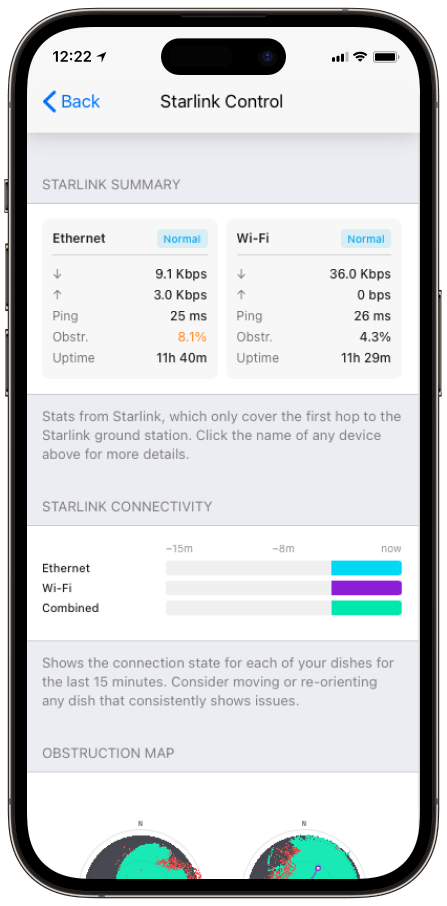
Monitor your Starlink dish performance inside Speedify.
Speedify’s built-in Starlink Control Center gives you real-time visibility into your dish’s health — without opening a separate app.
What the Starlink Setup Analysis Report Covers
- A live, plain-language read on each dish. Speedify summarizes the state of every connected Starlink dish instead of leaving you to interpret raw numbers.
- Direct jumps to the fix. Tap any dish-specific line and Speedify opens that dish’s Alignment Wizard.
- One screen for the whole setup. The report spans all your dishes, so you see the weakest link without hunting for it.
Connect a Starlink dish to populate the section.
How to Act on Speedify’s Starlink Setup Analysis Report
The report is built to be acted on, not just read. When it flags a dish, the tap-through takes you to the Alignment Wizard for that exact dish, where the obstruction map and the dish’s target heading are already loaded. From there you re-aim, watch the obstruction percentage fall, and move to the next flagged dish.
For dish alerts you might see referenced along the way, Speedify keeps a full list in its Starlink dish alert messages article, and Starlink documents the underlying causes in its Obstructions Explained guide.
How the Starlink Setup Analysis Report Improves Speedify’s Bonding
The Setup Analysis report is the diagnostic layer on top of what Speedify’s channel bonding technology already does automatically. Speedify keeps you online by distributing traffic across healthy connections at the packet level; the report tells you which dish to physically fix so the bonded setup runs at full capacity rather than leaning on one dish while another sits half-blocked.
Who Benefits from the Setup Analysis Report
- IT and remote-site managers. A single read on every dish’s health, with the fix one tap away.
- Multi-dish operators under time pressure. Crews on a vessel or truck find the problem dish fast instead of checking each one.
- Anyone new to a multi-dish setup. Plain-language status beats interpreting raw azimuth and obstruction figures.
Speedify and Starlink: Find the Weak Dish, Fix It, Stay Bonded
The Setup Analysis report points you at the dish that needs work and drops you into the wizard to fix it. Speedify’s channel bonding technology keeps the rest of your dishes carrying traffic while you do. For the full dashboard, see how to use Speedify’s Starlink Control Center.
Alex and the Speedify team are always exploring the latest in networking and security technology—like 5G, 6G, WiFi 7, laser and satellite internet—and sharing it in new discussion content across YouTube, TikTok, Instagram, and LinkedIn every week.
Got a tech question? Let's go deeper! Pop into Speedify Office Hours live every Wednesday at 10 AM Eastern. Speedify CEO Alex Gizis and our network engineers are standing by to break down your questions about networks, tech updates, and Speedify features.


Speedify
Get started with Speedify today.
Combine Wi-Fi, 4G/5G cellular, Ethernet, Starlink, and more into one faster, steadier connection. Free to try — no credit card required.
🚀 Speed
Faster uploads and downloads by bonding all your connections at once.
📶 Stability
Automatic failover in under a second when any connection drops.
🔒 Security
AES-256 encryption on every connection, on every network you join.





15M+ downloads worldwide. 75K+ five-star reviews on iOS and Android.