


Every Speedify user knows that our team is committed to getting feedback from customers once they’ve had a chance to take our channel bonding service for a test-drive. Of course, we want to make sure that folks are up-and-running without any issues, but it’s equally important for us to reach out to Speedify users so we can get to know the specific circumstances that brought them to our product. Surprisingly, our “Why Did You Sign Up?” email has been one of our most successful campaigns, bringing in a ton of qualitative marketing data on “decision triggers” while creating a relationship between the customer and our team.
With so much great information coming through the pipeline, we’ve decided to launch a monthly user spotlight column here at the Speedify blog.
Should you have a backup 4G, 5G, Starlink, or cable internet connection?
Yes — every internet connection goes down, including Starlink, which drops for ~34 minutes a day on average. A backup connection from a different provider means one outage never takes you fully offline. The most common options are a 4G/5G cellular hotspot, a cable or DSL line, or a second satellite dish.
4G/5G cellular
Works anywhere. Just a SIM or hotspot — no installation needed.
Learn more →Cable / DSL
Best for fixed locations. Different network, so outages rarely overlap.
Learn more →Second Starlink
Adds redundancy and throughput for remote sites or heavy usage.
Learn more →Speedify bonds any two connections into one — automatic failover, more speed, no dropped calls.
Try free →


The Road Warrior
A few days ago, we got some awesome feedback from Justin, a business traveler in the UK. In his email, he explains exactly what brought him to Speedify and how it’s improved his life on the road:

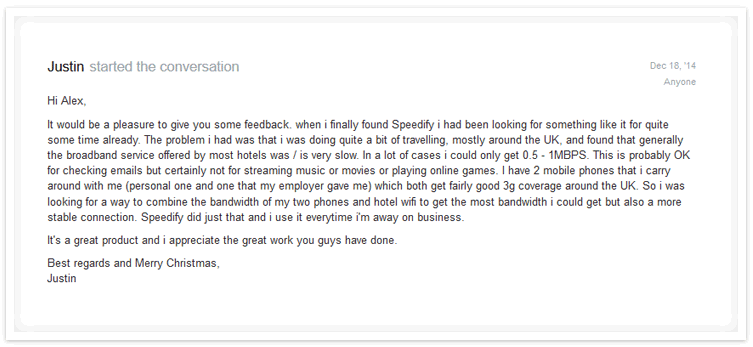
Sure, it feels great to get some affirmation that our product is helping people in their day-to-day lives, but we’re not just looking for a pat on the back. This kind of user feedback really helps our team understand exactly who needs our product most, and how to best get it into their hands.
There are probably millions of other “Justins” out there who haven’t yet gotten hip to Speedify, and it’s our job to make sure that they do. Maybe you spend a lot of time traveling too, and you’re just learning about how Speedify can be a lifesaver at home and on-the-go. In that case, we want you to hurry over and download Speedify, so you can see first-hand what Justin is talking about.
Speedify
Get started with Speedify today.
Combine Wi-Fi, 4G/5G cellular, Ethernet, Starlink, and more into one faster, steadier connection. Free to try — no credit card required.
🚀 Speed
Faster uploads and downloads by bonding all your connections at once.
📶 Stability
Automatic failover in under a second when any connection drops.
🔒 Security
AES-256 encryption on every connection, on every network you join.



15M+ downloads worldwide. 75K+ five-star reviews on iOS and Android.
Alex and the Speedify team are always exploring the latest in networking and security technology—like 5G, 6G, WiFi 7, laser and satellite internet—and sharing it in new discussion content across YouTube, TikTok, Instagram, and LinkedIn every week.
Got a tech question? Let's go deeper! Pop into Speedify Office Hours live every Wednesday at 10 AM Eastern. Speedify CEO Alex Gizis and our network engineers are standing by to break down your questions about networks, tech updates, and Speedify features.

