“Free” access comes at a cost
Comcast has been pushing new Xfinity WiFi routers onto subscribers that broadcast a public WiFi network in addition to their home Internet connection. These Xfinity WiFi Hotspots will together create a giant wireless network that Comcast is already selling access to for $19.95 per week to non-Xfinity customers (see pricing at bottom of http://wifi.comcast.com/). As a bandwidth-obsessed engineer, I wanted to understand exactly what Comcast is doing here. Despite their claims that these routers cost subscribers nothing extra, we actually measured the power consumption on the business router they sent us and were surprised by the results. Based on our tests, we expect that by the time they roll it out to all of their subscribers, Comcast will be pushing tens of millions of dollars per month of the electricity bills needed to run their nationwide public WiFi network onto consumers.
Should you have a backup 4G, 5G, Starlink, or cable internet connection?
Yes — every internet connection goes down, including Starlink, which drops for ~34 minutes a day on average. A backup connection from a different provider means one outage never takes you fully offline. The most common options are a 4G/5G cellular hotspot, a cable or DSL line, or a second satellite dish.
4G/5G cellular
Works anywhere. Just a SIM or hotspot — no installation needed.
Learn more →Cable / DSL
Best for fixed locations. Different network, so outages rarely overlap.
Learn more →Second Starlink
Adds redundancy and throughput for remote sites or heavy usage.
Learn more →Speedify bonds any two connections into one — automatic failover, more speed, no dropped calls.
Try free →


The Experiment
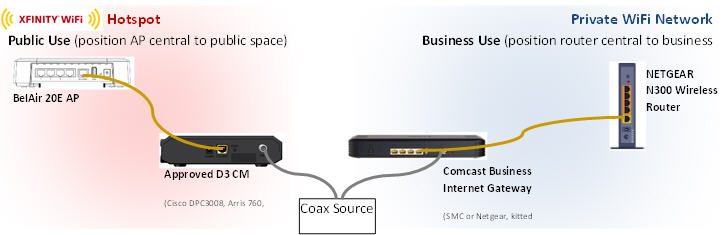
Comcast sent us the standard business Xfinity Hotspot setup for use in our office (this is different than the residential equipment). This includes a Cisco DPC3008 cable modem and BelAir 20E Wi-Fi router, which broadcasts the Xfinity public hotspot. It’s worth noting that this is totally separate from the Netgear CG3000DCR cable modem that supplies our office Internet gateway. We started testing by plugging both devices into a power strip, which was being monitored by a Kill-A-Watt power meter. First we tested the devices idle to get a control for the experiment. We turned on the Xfinity public hotspot and connected it to the Internet, but no one was on it. After getting some consistent data, we then connected two Windows laptops to the Xfinity hotspot, one watching Netflix and the other downloading files. You could immediately see the difference in the power meter, as the devices jumped from 0.14 Amps when idle, up to 0.22 Amps when actually being used. To translate this into dollars and cents, we used the average cost of power here in the Mid-Atlantic, which is $0.162 per KWh.
| Amps | Vrms | PF | KWh | KWh / year | Cost in Middle Atlantic (2013) | |
| Idle | 0.14 | 122 | 0.62 | 0.0105896 | 92.764896 | $14.99 |
| Under Load | 0.22 | 122 | 0.6 | 0.016104 | 141.07104 | $22.80 |
So, here’s what it actually costs you to host a “free” Xfinity Hotspot: up to $22.80 per year for those of us here in Philadelphia, or $1.90 per month.
Speedify
Get started with Speedify today.
Combine Wi-Fi, 4G/5G cellular, Ethernet, Starlink, and more into one faster, steadier connection. Free to try — no credit card required.
🚀 Speed
Faster uploads and downloads by bonding all your connections at once.
📶 Stability
Automatic failover in under a second when any connection drops.
🔒 Security
AES-256 encryption on every connection, on every network you join.



15M+ downloads worldwide. 75K+ five-star reviews on iOS and Android.
Alex and the Speedify team are always exploring the latest in networking and security technology—like 5G, 6G, WiFi 7, laser and satellite internet—and sharing it in new discussion content across YouTube, TikTok, Instagram, and LinkedIn every week.
Got a tech question? Let's go deeper! Pop into Speedify Office Hours live every Wednesday at 10 AM Eastern. Speedify CEO Alex Gizis and our network engineers are standing by to break down your questions about networks, tech updates, and Speedify features.