



Brand New App Brings Many Extra Features
Starting with Speedify 15.2 you can download the brand new MacOS app from our website – make sure to choose the “Download directly from Speedify” option. This new version of our channel bonding software is designed for macOS computers and includes:
- A modern macOS System Extension for more reliable and secure connectivity
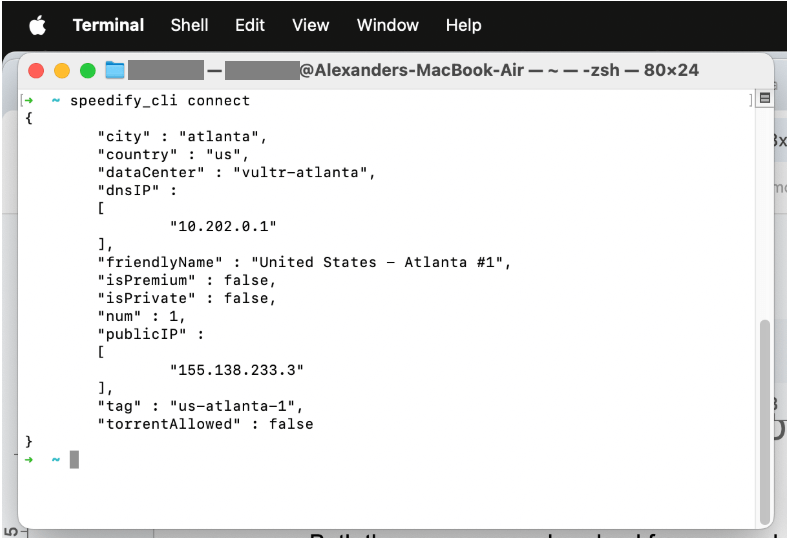
- The Speedify Command Line Interface (CLI) so you can control and monitor Speedify directly from your terminal.
With this new app, Speedify helps you use all available internet connections simultaneously for faster, more stable, and secure online experiences.
Should you have a backup 4G, 5G, Starlink, or cable internet connection?
Yes — every internet connection goes down, including Starlink, which drops for ~34 minutes a day on average. A backup connection from a different provider means one outage never takes you fully offline. The most common options are a 4G/5G cellular hotspot, a cable or DSL line, or a second satellite dish.
4G/5G cellular
Works anywhere. Just a SIM or hotspot — no installation needed.
Learn more →Cable / DSL
Best for fixed locations. Different network, so outages rarely overlap.
Learn more →Second Starlink
Adds redundancy and throughput for remote sites or heavy usage.
Learn more →Speedify bonds any two connections into one — automatic failover, more speed, no dropped calls.
Try Speedify free →New Mac System Extension
In this updated release, Speedify adopts Apple’s Network Extension framework (often referred to as a “system extension”) to provide advanced networking capabilities. This modern approach offers several benefits:
- Improved security: running as a system extension means Speedify operates with tighter, more secure controls at the OS level while still adhering to Apple’s Sandbox and Hardened Runtime restrictions, to protect the user.
- A modern macOS system extension for more reliable and secure connectivity. We’ve aligned Speedify with Apple’s current best practices and API’s.
- Enhanced stability and performance: by running as a system extension, Speedify can more efficiently handle multiple internet connections without the limitations of older methods
Differences Between the Direct Download App and the Mac App Store Versions
Both the app you can download from our website and the one you can get from the Mac App Store help you use all available connections at the same time for faster, more reliable and secure Internet. However, there are a few differences between these:
- Speedify command line interface (CLI)
- Direct Download Version: Includes the CLI by default. You can run Speedify commands from the terminal, script functionality, or even integrate Speedify into other workflows.
- Mac App Store Version: Does NOT include the CLI. You can only use the graphical user interface for configuration and monitoring.
- Faster updates and early access to new features
- Direct Download: We can release improvements and bug fixes as soon as they’re ready without needing to wait in Apple’s approval review queue.
- Mac App Store Version: Updates are subject to Apple’s review process, which can delay releases. Some experimental or cutting-edge features may also be excluded from the App Store until fully approved.
On Windows, MacOS and Linux, the Speedify CLI and libraries allow you to control Speedify from inside of your own application. Login, Start, Stop, Change Servers, Speed vs Redundant mode, etc. can all be controlled from your app. We also provide wrappers in Python and Java. Check out more details about the Speedify CLI in our knowledge base article.

Which Speedify Mac Version Should You Choose?
We recommend using the direct download version from our website for the best performance, easiest access to updates, and advanced features (like CLI). If you prefer to stick with the App Store ecosystem, the Mac App Store version is also a solid choice, especially if you value a simpler environment.
Regardless of which version you pick, you’ll enjoy Speedify’s robust channel bonding technology that delivers faster, more stable, and secure internet by combining your available networks into one super connection.
Get Started with the New Speedify MacOS App
Ready to try the new Speedify macOS app for yourself? Download it directly and start combining your connections today! If you have any questions or feedback, don’t hesitate to reach out to our support team!
Alex and the Speedify team are always exploring the latest in networking and security technology—like 5G, 6G, WiFi 7, laser and satellite internet—and sharing it in new discussion content across YouTube, TikTok, Instagram, and LinkedIn every week.
Got a tech question? Let's go deeper! Pop into Speedify Office Hours live every Wednesday at 10 AM Eastern. Speedify CEO Alex Gizis and our network engineers are standing by to break down your questions about networks, tech updates, and Speedify features.


Speedify
Get started with Speedify today.
Combine Wi-Fi, 4G/5G cellular, Ethernet, Starlink, and more into one faster, steadier connection. Free to try — no credit card required.
🚀 Speed
Faster uploads and downloads by bonding all your connections at once.
📶 Stability
Automatic failover in under a second when any connection drops.
🔒 Security
AES-256 encryption on every connection, on every network you join.





15M+ downloads worldwide. 75K+ five-star reviews on iOS and Android.