


The Starlink Connectivity Card in Speedify Shows How Each Dish Holds Up Over Time
Starlink disconnects all the time for ALL Starlink users. The Speedify Starlink Index report found that Starlink connections are down for an average of ~33 min per day. Plus, all Starlink dishes experience small drops and packet loss every 15 seconds, when the moving Starlink satellites hand off the connection to the next satellite overhead.
The best way to fix Starlink's connection drops is to combine your Starlink connection with another internet connection, such as 4G/5G cellular, cable, fiber, DSL, or another Starlink connection. Speedify makes this possible with channel bonding.

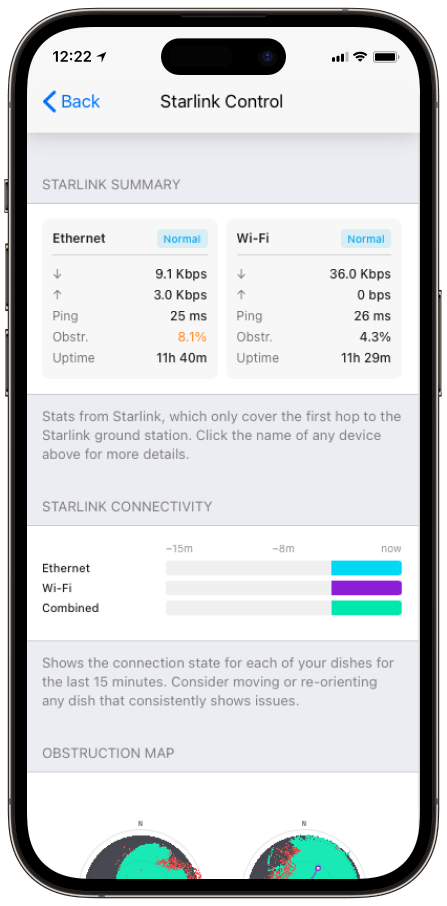
Monitor your Starlink dish performance inside Speedify.
Speedify’s built-in Starlink Control Center gives you real-time visibility into your dish’s health — without opening a separate app.
What Speedify’s Starlink Connectivity Card Shows
- One row per dish. Each row is a single Starlink dish, with color showing its connection state across the last 15 minutes.
- A Combined row. The bottom row shows whether your dishes fill in each other’s gaps or drop out together.
- Pattern over time. A dish that flickers on a regular interval points to a recurring satellite handoff or a fixed obstruction, not a one-off.
Why the Combined Row Is the One to Watch in Speedify’s Starlink Control Center
If the Combined row shows frequent yellow or gaps even when each individual dish looks healthy, your dishes are likely pointed at the same slice of sky and hitting the same obstructions at the same moments. That defeats the point of running more than one.
The fix is to re-aim one dish so the two cover different sky, which Starlink’s guidance on running multiple dishes with a clear field of view backs up: each antenna needs roughly 20° elevation clearance across a full 360° azimuth. Speedify’s Dish Orientation card and Alignment Wizard handle the re-aiming.
How Speedify Uses the Timeline
The Connectivity card is the visible side of what Speedify is already doing underneath. Speedify’s channel bonding technology measures latency, packet loss, and throughput on every connection continuously, and moves traffic off a degrading dish before it fully drops.
Because Speedify works at the packet level, a gap on one row in the timeline doesn’t have to mean a gap in your video call. If you want to track drops over a longer window, see how to monitor Starlink outages and uptime with Speedify.
Who Benefits from Speedify’s Starlink Connectivity Card
- Multi-dish operators. The Combined row is the fastest way to tell whether two dishes are genuinely redundant or just duplicating each other.
- Live streamers and remote workers. A repeating drop pattern on the timeline explains stutters that a speed test would miss.
- Anyone repositioning a dish. The timeline shows within minutes whether a move actually reduced dropouts.
Speedify and Starlink: From Timeline to Uninterrupted Connection
The Connectivity card shows where each Starlink dish struggles. Speedify’s channel bonding technology spreads your traffic so those struggles stay off your screen, and the Combined row tells you when it’s time to re-aim. For the full dashboard walkthrough, see how to use Speedify’s Starlink Control Center.
Alex and the Speedify team are always exploring the latest in networking and security technology—like 5G, 6G, WiFi 7, laser and satellite internet—and sharing it in new discussion content across YouTube, TikTok, Instagram, and LinkedIn every week.
Got a tech question? Let's go deeper! Pop into Speedify Office Hours live every Wednesday at 10 AM Eastern. Speedify CEO Alex Gizis and our network engineers are standing by to break down your questions about networks, tech updates, and Speedify features.


Speedify
Get started with Speedify today.
Combine Wi-Fi, 4G/5G cellular, Ethernet, Starlink, and more into one faster, steadier connection. Free to try — no credit card required.
🚀 Speed
Faster uploads and downloads by bonding all your connections at once.
📶 Stability
Automatic failover in under a second when any connection drops.
🔒 Security
AES-256 encryption on every connection, on every network you join.





15M+ downloads worldwide. 75K+ five-star reviews on iOS and Android.