
Speedify Monitors Your Starlink Internet Connection and Keeps You Online Through Starlink Outages
Starlink does go down, in two ways. Short drops happen often: your Starlink dish switches satellites about every 15 seconds, and a switch, a storm or something blocking its view can cut your internet for a moment. Longer outages come from a network problem on Starlink’s side, or a problem with your own Starlink dish. To check your Starlink uptime and outage history, open Statistics in the Starlink app, or go to dishy.starlink.com on your Starlink Wi-Fi.
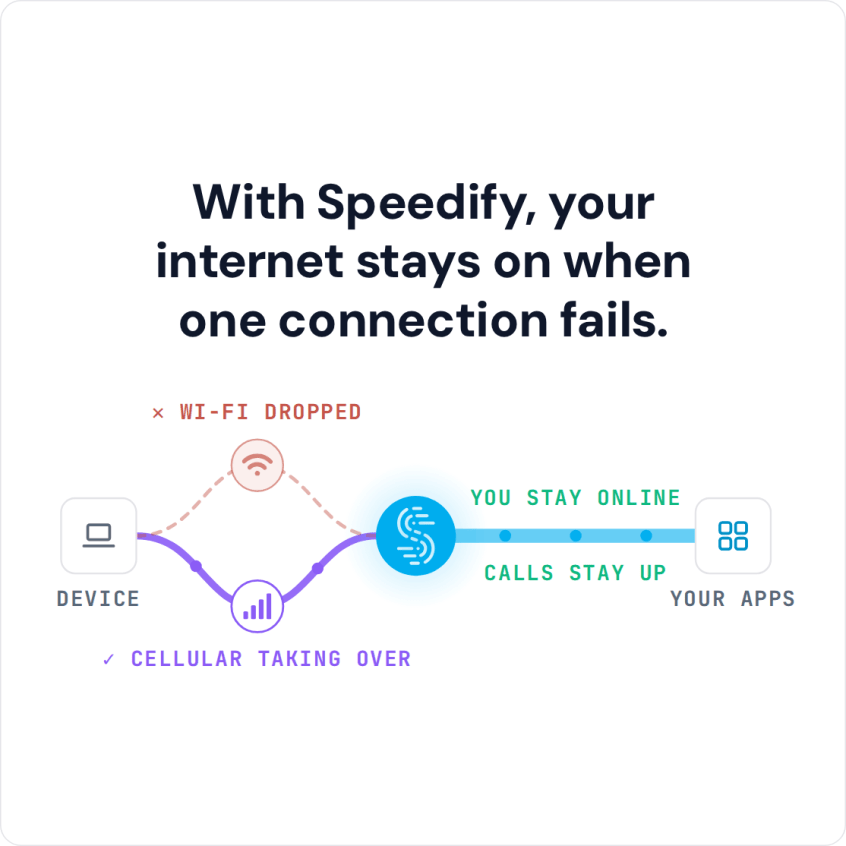
Speedify, an app that uses all of your internet connections at the same time, including Starlink plus 4G/5G cellular, cable or another Starlink dish, tracks your Starlink dish’s uptime live, and keeps you online when Starlink drops out. Below: how to tell whether Starlink is down, how to read your uptime, and how to stay online through outages.
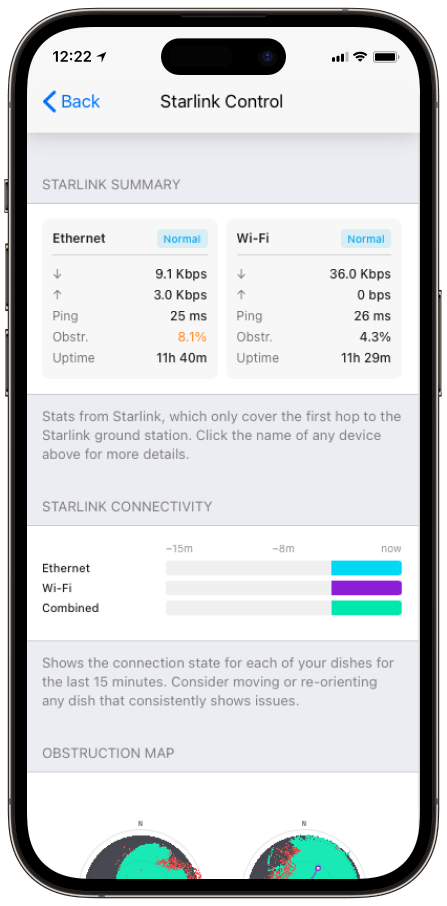
Monitor your Starlink dish performance inside Speedify.
Starlink Internet Connection Dropouts Happen to Everyone
Speedify measures thousands of Starlink users in more than 150 countries. From 29 September to 12 October 2026, fixed Starlink dishes went offline for about 37 minutes a day on average, and Starlink dishes on RVs and boats for about 61 minutes a day.
Starlink also switches each dish to a new satellite every 15 seconds, and a switch can cause a short dropout. Even a perfectly installed Starlink dish goes offline, and about 7 in 10 Starlink users on Speedify use Starlink together with a second internet connection, like 4G/5G cellular.
How to Check If Starlink Is Down, or If It’s Your Starlink Dish
- Check your Starlink dish’s status first. The Starlink app shows the status of your Starlink dish and Starlink router even with no internet, so you can tell whether your own equipment is reachable. For what each status means, see how to check your Starlink status.
- Read the uptime and outages list. The Statistics page (in the Starlink app, or at dishy.starlink.com or 192.168.100.1) lists recent outages with their likely cause: something blocking the view, no signal received, or a network problem.
- Tell a problem at home from a network outage. Outages caused by something blocking the view are usually at your end. A drop with no Starlink dish alerts, where other people nearby are offline too, points to an outage on Starlink’s side.
- Check an outage tracker. Independent outage websites show whether other Starlink users near you are reporting the same drop.
If your Starlink dish is offline and Starlink isn’t reporting an outage, see why your Starlink isn’t working for step-by-step fixes. For how rare Starlink-wide outages are, see 31 days of Speedify Starlink Index data on Starlink outages.
How Speedify Tracks Starlink Uptime and Your Starlink Dish’s Health
Speedify’s Starlink Control Center shows your Starlink dish’s status, uptime, ping and how much of its view is blocked, live, and shows Starlink dish alerts in the app, like a stuck motor, a pole that isn’t straight or a Starlink dish that’s overheating.
An alert shows up within about 15 seconds of a problem and stays up while the problem lasts, so you see what’s wrong while it’s happening. If you use more than one Starlink dish, Speedify tracks all of them at once. Starlink reports a high average uptime, while Speedify’s measurements of real Starlink users show more time offline: on the Speedify Starlink Index from 29 September to 12 October 2026, Starlink internet connections worked 96.77% of the time, about 46 minutes offline a day. How Speedify measures Starlink reliability explains why the Starlink number and the Speedify number can both be true.
How Speedify Keeps You Online Through a Starlink Outage
Tracking outages tells you that you’re offline. With a second internet connection, Speedify keeps you online instead. Starlink moves your Starlink dish to a new satellite about every 15 seconds, and each switch is a chance to drop. Add storms and anything blocking the view, and the drops add up.
Speedify uses your Starlink internet connection together with a second internet connection, like 4G/5G cellular or a wired line, and sends your traffic over both at the same time. A second Starlink dish helps when one dish is blocked, but not with satellite switches: every Starlink dish switches satellites on the same 15-second schedule.
When either internet connection drops, Speedify switches your traffic to the other right away, without cutting off calls, streams or downloads. With Starlink alone, Speedify can track outages but can’t stop them: it needs that second internet connection. There’s more on the satellite switches in how Speedify prevents disconnections from Starlink satellite switches.
Who Needs to Track Starlink Outages
People who work from home in the country. If your job runs on video calls, watch your uptime and use Starlink with cellular, so a satellite switch or a short outage doesn’t end a meeting.
Doctors and therapists who see patients online. An online appointment can’t be cut off. Speedify tracks your Starlink dish’s health and keeps the call going on a second internet connection when Starlink drops.
Businesses at remote sites. Where downtime stops work, watch every Starlink dish in Speedify and use them together with 4G/5G cellular, so one Starlink dish failing or a satellite switch doesn’t take the site offline.
Track Your Starlink Uptime with Speedify, and Stay Online When Starlink Drops
Check the Starlink app to see whether Starlink is down, read the uptime and outage list to learn why, and watch your Starlink dish’s health in Speedify’s Starlink Control Center. Then add a second internet connection, so the outages you’re tracking stop taking you offline.
Speedify
Get started with Speedify today.
Speedify combines Wi-Fi, 4G/5G cellular, Ethernet, Starlink and satellite into one faster, more reliable internet connection. Free to try: 5 GB a month with a free account. No credit card required.
🚀 Speed
Faster uploads and downloads, because Speedify uses all your internet connections at once.
📶 Stability
If one internet connection drops, Speedify moves your traffic to the others in milliseconds.
🔒 Security
AES-256 encryption on every internet connection, on any network you join.



15M+ downloads worldwide. 75K+ five-star reviews on iOS and Android.