



Speedify Connects 8 Starlink Dishes for Faster, More Reliable and Secure Internet
For Internet power users, remote workers or families in rural areas, a single Starlink connection can sometimes fall short, especially during congestion or bad weather.
You can merge eight Starlink connections into one faster, more reliable Internet connection using the Speedify software-based bonding solution, all without the need for extra routers of networking gear. You will get better upload and download speeds for video calls, streaming, online gaming and web browsing.
Most Starlink users already run a second connection.
From a sample of 6,228 Starlink users on Speedify, 71% ran at least one other internet connection while using Starlink. Cellular is the most common choice of backup connection.
What they pair with


Should you get a backup connection for Starlink?
Yes. Starlink goes down every day — an always-on dish averages about 34 minutes of downtime daily from routine satellite handoffs. A second connection keeps you online when Starlink drops.
What’s the best backup connection for Starlink?
A 4G/5G cellular hotspot or SIM is the most practical backup for most Starlink users — it works anywhere Starlink works, requires no installation, and uses a different network so outages rarely overlap. Cable or DSL broadband is a strong option if you have it at a fixed location. A second Starlink dish is also possible if you need maximum throughput.
How do you use two internet connections at once with Starlink?
Speedify combines Starlink with any other connection — cellular, cable, Wi-Fi, or a second dish — into one bonded connection. Speedify runs on your phone, laptop, or router. When Starlink drops, Speedify moves your traffic to the backup instantly, so calls don’t cut out and downloads don’t stall. Speedify is free to try.
71% of Speedify’s Starlink users already run a second connection. Speedify’s Starlink Index tracks real-world Starlink performance data from thousands of dishes.
See the full dataset →Use Speedify to stay online during Starlink satellite handoffs every 15 seconds
Research confirms Starlink switches between satellites every 15 seconds on a fixed schedule. Each satellite handoff is a potential dropout, and on a congested network or with any obstruction, those Starlink dropouts become real interruptions.
Speedify fixes Starlink connection drops by combining your Starlink internet connection with another satellite dish, Wi-Fi, 4G/5G cellular, or wired Ethernet at the same time. When Starlink drops, Speedify keeps your traffic moving on the backup internet connection instantly.


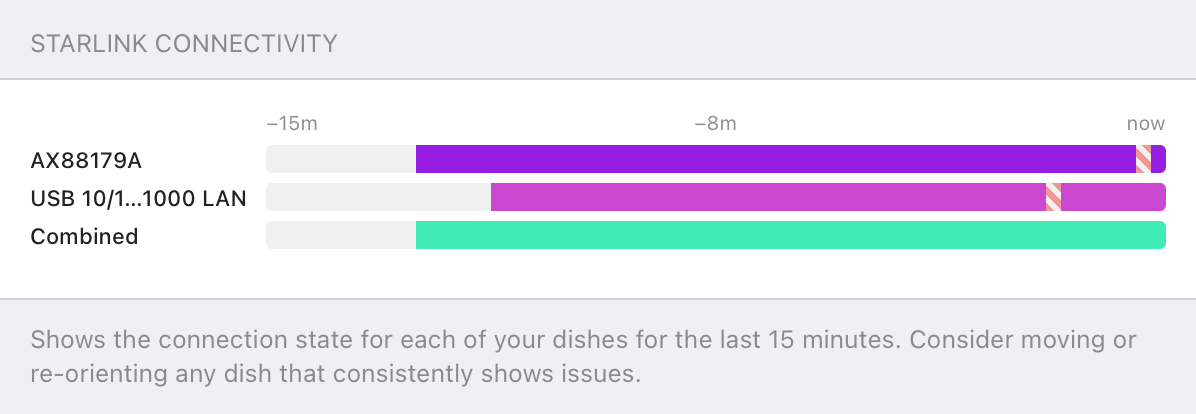

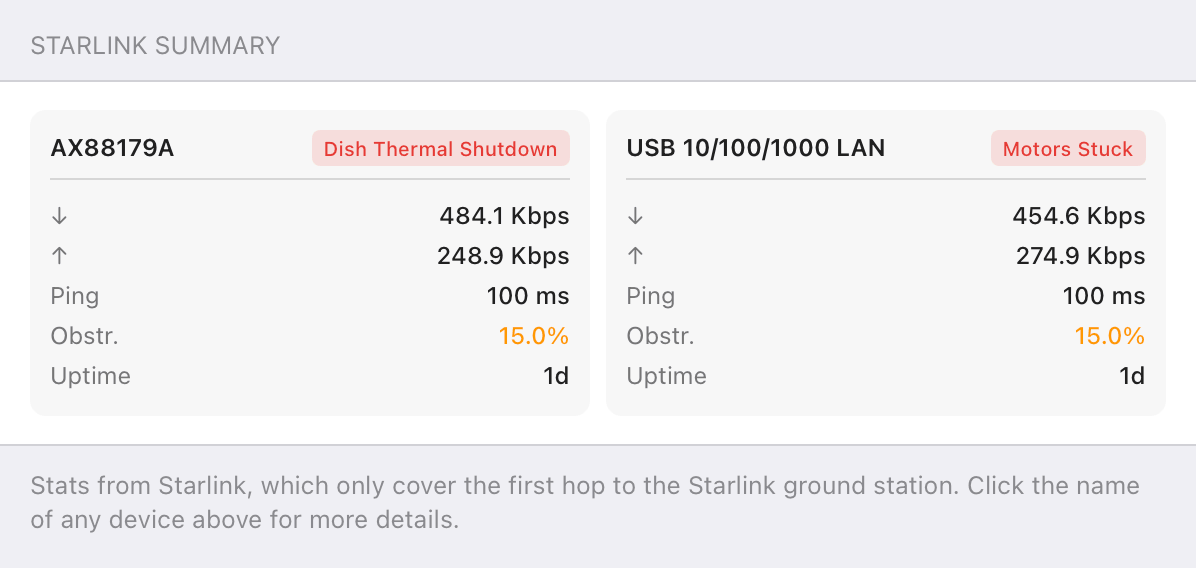

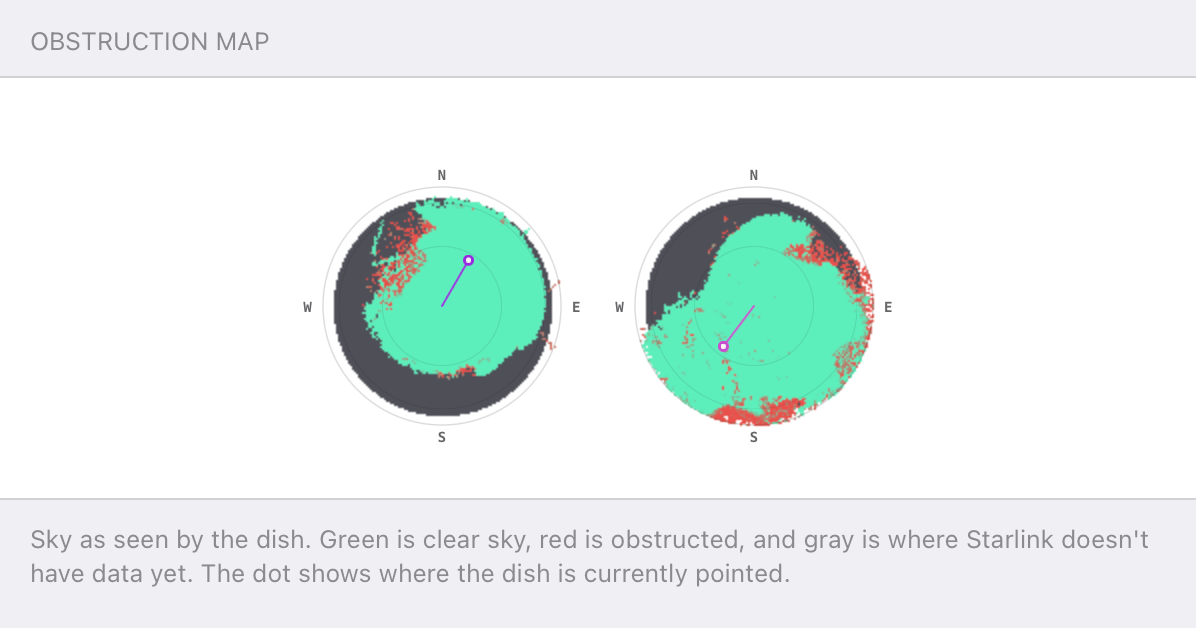
Speedify alerts you about your Starlink dish status
Speedify software alerts you about your Starlink dish status as soon as your dish experiences an issue - e.g. when your actuator motor is stuck, the mast is not vertical or there's a thermal throttle.
Speedify's Starlink Control Center helps you monitor all your Starlink dishes, read obstruction maps, and align multiple dishes all in the Speedify app. Get a real-time view of each dish's health and optimize the position of each Starlink dish, so you get the best possible performance out of your Starlink connections.
Should you get a backup connection for Starlink?
Yes. Starlink goes down every day — an always-on dish averages about 34 minutes of downtime daily from routine satellite handoffs. A second connection keeps you online when Starlink drops.
What’s the best backup connection for Starlink?
A 4G/5G cellular hotspot or SIM is the most practical backup for most Starlink users — it works anywhere Starlink works, requires no installation, and uses a different network so outages rarely overlap. Cable or DSL broadband is a strong option if you have it at a fixed location. A second Starlink dish is also possible if you need maximum throughput.
How do you use two internet connections at once with Starlink?
Speedify combines Starlink with any other connection — cellular, cable, Wi-Fi, or a second dish — into one bonded connection. Speedify runs on your phone, laptop, or router. When Starlink drops, Speedify moves your traffic to the backup instantly, so calls don’t cut out and downloads don’t stall. Speedify is free to try.
71% of Speedify’s Starlink users already run a second connection. Speedify’s Starlink Index tracks real-world Starlink performance data from thousands of dishes.
See the full dataset →Use Speedify to stay online during Starlink satellite handoffs every 15 seconds
Research confirms Starlink switches between satellites every 15 seconds on a fixed schedule. Each satellite handoff is a potential dropout, and on a congested network or with any obstruction, those Starlink dropouts become real interruptions.
Speedify fixes Starlink connection drops by combining your Starlink internet connection with another satellite dish, Wi-Fi, 4G/5G cellular, or wired Ethernet at the same time. When Starlink drops, Speedify keeps your traffic moving on the backup internet connection instantly.
Speedify alerts you about your Starlink dish status
Speedify software alerts you about your Starlink dish status as soon as your dish experiences an issue - e.g. when your actuator motor is stuck, the mast is not vertical or there's a thermal throttle.
Speedify's Starlink Control Center helps you monitor all your Starlink dishes, read obstruction maps, and align multiple dishes all in the Speedify app. Get a real-time view of each dish's health and optimize the position of each Starlink dish, so you get the best possible performance out of your Starlink connections.
Reasons to Combine 8 Starlink Connections
Starlink can provide speeds ranging from 50 to 300 Mbps, but performance can be inconsistent due to things such as network congestion, bad weather and satellite handoff factors.
Connecting four Starlink cables together helps you:
- Increase your upload and download speeds potential
- Maintain reliable service if one dish experiences issues
- Improve performance for video calls, streaming, or remote work
Rather than investing in expensive load-balancing routers or multi-WAN appliances, you can use Speedify to do it all through a software app right on your computer, mobile device or supported multi-WAN router.
How Speedify Helps Merge 8 Starlinks
Speedify is the only VPN that can combine Wi-Fi, 4G, 5G, Starlink, wired broadband and other internet sources into one bonded super-connection to improve speed, stability, and security for livestreaming, video calls, streaming gaming, web browsing, and everything else you do online.
The best part? It’s a connection bonding solution for Starlink – meaning it helps you combine multiple Starlink connections for you to use on any device.
You will need the following:
- Eight active Starlink terminals
- Starlink Ethernet adapters
- A Speedify active subscription


NEW!
Miri X510 Bonding Router
POWERED BY SPEEDIFY
Bond up to 7 Links Simultaneously
Combine wired, Wi-Fi, 5G, and LTE connections plus Pair & Share with other Speedify users.
Battery-powered Portability
Connect 8 Starlink Dishes Together with Speedify on a Computer and Share the Bonded Connection via Wi-Fi
- Make sure your 8 Starlink dishes are installed according to the manual, with a minimum separation distance of 0.9 meters between them.
- Connect all Starlink terminals to the computer running Windows, MacOS or Linux. This can be done by any combination of Ethernet ports / adapters and built-in Wi-Fi / USB adapters – e.g. 6 Ethernet and 2 Wi-Fi, 3 Wi-Fi and 5 Ethernet, etc.
- To further increase the reliability of the resulting connection, you can also tether an iPhone or an Android phone or use a USB cellular adapter, for an extra 4G / 5G cellular connection.


- Launch and configure Speedify on the computer. For best performance, you should set the connection priority for all Starlink connections as Primary.
- Test your internet speed – either using the built-in the Speedify speed test or using a speed test site like speedtest.net or fast.com.
- Share the bonded connection with other devices (tablets, smartphones, etc.) via Wi-Fi from computers running Windows, MacOS or Linux.
Benefits of Using Speedify to Combine Eight Starlinks
Speedify is the most flexible way to bond 8 Starlink internet sources together: you can use it as an app right on your computers, mobile devices and supported networking equipment or you can just get an out-of-the-box Powered by Speedify network bonding router.
One thing is for sure: you will get increased upload and download speeds for demanding apps, such as streaming, video conferencing or large file downloads / uploads. Also, if one Starlink goes down, Speedify keeps you online with the help of the other active connections.
If you’re in a remote area and depend on Starlink, combining 8 Starlink connections with Speedify is a simple, cost-effective way to enhance your internet without investing in complex networking gear. Whether you’re attending Zoom meetings, uploading large files, gaming online, or just trying to keep everyone connected, Speedify ensures your internet is faster and more reliable.
Speedify
Get started with Speedify today.
Combine Wi-Fi, 4G/5G cellular, Ethernet, Starlink, and more into one faster, steadier connection. Free to try — no credit card required.
🚀 Speed
Faster uploads and downloads by bonding all your connections at once.
📶 Stability
Automatic failover in under a second when any connection drops.
🔒 Security
AES-256 encryption on every connection, on every network you join.



15M+ downloads worldwide. 75K+ five-star reviews on iOS and Android.
Alex and the Speedify team are always exploring the latest in networking and security technology—like 5G, 6G, WiFi 7, laser and satellite internet—and sharing it in new discussion content across YouTube, TikTok, Instagram, and LinkedIn every week.
Got a tech question? Let's go deeper! Pop into Speedify Office Hours live every Wednesday at 10 AM Eastern. Speedify CEO Alex Gizis and our network engineers are standing by to break down your questions about networks, tech updates, and Speedify features.

