


Why Two Starlink Dishes Overlap, and How to Aim Them Apart
If you run two Starlink dishes and aim them the same way, the second dish is mostly wasted: both see the same satellites and the same obstructions, so you pay for two dishes but get close to the coverage of one. The fix is to point each dish at a different part of the sky so they don’t overlap.Speedify is an app that helps you use all of your internet connections at the same time – including two Starlink dishes – for faster uploads and downloads and a more reliable connection. Speedify includes a Starlink Dish Orientation card: a simple panel that shows the direction each of your Starlink dishes is pointing, so you can spot when two overlap and re-aim one of them. Below, we explain how to read that card and use it to aim your dishes apart.
Starlink disconnects all the time for ALL Starlink users. The Speedify Starlink Index report found that Starlink connections are down for an average of ~33 min per day. Plus, all Starlink dishes experience small drops and packet loss every 15 seconds, when the moving Starlink satellites hand off the connection to the next satellite overhead.
The best way to fix Starlink's connection drops is to combine your Starlink connection with another internet connection, such as 4G/5G cellular, cable, fiber, DSL, or another Starlink connection. Speedify makes this possible with channel bonding.

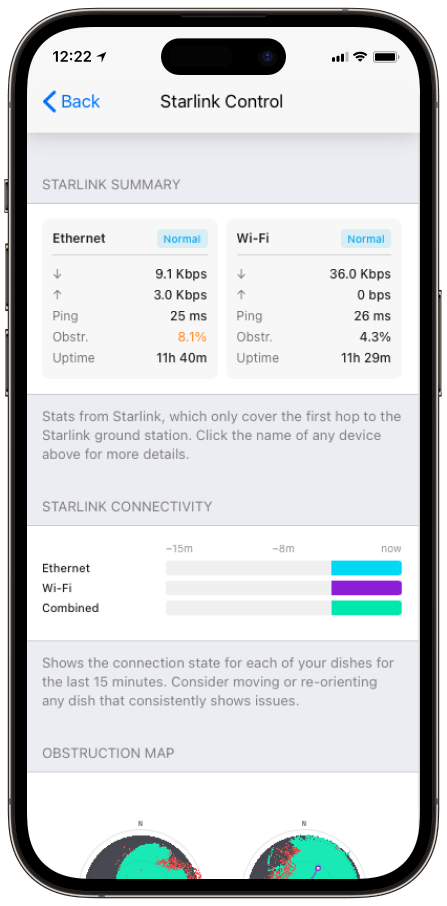
Monitor your Starlink dish performance inside Speedify.
Speedify’s built-in Starlink Control Center gives you real-time visibility into your dish’s health — without opening a separate app.
What the Speedify Starlink Dish Orientation Card Reports
- Azimuth (az). The compass heading the dish is aimed at.
- Tilt. The dish’s angle from horizontal.
- Obstruction percentage. How blocked each dish’s current view is, shown next to its heading.
Two dishes sitting at nearly the same azimuth are the tell-tale sign of overlap. One of them can be rotated to cover a different direction.
How to Aim Two Starlink Dishes Apart
Starlink asks for roughly 20° of elevation clearance across a full 360° azimuth per antenna, and explicitly notes that multiple dishes can be used where a single dish can’t get a clear view.
The Dish Orientation card turns that into a concrete target: separate the two azimuths so each dish works a different region of sky and the obstruction percentages drop. Select a dish on the card to open its Alignment Wizard, then rotate the hardware until the heading matches.
How an Optimal Starlink Dish Orientation Improves Speedify’s Bonding
Aiming dishes apart isn’t just about avoiding shared obstructions. Dishes on different sky connect to different satellites, which means more independent capacity for Speedify’s channel bonding technology to combine.
Speedify distributes your traffic across both dishes at the packet level and fails over instantly if one drops, so the more independent the two connections are, the more the bonded result gains.
Who Benefits from the Starlink Dish Orientation Card
- Maritime and broadcast operators. Crews running two or more dishes on a vessel or truck use the card to confirm each one is earning its place.
- RV and remote-site users. The compass view makes it obvious when a quick re-park has left both dishes facing the same trees.
- Anyone adding a second dish. The card shows whether the new dish actually expands coverage or just duplicates the first.
Speedify and Starlink: Aim the Starlink Dishes Apart, Then Bond Together
The Dish Orientation card shows you where each Starlink dish points and where two of them overlap. Speedify’s channel bonding technology then combines the dishes into one faster, more resilient connection, and the further apart they’re aimed, the more there is to combine. For the bigger picture, see when running multiple Starlink dishes makes sense.
Alex and the Speedify team are always exploring the latest in networking and security technology—like 5G, 6G, WiFi 7, laser and satellite internet—and sharing it in new discussion content across YouTube, TikTok, Instagram, and LinkedIn every week.
Got a tech question? Let's go deeper! Pop into Speedify Office Hours live every Wednesday at 10 AM Eastern. Speedify CEO Alex Gizis and our network engineers are standing by to break down your questions about networks, tech updates, and Speedify features.


Speedify
Get started with Speedify today.
Combine Wi-Fi, 4G/5G cellular, Ethernet, Starlink, and more into one faster, steadier connection. Free to try — no credit card required.
🚀 Speed
Faster uploads and downloads by bonding all your connections at once.
📶 Stability
Automatic failover in under a second when any connection drops.
🔒 Security
AES-256 encryption on every connection, on every network you join.





15M+ downloads worldwide. 75K+ five-star reviews on iOS and Android.