


Network Wide Ad Blocking at Its Best with Channel Bonding Capabilities
Network-wide ad blocking and faster internet can come from one app instead of a separate Pi-hole box. Speedify is an app that combines two or more internet connections at once – Wi-Fi, Ethernet, and 4G/5G cellular – for faster upload and download speeds, and it also blocks ads across the network through its DNS.
Here is how a Speedify-powered setup compares to a Pi-hole.
With Speedify, your internet stays on when one connection fails.
When one of your connections drops, Speedify automatically routes your traffic to your remaining connections — so calls don't cut out and downloads don't stall.
How do I use WiFi and 4G/5G cellular at the same time with Speedify?


Pick your two internet connections and your device below and we'll take you to the step-by-step setup guide.



What Is Speedify?
Speedify is a bonding VPN which offers online privacy and security like any other VPN, as well as providing a DNS based ad blocker. But most importantly, it provides the possibility to combine multiple internet connections at once into one super pipe.
You can use the Internet connection you have at home and also borrow another from a public Wi-Fi hotspot, restaurant or cafe. Or you can get another plan from your ISP or use your cellular plan, if you’ve got lots of data available. Bond as many connections as you have at your disposal.
But how does this cover your whole network?
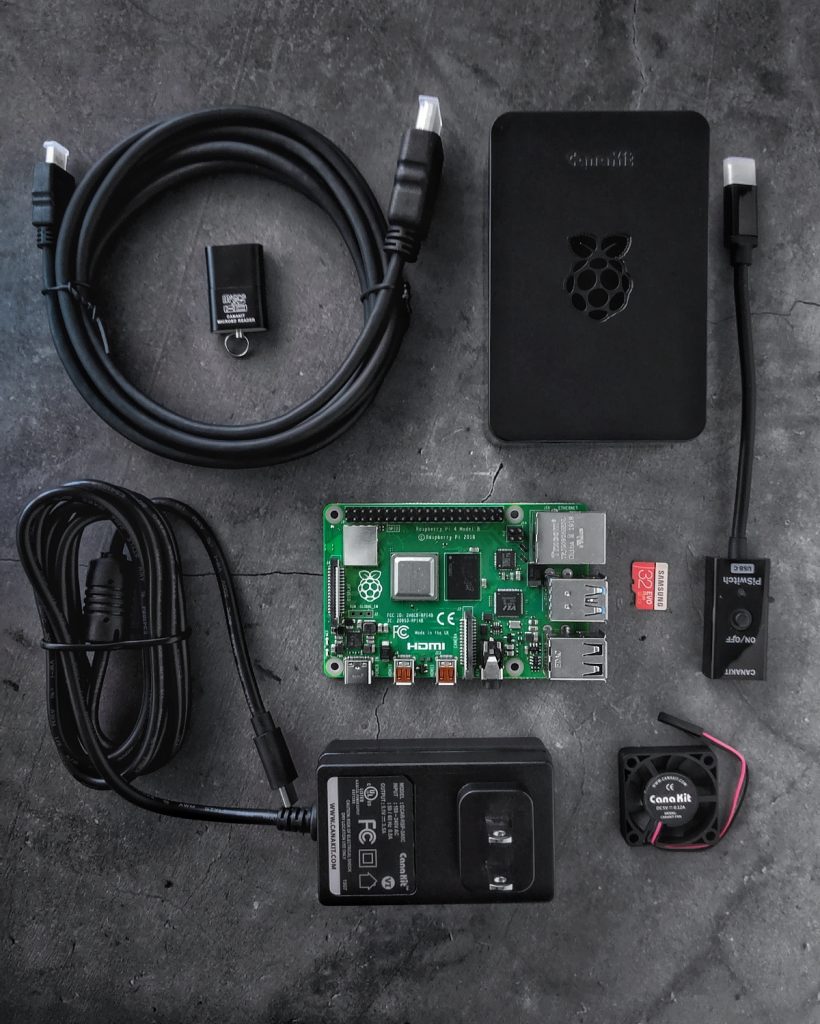
You can set up Speedify on a Raspberry Pi, which is a $30 computer. If we are being honest it’s a bit more than that with some accessories, but it’s totally worth it. Raspberry Pi is a mini computer that runs Linux and you can install Speedify on it and use it as a router.
Introducing the “SpeediPi” – Pi Hole Alternative with Channel Bonding
Requirements:
- Raspberry Pi – we recommend gen 3 or 4
- Router
- Speedify channel bonding software – installed on the Pi
- Optional: USB dongles for Wi-Fi or cellular, to be able to combine connections.
In my case, the setup looks a bit like this: a Raspberry Pi 4 running Speedify is connected to my router over Ethernet (LAN port). From there the Pi, or “SpeedyPi” as I like to call it, is broadcasting a Wi-Fi signal to which all of my devices at home are connected.
But that’s not all, along with my connection from the router, the Pi is connected to a local restaurant Wi-Fi via a USB dongle connected to it. Thanks to Speedify and its channel bonding technology, this adds another 20 Mbps to my 20 Mbps connection, I usually have stable speeds of 36 Mbps at all times.
The DNS in Speedify is set to Ad Blocking DNS, which removes most of the ads popping up all over the web which otherwise drive me crazy.
And I don’t have to worry about hackers trying to intercept my internet traffic and steal my sensitive information either. Speedify offers AES or ChaCha based advanced encryption.
A Day in the Life of a SpeediPi User
Sounds too good to be true? Here’s how it works in real life:
- My phone is connected to the SpeediPi Wi-Fi network. While I am browsing the web, I see way less ads then I usually would.
- I turn on the TV and watch Netflix. TV is also connected to the SpeediPi Wi-Fi network. You may be aware that most VPNs are blocked by Netflix and if Netflix detects that you are using a VPN you won’t be able to access it. Luckily, Speedify has a feature called bypass, which allows Netflix and other streaming services to go around the VPN without any action needed on your part.
- When I am done watching Netflix, I use my desktop computer and realize there’s a new game out. But it’s 100 GB and it would take forever to download with my home internet connection. No problem, since I have two connections and almost double the speed – I’ll be able to play it today!
BONUS: This one time contractors were doing some work in my building. Everyone in the building that were using the same ISP as I lost their Internet connection for hours. Since I was also connected to the nearby restaurant’s Wi-Fi, I didn’t even notice it. Speedify seamlessly switched me over to using just that public Wi-Fi until the connection from my ISP was restored. Thanks to Speedify’s failover protection, I was able to attend this business call I had scheduled.
Why SpeediPi Is Better than a Pi Hole
Because it also delivers speed, stability and security for your ad-free internet.
Don’t take my word for it, try it yourself. Speedify comes with a 30 day money back guarantee, so give it a shot. If you are using any other OS than Linux, you can take advantage of Speedify’s free tier. Try it on your mobile phone to combine WiFi with your cellular data and watch the channel bonding magic happen right in front of your eyes. You can download Speedify here.
If you would like to replicate my setup, you are not limited to a Raspberry Pi. You can use Speedify on Ubuntu as well and other Debian based distros should work too!
Detailed instructions on installing and setting up Speedify are available here. In particular, the installation instructions are here. The sharing configuration settings are here.
If you would like to read more about Speedify and Raspberry Pi, check out this blog post.
Speedify
Get started with Speedify today.
Combine Wi-Fi, 4G/5G cellular, Ethernet, Starlink, and more into one faster, steadier connection. Free to try — no credit card required.
🚀 Speed
Faster uploads and downloads by bonding all your connections at once.
📶 Stability
Automatic failover in under a second when any connection drops.
🔒 Security
AES-256 encryption on every connection, on every network you join.




15M+ downloads worldwide. 75K+ five-star reviews on iOS and Android.
Alex and the Speedify team are always exploring the latest in networking and security technology—like 5G, 6G, WiFi 7, laser and satellite internet—and sharing it in new discussion content across YouTube, TikTok, Instagram, and LinkedIn every week.
Got a tech question? Let's go deeper! Pop into Speedify Office Hours live every Wednesday at 10 AM Eastern. Speedify CEO Alex Gizis and our network engineers are standing by to break down your questions about networks, tech updates, and Speedify features.

