
Combining Multiple Internet Connections the Easy Way with Speedify
Want faster upload and download speeds and internet that stays online even if one connection drops out? Run two or more of your internet connections at the same time.
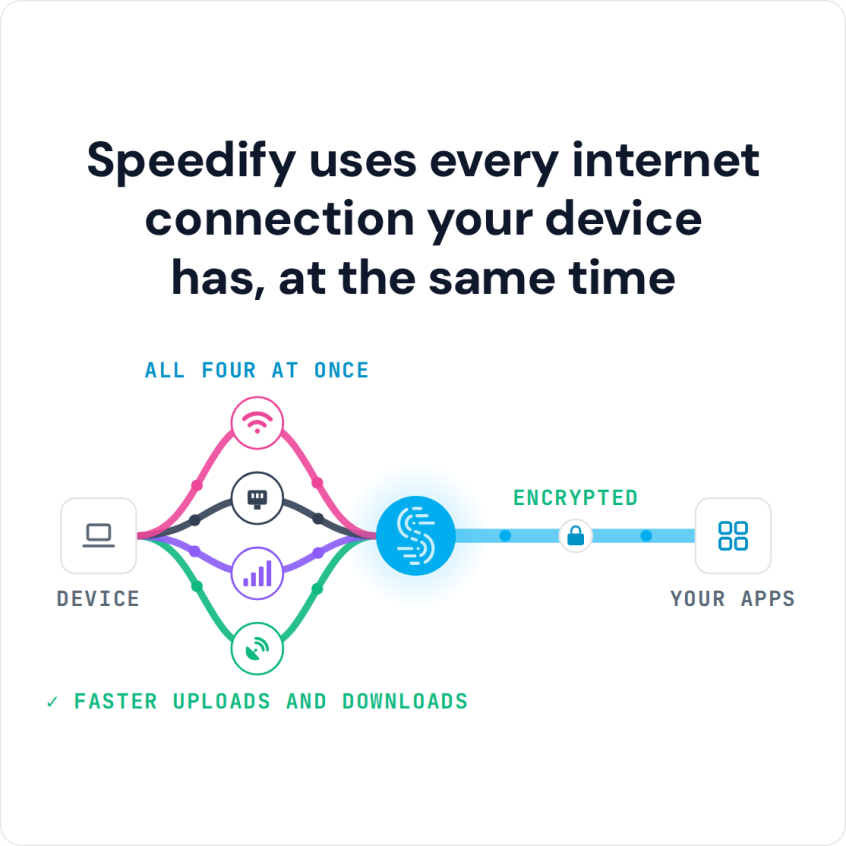
Speedify is an app that combines two or more internet connections at once, such as Wi-Fi, Ethernet, 4G/5G cellular and Starlink, by splitting your traffic across all of them. Speedify works on Windows, macOS, Android, iOS and Linux.
Speedify uses every internet connection your device has, at the same time
How do I use WiFi and 4G/5G cellular at the same time with Speedify?

Pick your two internet connections and your device below and we'll take you to the step-by-step setup guide.


Why Combine Multiple Internet Connections: Faster Speeds and Failover
Have you ever tried to watch a video on your phone or laptop but been faced with constant buffering and lag? If you were able to add a second internet connection to work in concert with the first, you would not only get faster download and upload speeds but a steady enough connection to enjoy the video without interruption.
Speedify lets you use these multiple connections on your phone or computer and works in the background, checking the quality of each connection and routing traffic across them. If one connection goes bad, Speedify’s automatic failover moves all traffic to the remaining connections until the lost connection comes back online.
When Two Internet Connections at Once Help Most
Combining helps most when one connection cannot keep up on its own. Live streaming from a phone to YouTube or Facebook Live needs steady upload bandwidth, and a phone normally uses Wi-Fi or 4G/5G cellular, one at a time; with Speedify the stream uses both and stays live if one drops. The same applies to streaming games to Twitch while playing, and to video calls on trains, buses and airport Wi-Fi, where one hotspot comes and goes.
Internet Connections Speedify Can Combine: Wi-Fi, Ethernet, 4G/5G Cellular and More
Speedify can use practically any internet connection your computer or phone can connect to, including DSL, Wi-Fi, Ethernet, 4G/5G cellular modems, Starlink and tethered smartphones. Tethered phones work on Linux too; here is how to combine Wi-Fi and a tethered Android on Ubuntu.
If a connection needs extra setup (such as dialer software for a mobile broadband modem, or a captive portal login on hotel or airport Wi-Fi and Ethernet), Speedify starts using it as soon as you complete that setup.
Speedify does the combining in software on the phone or computer you already use, so there is no load balancing router or dedicated hardware to buy and no network settings to change, and it can combine three or more connections at once. To give every device on a home or office network the combined connection, Speedify also runs on routers (OpenWrt 23.05 or later, GL.iNet firmware on listed models, and Powered by Speedify routers such as the Miri X510), which need a Router License.
Below are some tutorials for combining different types of Internet connections. Make sure you follow the Speedify YouTube channel for new guides on combining connections.
Combine connections on a PC (Windows)
- How to Combine Two Wi-Fi Connections
- How to Combine Wi-Fi and Ethernet
- How to Combine Wi-Fi and Cellular
- How to Combine Wi-Fi and Tethered Android
- How to Combine Wi-Fi and Tethered iPhone
- How to Combine Two Ethernet Connections
- How to Combine Ethernet and Cellular
- How to Combine Ethernet and Tethered Android
- How to Combine Ethernet and Tethered iPhone
- How to Combine Cellular and Tethered Android
- How to Combine Cellular and Tethered iPhone
- How to Combine Tethered Android and Tethered iPhone
Combine connections on a Mac (macOS)
On a current Mac, the guides below that use a tethered Android phone do not apply: Android USB tethering needs the HoRNDIS driver, which supports only up to macOS 10.14 Mojave, and Speedify needs macOS 11.5 or later. Combining two Wi-Fi connections on a Mac needs a USB Wi-Fi adapter, which works only on Intel Macs running macOS 11 Big Sur.
- How to Combine Two Wi-Fi Connections
- How to Combine Wi-Fi and Ethernet
- How to Combine Wi-Fi and Cellular
- How to Combine Wi-Fi and Tethered Android
- How to Combine Wi-Fi and Tethered iPhone
- How to Combine Two Ethernet Connections
- How to Combine Ethernet and Cellular
- How to Combine Ethernet and Tethered Android
- How to Combine Ethernet and Tethered iPhone
- How to Combine Cellular and Tethered Android
- How to Combine Tethered Android and Tethered iPhone
Combine connections on a mobile device (Android, iOS)
- How to Combine Wi-Fi and Cellular on Android
- How to Combine Wi-Fi and Cellular on iPhone
- How to Combine Ethernet, Wi-Fi and Cellular on iPhone
Speedify Also Encrypts Traffic on Every Internet Connection
Speedify is more than a way to use and manage multiple internet connections on your device. Speedify also encrypts all of your traffic like a VPN, which protects you on an unsecured public network, and spreads that traffic across your connections, which works differently from load balancing.
Speedify packs combining internet connections, failover and encryption into one app that anyone can set up in a few minutes, and the app is built so it won’t drain your battery.
Use multiple, secure internet connections on your PC, Mac, iPhone, iPad or Android phone. Get started with Speedify today for free: a free account includes 5 GB per month.
Speedify
Get started with Speedify today.
Speedify combines Wi-Fi, 4G/5G cellular, Ethernet, Starlink and satellite into one faster, more reliable internet connection. Free to try: 5 GB a month with a free account. No credit card required.
🚀 Speed
Faster uploads and downloads, because Speedify uses all your internet connections at once.
📶 Stability
If one internet connection drops, Speedify moves your traffic to the others in milliseconds.
🔒 Security
AES-256 encryption on every internet connection, on any network you join.



15M+ downloads worldwide. 75K+ five-star reviews on iOS and Android.