



Speedify keeps train Wi-Fi fast and steady so email, video calls, and streaming keep working even as an Amtrak train moves in and out of coverage. Speedify is an app that combines two or more internet connections at once – the train’s Wi-Fi plus a phone’s 4G/5G – into one faster, more reliable connection.
If one connection drops, Speedify stays online on the other, so work does not stall mid-trip. Speedify runs on Windows, macOS, Android, iOS, and Linux.
<1 sec
With Speedify, your internet stays on when one connection fails.
When one of your internet connections drops, Speedify shifts your traffic to your remaining connections in under a second — so calls don’t cut out and downloads don’t stall.
Should you have a backup 4G, 5G, Starlink, or cable internet connection?
Yes — every internet connection goes down, including Starlink, which drops for ~34 minutes a day on average. A backup connection from a different provider means one outage never takes you fully offline. The most common options are a 4G/5G cellular hotspot, a cable or DSL line, or a second satellite dish.
4G/5G cellular
Works anywhere. Just a SIM or hotspot — no installation needed.
Learn more →Cable / DSL
Best for fixed locations. Different network, so outages rarely overlap.
Learn more →Second Starlink
Adds redundancy and throughput for remote sites or heavy usage.
Learn more →Speedify bonds any two connections into one — automatic failover, more speed, no dropped calls.
Try Speedify free →


The Test
To understand the Amtrak WiFi experience, I grabbed a couple network cards and jumped on the Amtrak route from New York City to Philadelphia and ran some tests.
I brought along my laptop and three Internet connections:
- The laptop’s built-in WiFi card, so I could connect to the Amtrak WiFi network
- A Verizon LTE MiFi, tethered via USB
- A CLEAR USB WiMAX card
In Penn Station, NY, none of the cards were able to connect. As expected, I didn’t have a signal until we made it out of the tunnel on the New Jersey side. For the rest of the trip, my laptop ran a speed test every two minutes to check the connectivity and bandwidth of the various links. Here’s a birds-eye view of how each Internet connection performed on my journey:
| Connection | Average Speed (while connected) | Reliability (>0 Kbps) | Good Internet (>2 Mbps) | # of times offline |
| Amtrak Wifi | 2.583 Mbps | 94.12% | 67.65% | 2 |
| Verizon Mifi | 3.875 Mbps | 85.29% | 70.59% | 5 |
| Clear WiMax | 4.700 Mbps | 61.76% | 47.06% | 13 |
The CLEAR card could only stay connected about half of the time. It’s not a great option on the train, so I’m ignoring it for the rest of this discussion.
Next we look at how the Verizon 4G LTE card and the Amtrak WiFi performance lined up:


As you’d expect, both connections were jumping all over the place as my train darted towards Philadelphia. Sometimes the Verizon LTE card was pretty fast, while Amtrak’s WiFi slowed to a crawl. At other times, my 4G card disconnected, but the WiFi was still chugging along. The bigger picture is that at least one of the two networks had a working connection the whole way down to Philadelphia. Sure, both connections frequently failed, but they never failed at the same time.
Enter Speedify
Speedify is our service that lets you combine Internet connections for speed and reliability.
Amtrak riders want to stay online with a connection reliable enough to get some work done. This is where Speedify comes in: our cloud service gives users the power to bond two or more Internet connections. With Speedify bonding the Amtrak WiFi and Verizon LTE, I never lost connectivity (that’s 100% uptime, folks). I even had at least 2 Mbps throughput for 85% of the trip.
This chart plots the speeds of the Verizon, Amtrak and combined connections. Because we want to see places where the speed is LESS than 2 Mbps, I capped all the speeds at 2Mbps, so the failures will be clearer:

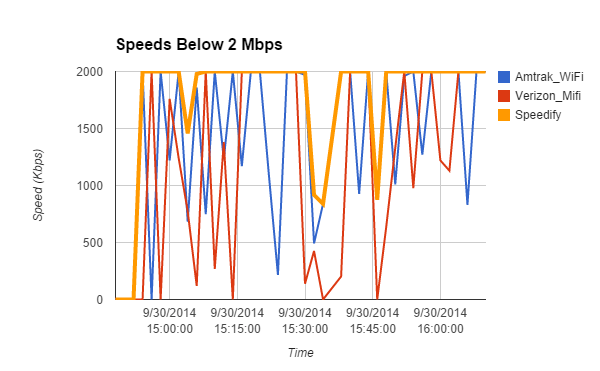
Bandwidth of each connection, and combined connection, capped at our 2 Mbps goal.
| Connection | Reliability (>0 Kbps) | Good Internet (>2 Mbps) | # of times kicked offline |
| Amtrak Wifi | 94.12% | 67.65% | 2 |
| Verizon Mifi | 85.29% | 70.59% | 5 |
| Speedify (Amtrak + Verizon) | 100% | 85.29% | 0 |
Despite their recent upgrades, this data shows that Amtrak still has a way to go in providing solid connectivity for their train customers. But with Speedify, you will have no trouble getting emails out, or putting the finishing touches on that presentation during your morning commute.
Alex and the Speedify team are always exploring the latest in networking and security technology—like 5G, 6G, WiFi 7, laser and satellite internet—and sharing it in new discussion content across YouTube, TikTok, Instagram, and LinkedIn every week.
Got a tech question? Let's go deeper! Pop into Speedify Office Hours live every Wednesday at 10 AM Eastern. Speedify CEO Alex Gizis and our network engineers are standing by to break down your questions about networks, tech updates, and Speedify features.


Speedify
Get started with Speedify today.
Combine Wi-Fi, 4G/5G cellular, Ethernet, Starlink, and more into one faster, steadier connection. Free to try — no credit card required.
🚀 Speed
Faster uploads and downloads by bonding all your connections at once.
📶 Stability
Automatic failover in under a second when any connection drops.
🔒 Security
AES-256 encryption on every connection, on every network you join.




15M+ downloads worldwide. 75K+ five-star reviews on iOS and Android.