


Unbreakable VPN Connection for Amazon Fire TV Stick or Cube by Combining Wi-Fi and 4G / 5G Cellular with Speedify
You settle in for a film on the Fire TV Stick and the picture drops to a blur while the stream catches up.
Speedify keeps what you watch private from your internet provider and, instead of leaning on a single internet connection, draws speed from two at once – the household Wi-Fi plus a phone’s 4G/5G cellular data, for instance.
Four setup steps are covered below, and with Speedify feeding your Fire TV Stick from more than one internet connection the picture holds its quality, downloads arrive faster, and a wobbly Wi-Fi signal no longer stops the film.
Should you have a backup 4G, 5G, Starlink, or cable internet connection?
Yes — every internet connection goes down, including Starlink, which drops for ~34 minutes a day on average. A backup connection from a different provider means one outage never takes you fully offline. The most common options are a 4G/5G cellular hotspot, a cable or DSL line, or a second satellite dish.
4G/5G cellular
Works anywhere. Just a SIM or hotspot — no installation needed.
Learn more →Cable / DSL
Best for fixed locations. Different network, so outages rarely overlap.
Learn more →Second Starlink
Adds redundancy and throughput for remote sites or heavy usage.
Learn more →Speedify bonds any two connections into one — automatic failover, more speed, no dropped calls.
Try Speedify free →Why Speedify Is the Best VPN for Firestick
Among all VPN services on the market available for the Amazon Fire TV Stick or Cube, our recommendation is to go with Speedify bonding VPN. Compared to other VPN solutions, you get all these things for a smoother and secure streaming experience:
- Optimized forward error correction algorithm, which doesn’t slow down the Internet connection while protecting your privacy. If connected over WiFi, it will also minimize your packet loss. So – no more buffering, disconnects or load errors on your Amazon Fire TV Stick.
- Fast encryption with no logging of data – your online traffic will be 100% secure from any snoops. We don’t sell any data to other companies so you can get “relevant” ads served to you.
- Get the possibility to use 2 or more Internet connections at the same time. One Speedify subscription works on up to 5 of your devices. Use it for your Amazon Fire TV Stick, iPhone, Windows or Mac laptop, Android smartphone, Linux device, etc.
Best VPN for Firestick: Four Easy Installation Steps to Get Speed and Privacy
It’s very easy to install the best VPN on your Amazon Fire TV Stick. We’re illustrating this guide below with screenshots from our first generation Firestick. Going through all the steps in this guide shouldn’t take more than 5 minutes:
- Register for a Speedify account here on any of your devices – iPhone, iPad, Android smartphone, Windows or Mac PCs.
- Download the Speedify APK and load it to your Fire TV stick. Make sure you allow your Fire TV to install apps from unknown sources.
See 3 ways you can sideload apps on Amazon Fire TV. Our favorite and most likely the simplest way is using the Downloader app on the Fire TV:
- Search for the Downloader app on your Fire TV and install it.


- Once you have the Downloader app installed, open it and enter the following URL:
https://speedify.com/firetv - Install Speedify after the download is complete

- Launch Speedify and login with your email and password from step 1.
Be sure you accept the “Connection request” for VPN connections. And remember – while the “key’ symbol appears on the top of your screen, Speedify VPN for Fire TV Stick or Cube is active and your online privacy is protected.

Speedify should automatically detect your Fire TV Stick’s WiFi or wired connection and start using it.

- By default, Speedify will connect to the fastest server available, but if you want to unblock region restricted services such as YouTube, BBC iPlayer and others, just choose a server in a country or region that is not blocked by that service.
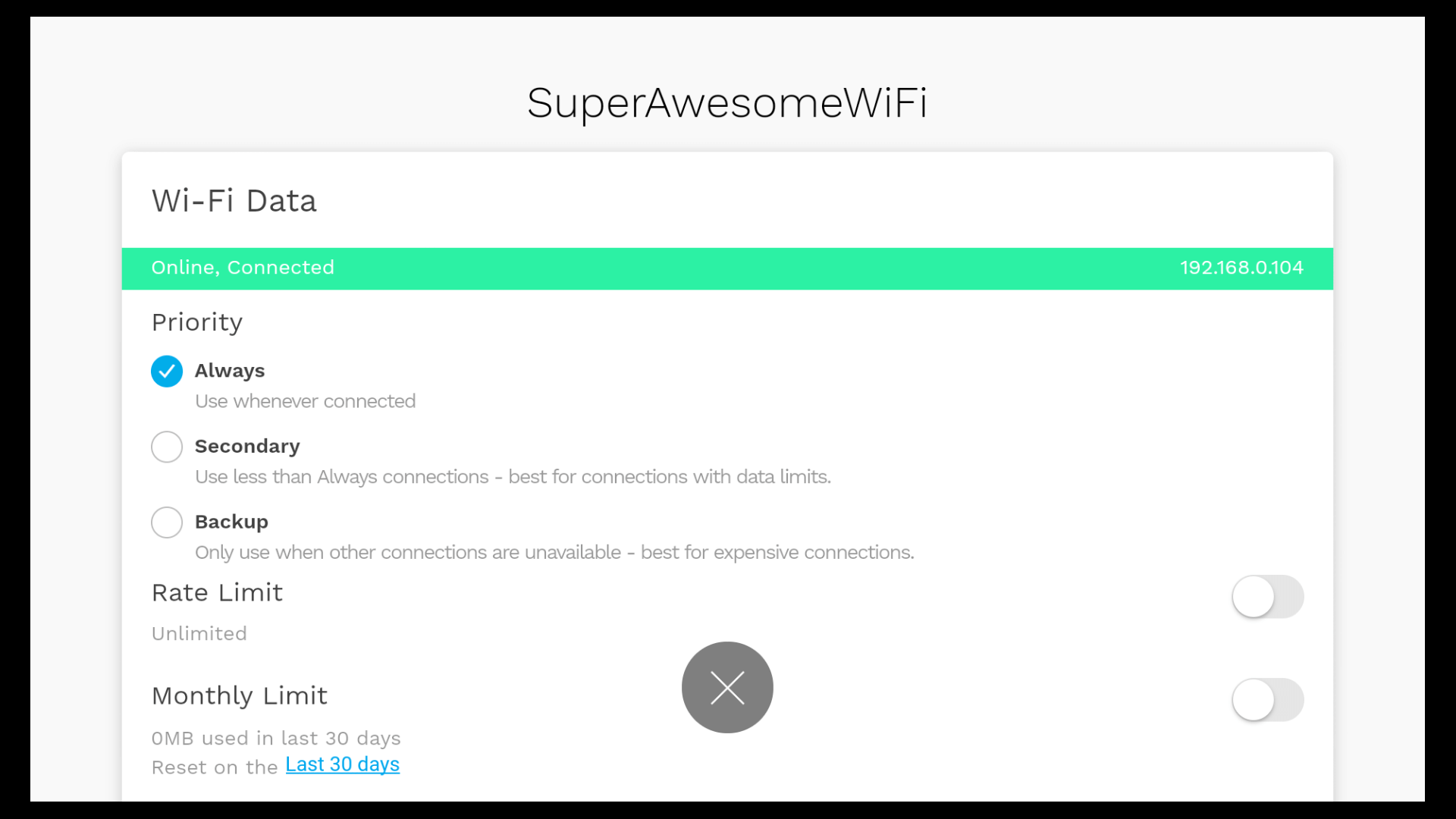
You can navigate the whole Speedify user interface with a remote control, if you don’t have any “mouse”-like functionality for your Android TV box.
Users Agree on the Best VPN for Firestick: Speedify Marks All Requirements
Unlike other VPN solutions, Speedify doesn’t slow down your Internet. Moreover, it can improve the Internet speed on devices that support multiple Internet connectivity such as desktop and laptop PCs, smartphones and tablets. Speedify gets you faster and more reliable Internet by combining all available Internet connections at once.
Speedify also monitors the quality of your connections and encrypts your data. If one of your connections disconnects, Speedify automatically reroutes all your traffic through the remaining connections. Once the lost Internet link is stable again Speedify automatically reconnects. You may not even notice anything has happened; you will be always connected and able to enjoy your streaming videos.
Don’t settle for buffering videos or unreliable service on your Amazon Fire TV Stick or Cube. Get yourself the best VPN for that. Use Speedify!
Alex and the Speedify team are always exploring the latest in networking and security technology—like 5G, 6G, WiFi 7, laser and satellite internet—and sharing it in new discussion content across YouTube, TikTok, Instagram, and LinkedIn every week.
Got a tech question? Let's go deeper! Pop into Speedify Office Hours live every Wednesday at 10 AM Eastern. Speedify CEO Alex Gizis and our network engineers are standing by to break down your questions about networks, tech updates, and Speedify features.


Speedify
Get started with Speedify today.
Combine Wi-Fi, 4G/5G cellular, Ethernet, Starlink, and more into one faster, steadier connection. Free to try — no credit card required.
🚀 Speed
Faster uploads and downloads by bonding all your connections at once.
📶 Stability
Automatic failover in under a second when any connection drops.
🔒 Security
AES-256 encryption on every connection, on every network you join.





15M+ downloads worldwide. 75K+ five-star reviews on iOS and Android.