


What is Packet Loss and How can I Fix it?
What is a Packet?
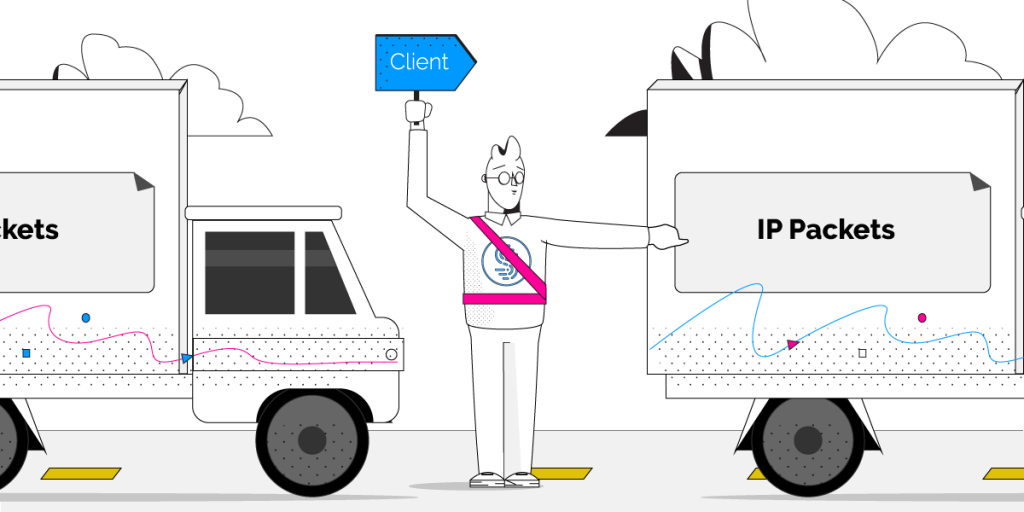
Packets are single small formatted units of data that you send and receive when accessing content across the Internet.
Whenever you request a web page, upload a photo, download a file, stream a video, or play a game on the internet you exchanging millions of these tiny bits of data with remote computers and servers around the world.
You can think of packets as the individual bricks that make up an entire wall.
What exactly is Packet Loss?
Packet loss occurs when one or more of these packets fail to reach their destination. This can occur when the network is overly congested, but can also be a result of flaky wireless connections. Learn more about the common causes of Packet Loss here.
If packets are lost, they will eventually be detected and resent, but not before resulting in a major bottleneck. The rules defined in TCP (one of the key technologies that makes up the modern Internet) govern that the packets that did successfully get through to their destination cannot be delivered before the missing packets arrive – slowing everything down until the situation is resolved.
To add insult to injury, when packet loss is detected, TCP’s congestion control algorithms step in and temporarily decrease the sending speed in an attempt to mitigate further loss.
Are you experiencing high packet loss? Keep reading below to see how to quickly and easily fix it.
What is TCP?
As described above, TCP or Transmission Control Protocol is a powerful communication protocol that underlies all of your web browsing and defines how your computer exchanges information with others over the Internet.
You can think of TCP like the rules to a board game.
In short, TCP guarantees that:
- All data arrives in order
- All data has been checked and has minimal errors
- Duplicate data is discarded
- Lost or discarded packets are re-sent
- Traffic congestion is controlled
Unfortunately, TCP was designed long before wireless links such as Wi-Fi existed. Compared to wired links, wireless connections are far more prone to sporadic and temporary connectivity issues that lead to packets of data being lost or received out of order.
Fixing Packet Loss with Speedify
Speedify is a fast bonding VPN that can detect when a packet has been lost instantaneously, and will resend it before TCP realizes and initiates congestion control – thereby preventing slowdowns before they occur.
Packet loss severely degrades the performance of your Internet connection. But with Speedify, even running with a single connection, you’re largely shielded from damages caused by losing over 1% of the packets. More impressive still, at 5% packet loss the throughput over Speedify is well over double that of regular TCP. And this goes one while also keeping your private information safe!
Multiple Connections, Maximum Performance
An additional benefit to Speedify is that you can use multiple Internet connections simultaneously for increased speed and reliability.
Speedify has several bonding modes which control how traffic is divided across available Internet connections:
- Streaming (default): Speedify maximizes the speed and reliability of your streaming traffic (video calls, audio calls, live streaming, etc.) by intelligently using both bonding and redundant traffic to get the best performance from your available internet connections. This mode can use extra data and battery to help deliver a better streaming experience.
- Speed: Speedify intelligently distributes your web traffic amongst all available internet connections in order to deliver optimal speed and performance.
- Redundant: Speedify will operate at the speed of the fastest single internet connection and use additional data in order to deliver an ultra-reliable connection. When using Redundant Mode, each packet gets sent simultaneously over multiple connections and whichever packet gets through first, is the one to be delivered. This mode uses more data and more battery, so most users are better off on Speed mode.
There are also multiple transport modes available: TCP, UDP, HTTPS, or TCP Multiple network protocol. This is an advanced setting, which we recommend leaving on “Auto”.
Here’s a comparison of packet loss performance when using Speedify with 2 connections:

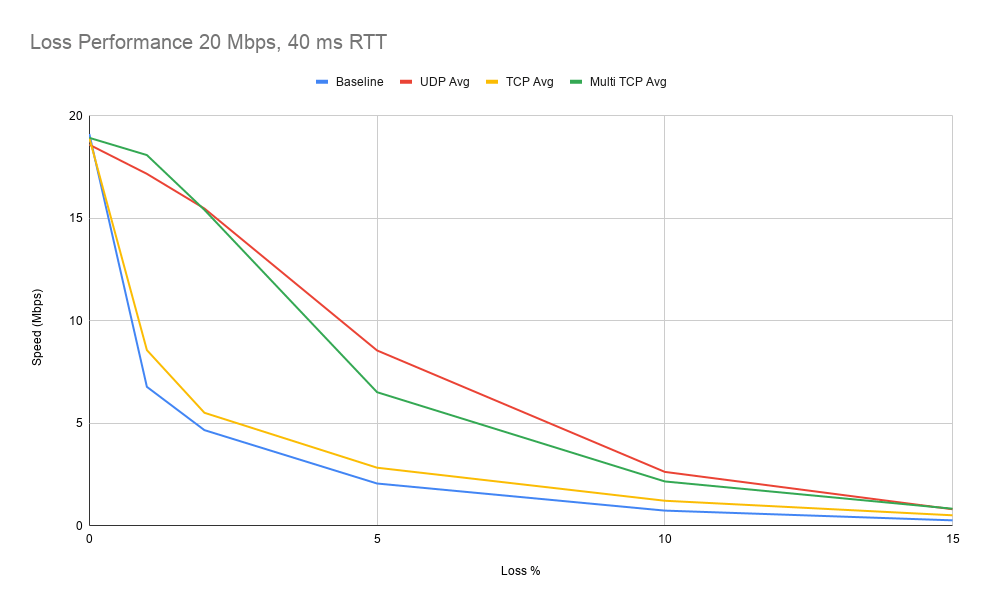
As you can see with the blue line (no Speedify), as packet loss increases, TCP performance plummets. Spedify UDP and Multi TCP transport modes provide protection against loss via fast retransmit and larger window sizes. When packet loss is present, you should expect a 3x performance increase in speed when using Speedify vs. without it.
Take Speedify for a spin yourself and see the difference, especially when you need low latency and high bandwidth, like gaming, traveling or streaming video.
Speedify, the Software Solution to Packet Loss
If your Internet link has significant packet loss, like many WiFi networks at long range or in crowded urban environments, Speedify really can double your speeds – even if there’s only a single Internet connection available. As we’ve discovered, if your connection also suffers from high or variable latency, Speedify’s advantages stack up even faster.
The best part is that it does it while keeping your online traffic safe and protecting you from snooping ISPs, hackers and other cyber threats.
Speedify is available for PC, Mac, iOS, and Android.
End your packet loss issues now! Get started with Speedify for FREE – no strings attached, no email sign-up necessary!
Alex and the Speedify team are always exploring the latest in networking and security technology—like 5G, 6G, WiFi 7, laser and satellite internet—and sharing it in new discussion content across YouTube, TikTok, Instagram, and LinkedIn every week.
Got a tech question? Let's go deeper! Pop into Speedify Office Hours live every Wednesday at 10 AM Eastern. Speedify CEO Alex Gizis and our network engineers are standing by to break down your questions about networks, tech updates, and Speedify features.


Speedify
Get started with Speedify today.
Combine Wi-Fi, 4G/5G cellular, Ethernet, Starlink, and more into one faster, steadier connection. Free to try — no credit card required.
🚀 Speed
Faster uploads and downloads by bonding all your connections at once.
📶 Stability
Automatic failover in under a second when any connection drops.
🔒 Security
AES-256 encryption on every connection, on every network you join.





15M+ downloads worldwide. 75K+ five-star reviews on iOS and Android.
Should you have a backup 4G, 5G, Starlink, or cable internet connection?
Yes — every internet connection goes down, including Starlink, which drops for ~34 minutes a day on average. A backup connection from a different provider means one outage never takes you fully offline. The most common options are a 4G/5G cellular hotspot, a cable or DSL line, or a second satellite dish.
4G/5G cellular
Works anywhere. Just a SIM or hotspot — no installation needed.
Learn more →Cable / DSL
Best for fixed locations. Different network, so outages rarely overlap.
Learn more →Second Starlink
Adds redundancy and throughput for remote sites or heavy usage.
Learn more →Speedify bonds any two connections into one — automatic failover, more speed, no dropped calls.
Try Speedify free →