


You Can Combine Multiple Internet Connections Together – Like Starlink, Wi-Fi, 4G, 5G, and DSL – with Speedify, to Fix Slow Buffering & Stream Lag issues on Twitch
In the (not so) old days of online video game livestreaming, broadcasting your gameplay live meant you had to have a fantastic internet connection. And even with a good connection, choosing a VPN for security often meant losing quality on your streams. Say goodbye to those days, thanks to Speedify.
The reason for slow Twitch is most likely a poor connection to the Internet. You can solve Twitch problems by joining your main Internet connection with another Internet source like a Starlink or DSL, 4G, 5G. Whether at home, work, or on-the-go, Speedify works with all live streaming software and social platforms to get you faster, more reliable and secure Internet.
In this article we’ll show you how you can fix slow Twitch to be able to enjoy your favorite streamers without any issues.
Should you have a backup 4G, 5G, Starlink, or cable internet connection?
Yes — every internet connection goes down, including Starlink, which drops for ~34 minutes a day on average. A backup connection from a different provider means one outage never takes you fully offline. The most common options are a 4G/5G cellular hotspot, a cable or DSL line, or a second satellite dish.
4G/5G cellular
Works anywhere. Just a SIM or hotspot — no installation needed.
Learn more →Cable / DSL
Best for fixed locations. Different network, so outages rarely overlap.
Learn more →Second Starlink
Adds redundancy and throughput for remote sites or heavy usage.
Learn more →Speedify bonds any two connections into one — automatic failover, more speed, no dropped calls.
Try Speedify free →Fixing Packet Loss and Bandwidth Drops while Streaming to Twitch with One Connection
If you’re looking to secure your internet connection, Speedify’s high-speed proprietary ChaCha-based encryption keeps your connection safe without sacrificing speed, so you can protect yourself from IP leaks and DDoS attacks. With our speed servers spread across 24 countries and counting, changing your online location is easy with Speedify if you’re looking to play in a different region. Additionally, our advanced forward error correction features prevent packet loss so your streams stay smooth and crisp.
In our experiments with the Twitch Bandwidth Test Tool, Speedify consistently outperformed all other VPNs in the test. The results speak for themselves:
| VPN | Ping (ms) | Speedtest Download/Upload (Mbps) | Twitch Bandwidth Test | Encrypted |
|---|---|---|---|---|
| Speedify | 16 | 67.37 / 17.39 |  |
Yes |
| NordVPN | 21 | 43.76 / 17.11 | 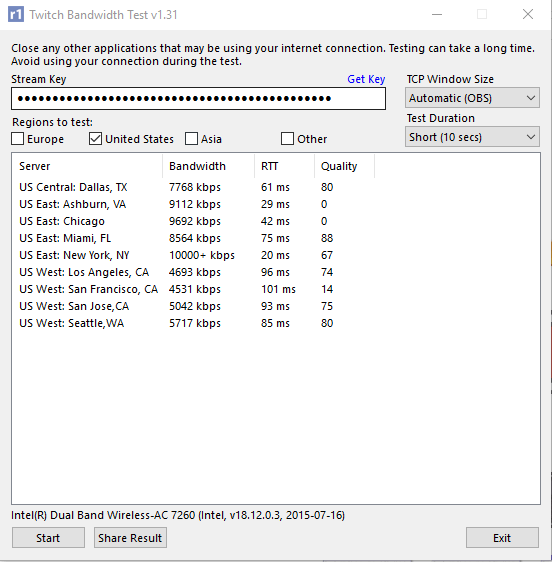 |
Yes |
| VyprVPN | 22 | 57.74 / 16.11 | 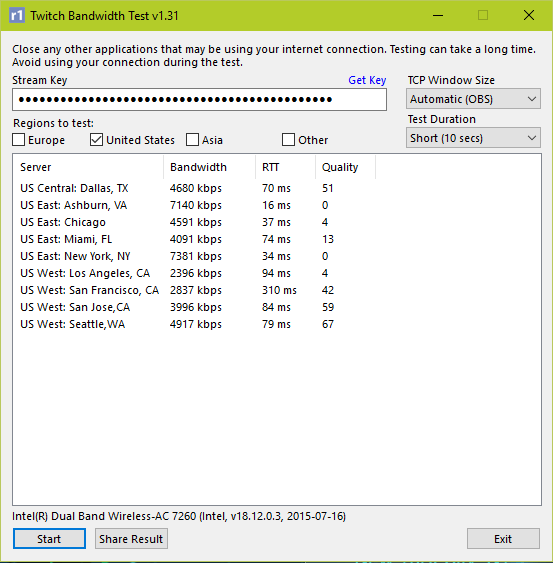 |
Yes |
| IPVanish VPN | 21 | 67.86 / 16.37 |  |
Yes |
| VPN Unlimited | 29 | 51.35 / 12.53 | 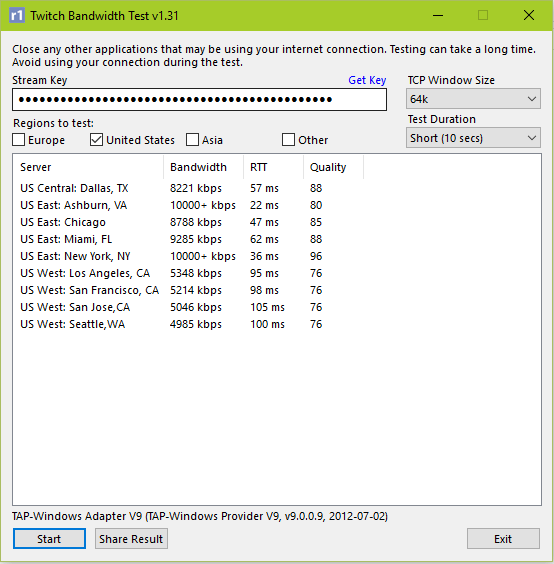 |
Yes |
| Private Internet Access | 21 | 63.43 / 17.02 |  |
Yes |
| No VPN | 16 | 71.35 / 17.89 | 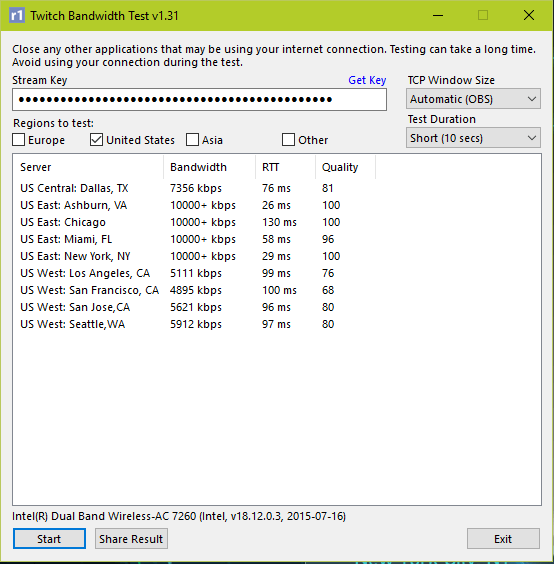 |
No |


Streaming to Twitch with Two Internet Connections
Speedify’s amazing bonding features let you combine the bandwidth of multiple connections. This means if you have an extra WiFi hotspot nearby or a smartphone connection to tether to your PC, you can really boost your speeds. Even working with a measly 2 Mbps Internet connection, Speedify can make your streams watchable by doubling that with a second connection, while protecting you with encrypted VPN security.
During our play tests, we attempted to stream Battlefield 1 in HD over a 3 Mbps connection. The results were poor at best without Speedify running, with a lot of buffering screens and interruptions. After turning on Speedify, we managed to get a pretty smooth stream going just by turning on Speedify and bonding with a connection to some nearby Xfinity hotspot that provided us with an extra 6 Mbps, for a nice total of 9 Mbps.
Watching Live Twitch Streams without Buffering or Low Resolution
Even if you’re not looking to share your gameplay, you can watch streams better with Speedify too. Speedify is available for both desktop (PC & Mac) and mobile (iOS & Android), so you can catch up with your favorite Twitch streamers and YouTubers on the go! Speedify mobile lets you combine WiFi and cellular so you can get a faster, more stable internet connection. If you’re at home, you can bond multiple connections to make the most out of your home Wi-Fi and view streamed video in HD with less buffering and interruptions.
Speedify Improves Latency and Reliability when Streaming or watching Twitch
Whether you’re using Twitch to stream your own gameplay or just to watch other streamers play, secure your connection and fix slow Internet speeds by using Speedify.
Are you ready to fully enjoy online gaming? Complaining too much about Twitch buffering or an unreliable Internet connection? Get started with Speedify today for FREE – no strings attached, no email sign-up necessary, no data logging!
Alex and the Speedify team are always exploring the latest in networking and security technology—like 5G, 6G, WiFi 7, laser and satellite internet—and sharing it in new discussion content across YouTube, TikTok, Instagram, and LinkedIn every week.
Got a tech question? Let's go deeper! Pop into Speedify Office Hours live every Wednesday at 10 AM Eastern. Speedify CEO Alex Gizis and our network engineers are standing by to break down your questions about networks, tech updates, and Speedify features.


Speedify
Get started with Speedify today.
Combine Wi-Fi, 4G/5G cellular, Ethernet, Starlink, and more into one faster, steadier connection. Free to try — no credit card required.
🚀 Speed
Faster uploads and downloads by bonding all your connections at once.
📶 Stability
Automatic failover in under a second when any connection drops.
🔒 Security
AES-256 encryption on every connection, on every network you join.





15M+ downloads worldwide. 75K+ five-star reviews on iOS and Android.