


Use Speedify to Join Multiple Phones’ Hotspots at the Same Time to Fix Slow Internet in Camping / RV
Campground and RV-park Wi-Fi is often slow and oversubscribed, and a spot far from the access point makes it worse. Speedify combines your devices’ Wi-Fi and 4G/5G cellular into one steadier connection.
When that isn’t enough, Speedify’s Pair & Share feature pairs your phones and pools their cellular both ways for more speed. No cables, no new data plans, no setup beyond a tap in the Speedify app.
<1 sec
With Speedify, your internet stays on when one connection fails.
When one of your internet connections drops, Speedify shifts your traffic to your remaining connections in under a second — so calls don’t cut out and downloads don’t stall.
Should you have a backup 4G, 5G, Starlink, or cable internet connection?
Yes — every internet connection goes down, including Starlink, which drops for ~34 minutes a day on average. A backup connection from a different provider means one outage never takes you fully offline. The most common options are a 4G/5G cellular hotspot, a cable or DSL line, or a second satellite dish.
4G/5G cellular
Works anywhere. Just a SIM or hotspot — no installation needed.
Learn more →Cable / DSL
Best for fixed locations. Different network, so outages rarely overlap.
Learn more →Second Starlink
Adds redundancy and throughput for remote sites or heavy usage.
Learn more →Speedify bonds any two connections into one — automatic failover, more speed, no dropped calls.
Try Speedify free →


Speedify Feature · Pair & Share
Cellular sharing that works better than a mobile hotspot.
Speedify Pair & Share: share cellular between your devices, both ways
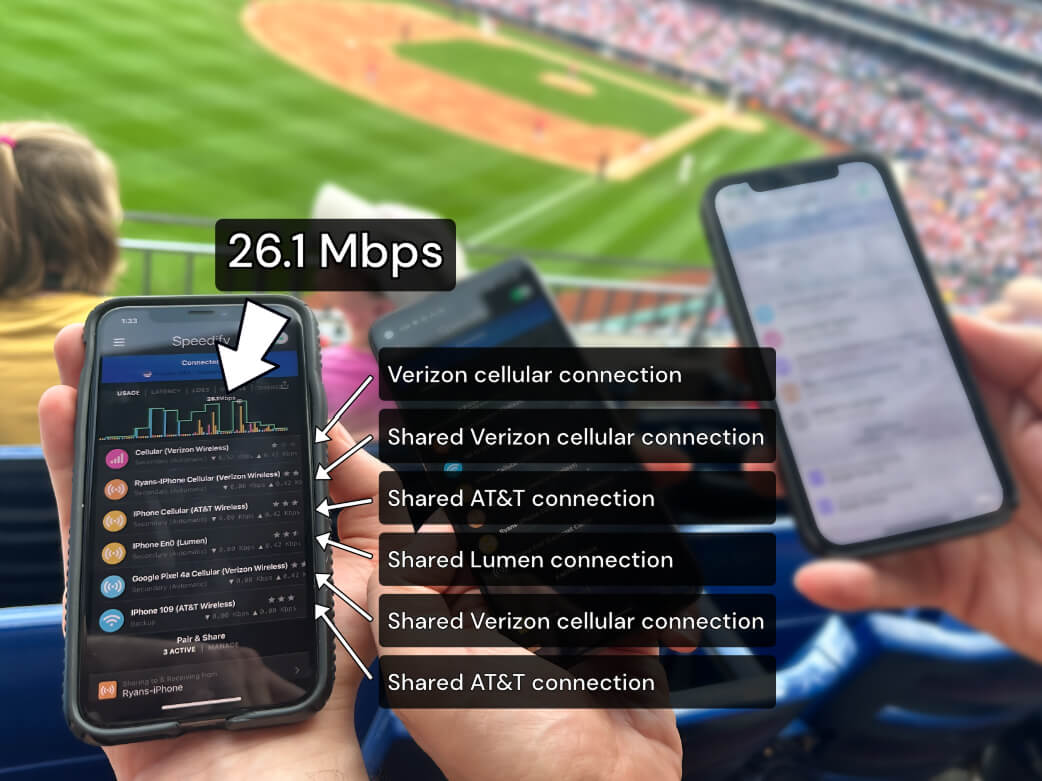
Most hotspots give. Speedify's Pair & Share gives and takes. Two devices running Speedify pair up and each uses the other's cellular connection simultaneously, so you both get faster uploads, faster downloads, and a steadier connection. No extra hardware, no new data plans, no setup beyond a tap.
Learn how Speedify's Pair & Share works ›
More speed
Every device you pair with adds its cellular to yours, and yours to theirs.
Stays connected
If a paired device drops out, Speedify keeps you online on the remaining links.
Always private
Every shared connection runs through AES-256 encryption. Your traffic is yours.
No new gear
Runs on devices already running Speedify, over your local network. Pair once, reconnects automatically.
Reasons for Slow Camping Internet
When you’re staying in camping or in your RV you need Internet connectivity that you can rely on. Watching videos, doing video calls or just browsing the Internet can sometimes be a hassle. Here are a few reasons why camper Internet is slow and unreliable:
- Crowded camping Wi-Fi – if it’s fully booked, there are hundreds, if not thousands of people using the same Wi-Fi hotspot provided by the camp owners. So each of those people eats up a certain amount of bandwidth, which is limited.
- Distance from the hotspot – if you are unlucky enough to get a place furthest away from the Wi-Fi hotspot, you’ll experience poor Internet connectivity just because of the multitude of walls the Wi-Fi signal has to pass through.
That’s why it’s important to use Speedify to combine multiple Internet connections – if one of them becomes sub-par, Speedify enables the others to compensate it and provide fast, reliable and secure connectivity.
3 Steps to Fix Slow and Unreliable Camping Internet
The easiest way for this is to use Speedify’s Pair & Share functionality. This allows you to combine multiple personal hotspots together to increase internet bandwidth and minimize latency for everyone.
Speedify’s Pair & Share is a new kind of personal hotspot. Instead of just one device sharing its internet, all paired devices can both share and receive connections at the same time.
Here’s what you need to do in order to use Speedify’s Pair & Share functionality,:
- Get the Speedify app on all your devices and connect to the same Wi-Fi network. This can be created by one of your devices or you can use a public Wi-Fi network – even the camping Wi-Fi.
- Make sure you have Pair & Share enabled on all devices. Start by pairing a device to share and receive.
- You are now taking advantage of both your and others’ Internet connectivity for faster, more reliable and secure Internet while staying in your RV or in the camping area.
Traffic between devices is fully encrypted, and you always maintain full control over which devices can do what – set permissions, limits, or unpair from other devices at any time.
For more details, check out our knowledge base article series on Pair & Share.
Speedify’s Pair & Share Functionality Helps You Avoid Slow Camping Internet
Forget about Internet issues with the camping Internet. As long as you have more than one phone to help, preferably from a different carrier, then you should be all good when using Speedify to join all available connections with the Pair & Share functionality.
Alex and the Speedify team are always exploring the latest in networking and security technology—like 5G, 6G, WiFi 7, laser and satellite internet—and sharing it in new discussion content across YouTube, TikTok, Instagram, and LinkedIn every week.
Got a tech question? Let's go deeper! Pop into Speedify Office Hours live every Wednesday at 10 AM Eastern. Speedify CEO Alex Gizis and our network engineers are standing by to break down your questions about networks, tech updates, and Speedify features.


Speedify
Get started with Speedify today.
Combine Wi-Fi, 4G/5G cellular, Ethernet, Starlink, and more into one faster, steadier connection. Free to try — no credit card required.
🚀 Speed
Faster uploads and downloads by bonding all your connections at once.
📶 Stability
Automatic failover in under a second when any connection drops.
🔒 Security
AES-256 encryption on every connection, on every network you join.




15M+ downloads worldwide. 75K+ five-star reviews on iOS and Android.