


Speedify vs. NordVPN: What Actually Makes Them Different
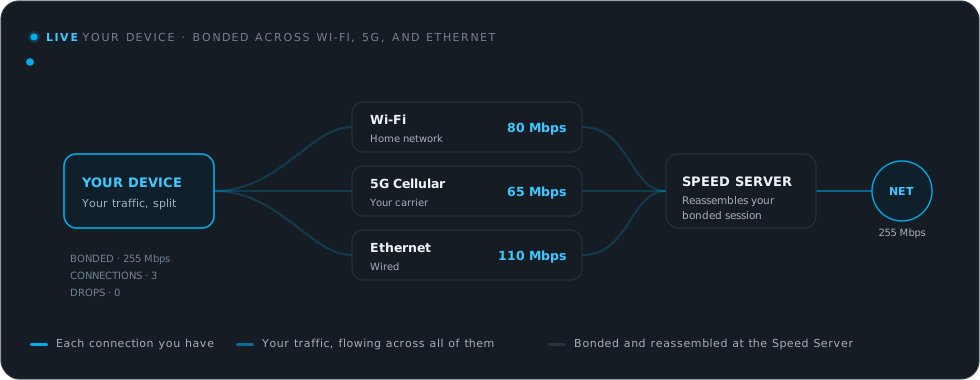
NordVPN and Speedify both encrypt your traffic, and both call themselves a VPN, but they are built to solve different problems. NordVPN is a traditional single-connection VPN: it takes one internet connection and routes it through an encrypted tunnel to a server. Speedify is a bonding VPN. Speedify combines Wi-Fi, 4G/5G cellular, Ethernet, Starlink and satellite into one connection, encrypts all of it, and keeps you online when any single link slows down or drops.
That one difference decides which app fits you. If the goal is privacy on a single, stable connection, a traditional VPN covers it. If the goal is staying fast and connected when networks are slow, crowded, or unreliable, Speedify is built for exactly that. Speedify’s channel bonding technology uses up to 95% of the combined capacity across every connection you give it.
Should you have a backup 4G, 5G, Starlink, or cable internet connection?
Yes — every internet connection goes down, including Starlink, which drops for ~34 minutes a day on average. A backup connection from a different provider means one outage never takes you fully offline. The most common options are a 4G/5G cellular hotspot, a cable or DSL line, or a second satellite dish.
4G/5G cellular
Works anywhere. Just a SIM or hotspot — no installation needed.
Learn more →Cable / DSL
Best for fixed locations. Different network, so outages rarely overlap.
Learn more →Second Starlink
Adds redundancy and throughput for remote sites or heavy usage.
Learn more →Speedify bonds any two connections into one — automatic failover, more speed, no dropped calls.
Try Speedify free →Speedify vs. NordVPN at a Glance
| Capability | Speedify | NordVPN |
|---|---|---|
| Core design | Bonding VPN that combines multiple internet connections at once | Single-connection VPN, one link at a time |
| Uses Wi-Fi, 4G/5G cellular, Ethernet, Starlink and other satellite together | Yes, simultaneously | No, one connection only |
| Faster upload and download speeds | Up to 95% of all internet connections combined | Limited to the single active internet connection |
| Automatic failover with no dropped session | Yes, sub-second switchover | Reconnects on the same single link |
| Cellular sharing across nearby phones | Yes, with Speedify’s Pair & Share feature | No |
| Real-time priority for calls, streaming, and gaming | Yes | Standard tunnel, no bonding |
| Encryption | AES-256 with hardware acceleration, DTLS over UDP | Industry-standard encryption |
| Platforms | Windows, macOS, Linux, iOS, Android, OpenWrt | Major desktop and mobile platforms |
| Best suited for | Staying fast, connected and secure across unstable or multiple internet connections | Private browsing across a broad set of server locations |
How a Traditional VPN Like NordVPN Works
A traditional VPN takes the one connection your device is already using and wraps it in an encrypted tunnel to a remote server. That hides your traffic and changes your apparent location, which is the job NordVPN is built to do, backed by a broad network of server locations.
The limitation is structural: the VPN can only be as fast and as stable as that single connection. If the Wi-Fi slows down, the VPN slows down. If the connection drops, the session drops with it.
For a deeper primer on the basics, see what a VPN is and how it works. And if a single-connection VPN keeps cutting out on you, here is how Speedify keeps a VPN connection from disconnecting.
How Speedify Works Differently
Speedify combines Wi-Fi, 4G/5G cellular, Ethernet, Starlink and satellite into one connection, then spreads your traffic across all of them at the packet level. This is not load balancing, which sends each app down one link. Speedify splits individual flows across every available connection at once, so a single download or live stream gets the speed of the whole combination.
- Faster uploads and downloads. Speedify pulls up to 95% of the combined capacity from your connections, so two networks that are each mediocre on their own add up to one fast link.
- No dropped sessions. Speedify watches every connection and fails over in under a second. If your Wi-Fi cuts out mid-call or mid-upload, Speedify keeps the session alive on cellular without skipping a beat.
- Real-time priority. Speedify automatically prioritizes video calls, live streams, and gaming, so the traffic that suffers most from lag gets protected first.
- Pair & Share. Speedify’s Pair & Share feature pools 4G/5G cellular from nearby phones, both ways, so a group on a mix of carriers has several towers working for it instead of one.
Security: Both Speedify and NordVPN Encrypt, Speedify Adds Resilience
Speedify is a no-log VPN that encrypts your traffic with AES-256, using the hardware acceleration built into modern CPUs, and carries it over DTLS, which is TLS over UDP. That gives Speedify the same class of encryption that protects banking and email sites, with better handling of lost packets on shaky connections. You can read the details on how Speedify handles encryption.
On public Wi-Fi the risk is real. The Federal Trade Commission explains how to tell whether your connection is encrypted, and the Federal Communications Commission recommends using a VPN on public hotspots.
For practical steps, see Speedify’s guide on how to stay safe on public Wi-Fi networks. A traditional VPN like NordVPN protects that single connection. Speedify protects every connection it bonds, and keeps you online if one of them fails.
Which One Should You Choose?
One honest comparison: if your only need is to hide your IP on a single stable home connection and pick from a wide list of server countries, a traditional VPN like NordVPN does that job well.
If you also want your internet connection to stay fast and unbroken on the move, on crowded Wi-Fi, or across several networks at once, Speedify is what you need. Speedify still works as a standard VPN when only one internet connection is available, so you are not giving up the single-connection use case to gain the bonding one.
How to Switch to Speedify
- Download Speedify and install it. Speedify runs on Windows, macOS, Linux, iOS, Android and supported OpenWrt routers.
- Open Speedify and sign in. Encryption is on by default, so your traffic is protected.
- Connect everything you have available, such as Wi-Fi plus a phone hotspot. Speedify combines them automatically and keeps the fast, secure connection running in the background.
Speedify vs. NordVPN: FAQ
Is Speedify a VPN like NordVPN?
Yes. Speedify is a VPN and encrypts all of your traffic. The difference is that NordVPN routes one internet connection through an encrypted tunnel, while Speedify combines Wi-Fi, 4G/5G cellular, wired Ethernet, Starlink and other satellite at once for faster upload and download speeds and a more reliable and secure internet connection.
Can Speedify use more than one internet connection at the same time?
Yes. Speedify combines Wi-Fi, 4G/5G cellular, Ethernet, Starlink and satellite into one connection and uses up to 95% of their combined capacity. A traditional VPN uses one connection at a time.
Does Speedify still work on a single internet connection?
Yes. With one connection, Speedify behaves like a standard encrypted VPN. Add a second connection and Speedify starts bonding for extra speed and instant failover.
Which is better for streaming and video calls?
Speedify. Speedify prioritizes real-time traffic and keeps the session alive if one connection drops, so calls and live streams hold up where a single-connection VPN would stall.
Alex and the Speedify team are always exploring the latest in networking and security technology—like 5G, 6G, WiFi 7, laser and satellite internet—and sharing it in new discussion content across YouTube, TikTok, Instagram, and LinkedIn every week.
Got a tech question? Let's go deeper! Pop into Speedify Office Hours live every Wednesday at 10 AM Eastern. Speedify CEO Alex Gizis and our network engineers are standing by to break down your questions about networks, tech updates, and Speedify features.


Speedify
Get started with Speedify today.
Combine Wi-Fi, 4G/5G cellular, Ethernet, Starlink, and more into one faster, steadier connection. Free to try — no credit card required.
🚀 Speed
Faster uploads and downloads by bonding all your connections at once.
📶 Stability
Automatic failover in under a second when any connection drops.
🔒 Security
AES-256 encryption on every connection, on every network you join.





15M+ downloads worldwide. 75K+ five-star reviews on iOS and Android.