



Speedify Helps Starlink Priority Data Last Longer by Routing Heavy Traffic Over Your Other Internet Connections
This guide covers what uses the most Starlink data, how to cut the waste, and how the Speedify app stretches priority data by combining Starlink with another internet connection, such as 4G/5G cellular, Wi-Fi, or wired Ethernet.
Starlink disconnects all the time for ALL Starlink users. The Speedify Starlink Index report found that Starlink connections are down for an average of ~33 min per day. Plus, all Starlink dishes experience small drops and packet loss every 15 seconds, when the moving Starlink satellites hand off the connection to the next satellite overhead.
The best way to fix Starlink's connection drops is to combine your Starlink connection with another internet connection, such as 4G/5G cellular, cable, fiber, DSL, or another Starlink connection. Speedify makes this possible with channel bonding.
Most Starlink users already run a second connection.
From a sample of 6,228 Starlink users on Speedify, 71% ran at least one other internet connection while using Starlink. Cellular is the most common choice of backup connection.
What they pair with
Should you get a backup connection for Starlink?
Yes. Starlink goes down every day — an always-on dish averages about 34 minutes of downtime daily from routine satellite handoffs. A second connection keeps you online when Starlink drops.
What’s the best backup connection for Starlink?
A 4G/5G cellular hotspot or SIM is the most practical backup for most Starlink users — it works anywhere Starlink works, requires no installation, and uses a different network so outages rarely overlap. Cable or DSL broadband is a strong option if you have it at a fixed location. A second Starlink dish is also possible if you need maximum throughput.
How do you use two internet connections at once with Starlink?
Speedify combines Starlink with any other connection — cellular, cable, Wi-Fi, or a second dish — into one bonded connection. Speedify runs on your phone, laptop, or router. When Starlink drops, Speedify moves your traffic to the backup instantly, so calls don’t cut out and downloads don’t stall. Speedify is free to try.
71% of Speedify’s Starlink users already run a second connection. Speedify’s Starlink Index tracks real-world Starlink performance data from thousands of dishes.
See the full dataset →Use Speedify to stay online during Starlink satellite handoffs every 15 seconds
Research confirms Starlink switches between satellites every 15 seconds on a fixed schedule. Each satellite handoff is a potential dropout, and on a congested network or with any obstruction, those Starlink dropouts become real interruptions.
Speedify fixes Starlink connection drops by combining your Starlink internet connection with another satellite dish, Wi-Fi, 4G/5G cellular, or wired Ethernet at the same time. When Starlink drops, Speedify keeps your traffic moving on the backup internet connection instantly.


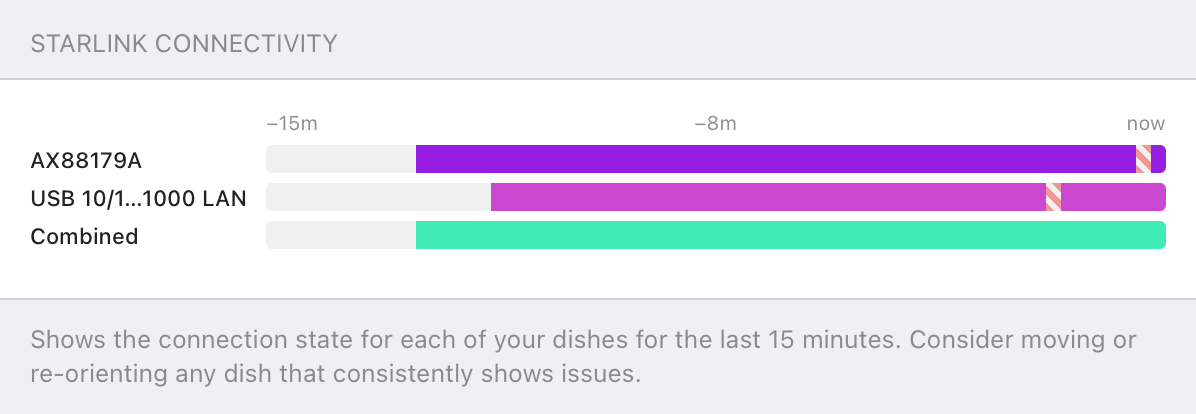

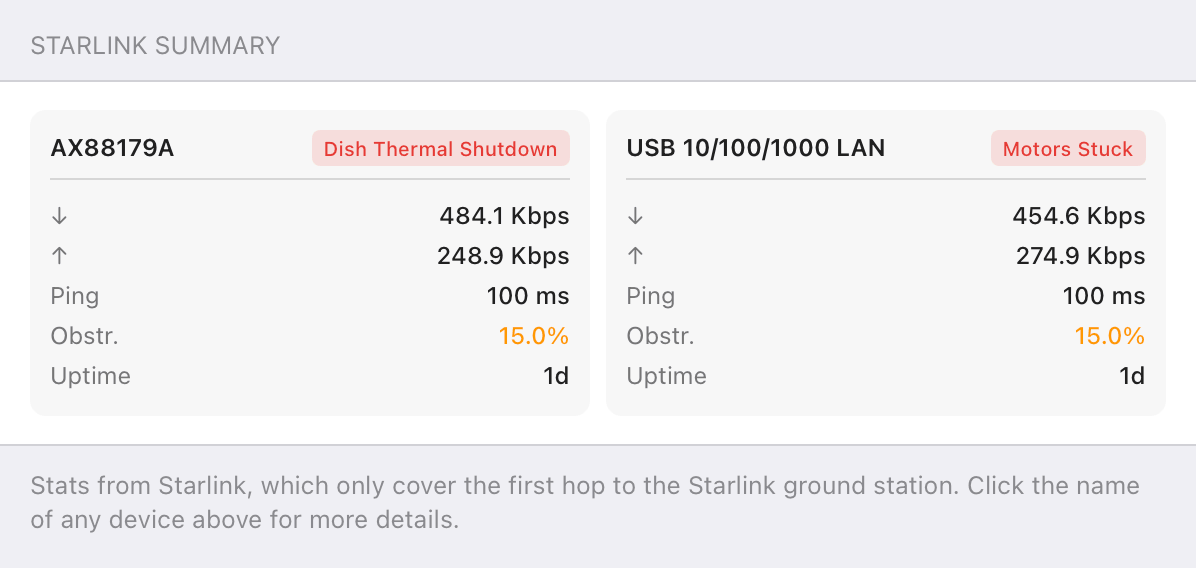

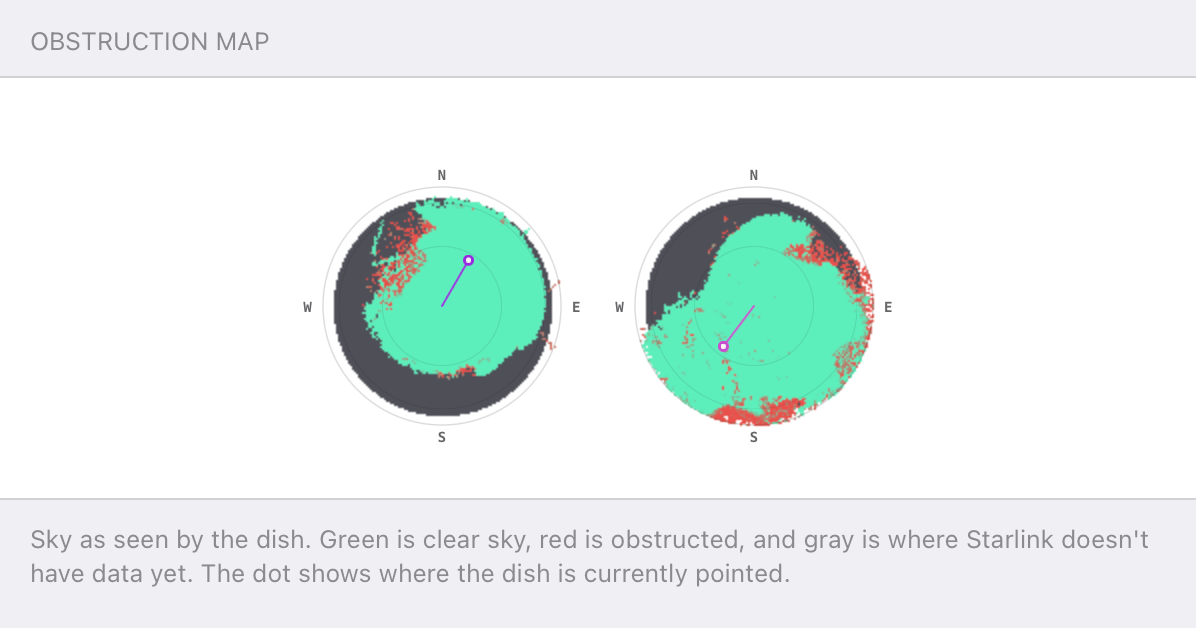
Speedify alerts you about your Starlink dish status
Speedify software alerts you about your Starlink dish status as soon as your dish experiences an issue - e.g. when your actuator motor is stuck, the mast is not vertical or there's a thermal throttle.
Speedify's Starlink Control Center helps you monitor all your Starlink dishes, read obstruction maps, and align multiple dishes all in the Speedify app. Get a real-time view of each dish's health and optimize the position of each Starlink dish, so you get the best possible performance out of your Starlink connections.
What Uses the Most Starlink Data
- Streaming video. 4K streaming is the single biggest draw on most plans, at around 7 GB per hour. Dropping to HD, at roughly 3 GB per hour, cuts that sharply.
- Cloud backups. Photo and file sync run in the background and can move large amounts without you noticing.
- System and app updates. Operating system and console updates arrive in multi-gigabyte chunks.
- Game downloads. A single modern game can use more data than a week of browsing.
Quick Ways to Cut Starlink Data Use
Set streaming apps to HD rather than 4K, schedule backups and updates for when they are not competing with anything important, and turn off autoplay so video does not run when no one is watching. These habits reduce how fast a plan burns through priority data. What they cannot do is move the heavy traffic off Starlink entirely, which is where a second connection comes in.
Who Watches Starlink Data Closely
- Roam and travel users. Plans where data is metered and every gigabyte counts.
- Large households. Several people streaming and backing up at once.
- Remote workers. Anyone running large uploads and video calls on a capped plan.
- Rural homes. Where Starlink is the only connection and the plan has to cover everything.
Speedify and Starlink: Save Priority Data by Splitting the Load
Speedify combines Starlink with 4G/5G cellular, Wi-Fi, or wired Ethernet into one bonded connection, and Speedify connection priorities decide which traffic runs over which link. Set Starlink as the priority connection for what needs it, and route bulk traffic like backups, updates, and large downloads over an unlimited home or cellular connection instead. The heavy data that used to drain Starlink priority data runs somewhere else, while Speedify still bonds everything together for a connection that is faster and more reliable. If that second line is 5G, see Starlink vs 5G home internet.
To see how it works, learn how Speedify’s channel bonding combines connections, then read whether a second internet connection is worth it.
Speedify
Get started with Speedify today.
Combine Wi-Fi, 4G/5G cellular, Ethernet, Starlink, and more into one faster, steadier connection. Free to try — no credit card required.
🚀 Speed
Faster uploads and downloads by bonding all your connections at once.
📶 Stability
Automatic failover in under a second when any connection drops.
🔒 Security
AES-256 encryption on every connection, on every network you join.



15M+ downloads worldwide. 75K+ five-star reviews on iOS and Android.
Alex and the Speedify team are always exploring the latest in networking and security technology—like 5G, 6G, WiFi 7, laser and satellite internet—and sharing it in new discussion content across YouTube, TikTok, Instagram, and LinkedIn every week.
Got a tech question? Let's go deeper! Pop into Speedify Office Hours live every Wednesday at 10 AM Eastern. Speedify CEO Alex Gizis and our network engineers are standing by to break down your questions about networks, tech updates, and Speedify features.

