


Speedify Combines Wi-Fi and 4G/5G Mobile Data Simultaneously Instead of Switching Between Them
Want faster upload and download speeds and more reliable internet on your iPhone? Run Wi-Fi and 4G/5G mobile data at the same time.
Speedify is an app that combines two or more internet connections at once – such as Wi-Fi and mobile data – so you get faster uploads and downloads and stay online if one connection drops out.
<1 sec
With Speedify, your internet stays on when one connection fails.
When one of your internet connections drops, Speedify shifts your traffic to your remaining connections in under a second — so calls don’t cut out and downloads don’t stall.
Should you have a backup 4G, 5G, Starlink, or cable internet connection?
Yes — every internet connection goes down, including Starlink, which drops for ~34 minutes a day on average. A backup connection from a different provider means one outage never takes you fully offline. The most common options are a 4G/5G cellular hotspot, a cable or DSL line, or a second satellite dish.
4G/5G cellular
Works anywhere. Just a SIM or hotspot — no installation needed.
Learn more →Cable / DSL
Best for fixed locations. Different network, so outages rarely overlap.
Learn more →Second Starlink
Adds redundancy and throughput for remote sites or heavy usage.
Learn more →Speedify bonds any two connections into one — automatic failover, more speed, no dropped calls.
Try Speedify free →


Speedify Feature · Pair & Share
Cellular sharing that works better than a mobile hotspot.
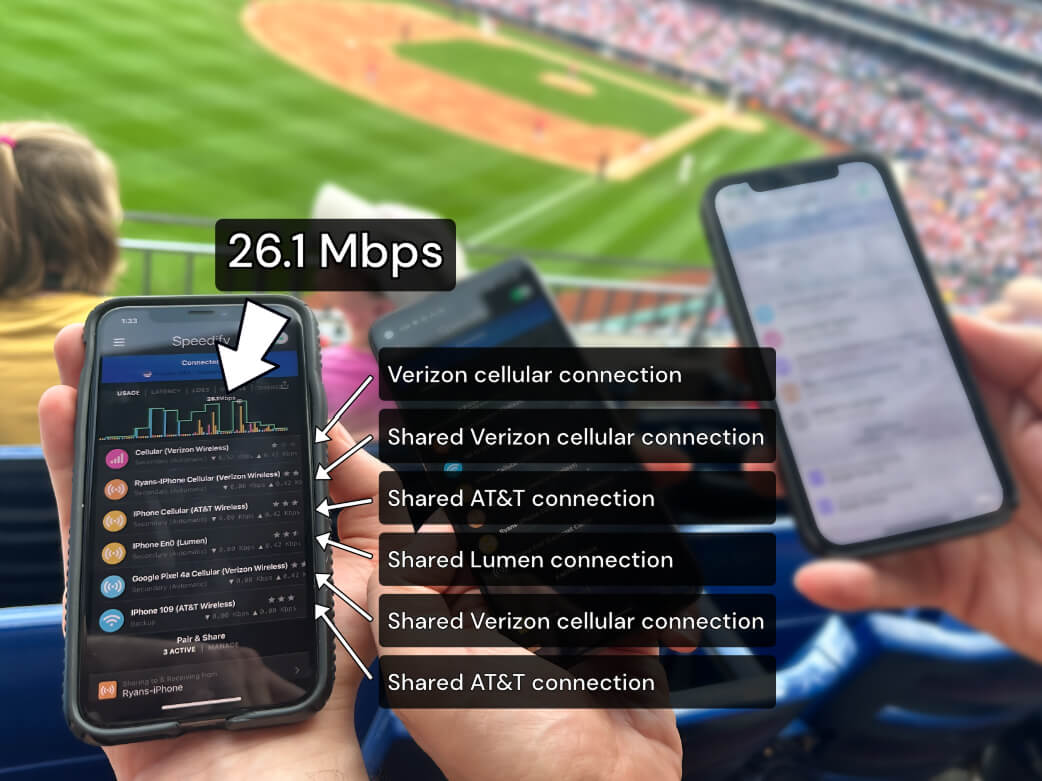
Speedify Pair & Share: share cellular between your devices, both ways
Most hotspots give. Speedify's Pair & Share gives and takes. Two devices running Speedify pair up and each uses the other's cellular connection simultaneously, so you both get faster uploads, faster downloads, and a steadier connection. No extra hardware, no new data plans, no setup beyond a tap.
Learn how Speedify's Pair & Share works ›
More speed
Every device you pair with adds its cellular to yours, and yours to theirs.
Stays connected
If a paired device drops out, Speedify keeps you online on the remaining links.
Always private
Every shared connection runs through AES-256 encryption. Your traffic is yours.
No new gear
Runs on devices already running Speedify, over your local network. Pair once, reconnects automatically.
What Are the Benefits when You Combine Internet Connections on iPhone?
Most people are OK with their iPhones automatically switching between Wi-Fi and cellular data, as needed. But there’s a problem: this switching takes time, at least a few seconds.
So what can happen during those seconds, you ask? Here are some examples:
- you may lose an important idea during your video calls
- you may be required to log in again to a particular platform or work VPN you’re using, because the IP address of your device has changed with the switch. This means additional time.
- you may be booted from the online game you’re playing
- you may lose your unsaved work in the cloud
… and the list can go on.
By combining Internet connections on your iPhone, you get more reliable connectivity. Your session will be consistent – meaning that your IP will not change if Wi-Fi should fail, because you’ll still be connected to cellular data. That saves a lot of time and hassles.
Faster Internet is also a benefit when you combine Internet connections on iPhone. You can create a “super-pipe” from your Wi-Fi + cellular data connections.
This will help with bandwidth-intensive apps like live streaming, video calls, online gaming, remote learning, etc.
All of this (and more!) is possible with the Speedify channel bonding app.
Step by Step Guide to Combine Internet Connections on iPhone Using Speedify
Here’s what you have to do to use both Wi-Fi and cellular data simultaneously on your iPhone:
- Verify that your cellular data connection is on and working. Go to Settings > Cellular and flip he switch to on.
- Connect to Wi-Fi. Verify that your Wi-Fi is enabled on your iPhone or iPad and connected to a network.
Go to Settings > Wi-Fi and flip the switch to on. You can then select a network from the list that appears. Keep in mind, private networks may require you to enter a password before connecting.
Need help with this step? Visit Apple’s knowledge base to learn more. - Get Speedify from the App Store and run it. Speedify will automatically detect any available Internet connections and combine them for increased speed, security, and stability.
Speedify Also Protects Your Online Privacy on iPhone
With its privacy and security functionalities as fast bonding VPN, Speedify will safely guard your online data and put it away from prying eyes (such as your ISP) or cyber criminals.
Speedify uses advanced encryption algorithms that are fast and secure. Hence – its ability not to slow down the Internet connections once running!
Plus – we care about your privacy, so we have a strict no log policy regarding the activities you do while using the Speedify service.
Speedify is compatible with all recent iPhones and iPads, including iPhone 5S and all versions of iPhone 6, iPhone 7, iPhone 8, iPhone X, iPhone 11, iPhone SE (2nd generation) and iPhone 12. It also supports all iPad Air and iPad Pro models, iPad 5th generation, iPad 6th generation, iPad 7th generation, iPad mini 2 and later devices. Please check the updated system requirements on the download page.
Alex and the Speedify team are always exploring the latest in networking and security technology—like 5G, 6G, WiFi 7, laser and satellite internet—and sharing it in new discussion content across YouTube, TikTok, Instagram, and LinkedIn every week.
Got a tech question? Let's go deeper! Pop into Speedify Office Hours live every Wednesday at 10 AM Eastern. Speedify CEO Alex Gizis and our network engineers are standing by to break down your questions about networks, tech updates, and Speedify features.


Speedify
Get started with Speedify today.
Combine Wi-Fi, 4G/5G cellular, Ethernet, Starlink, and more into one faster, steadier connection. Free to try — no credit card required.
🚀 Speed
Faster uploads and downloads by bonding all your connections at once.
📶 Stability
Automatic failover in under a second when any connection drops.
🔒 Security
AES-256 encryption on every connection, on every network you join.




15M+ downloads worldwide. 75K+ five-star reviews on iOS and Android.