


Upgrade Smart Network Switch with Intelligent Cost-Aware Capabilities
Samsung were the first to launch Smart Network Switch (also known on Android 8 devices as Adaptive Wi-Fi), which basically switches from WiFi to cellular data and back in order to prevent your Internet connection from disconnecting. The trouble is that this feature isn’t very smart and it uses too much data, according to customers. Smart Network Switch also prevents you from knowing how much data you are actually using.
As mobile data is a metered connection with caps, many prefer to look for how to disable Smart Network Switch / Adaptive Wi-Fi on their Android device. When they do that, they’ll have to deal with bad WiFi hotspots and Internet drops, as manual switching between WiFi and cellular isn’t a seamless process.
Read below to see a better alternative to Smart Network Switch and Adaptive Wi-Fi, which gives you much more control over your data usage and comes with other helpful features too.
<1 sec
With Speedify, your internet stays on when one connection fails.
When one of your internet connections drops, Speedify shifts your traffic to your remaining connections in under a second — so calls don’t cut out and downloads don’t stall.
Should you have a backup 4G, 5G, Starlink, or cable internet connection?
Yes — every internet connection goes down, including Starlink, which drops for ~34 minutes a day on average. A backup connection from a different provider means one outage never takes you fully offline. The most common options are a 4G/5G cellular hotspot, a cable or DSL line, or a second satellite dish.
4G/5G cellular
Works anywhere. Just a SIM or hotspot — no installation needed.
Learn more →Cable / DSL
Best for fixed locations. Different network, so outages rarely overlap.
Learn more →Second Starlink
Adds redundancy and throughput for remote sites or heavy usage.
Learn more →Speedify bonds any two connections into one — automatic failover, more speed, no dropped calls.
Try Speedify free →


Speedify Feature · Pair & Share
Cellular sharing that works better than a mobile hotspot.
Speedify Pair & Share: share cellular between your devices, both ways
Most hotspots give. Speedify's Pair & Share gives and takes. Two devices running Speedify pair up and each uses the other's cellular connection simultaneously, so you both get faster uploads, faster downloads, and a steadier connection. No extra hardware, no new data plans, no setup beyond a tap.
Learn how Speedify's Pair & Share works ›
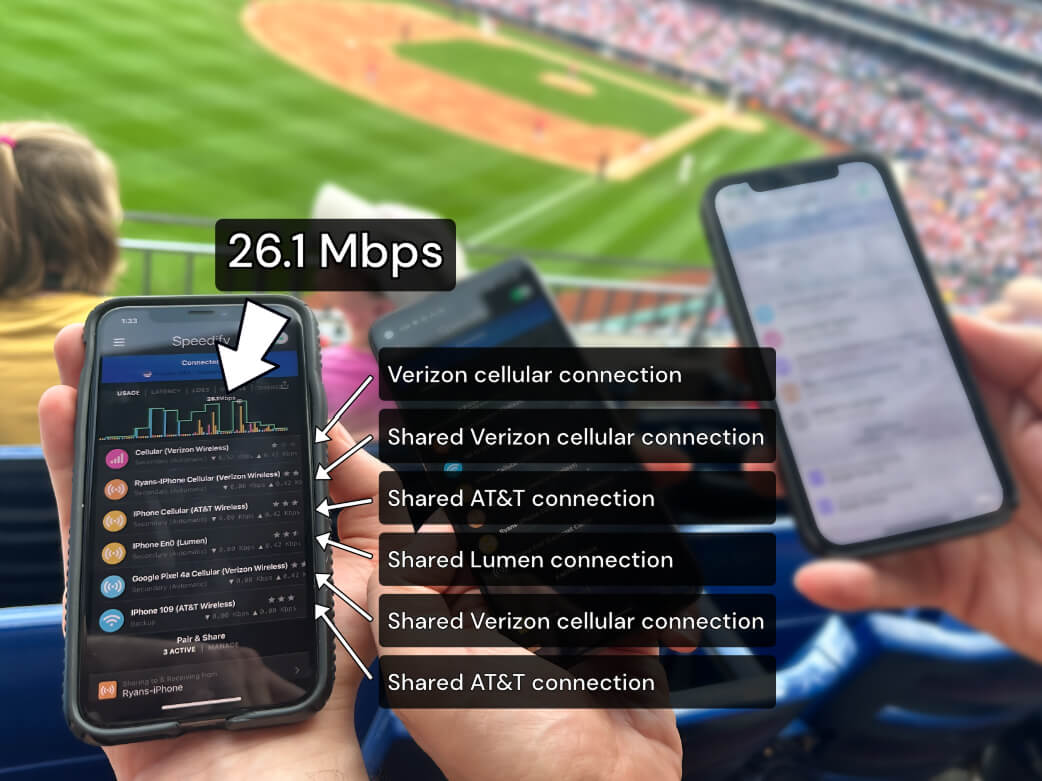
More speed
Every device you pair with adds its cellular to yours, and yours to theirs.
Stays connected
If a paired device drops out, Speedify keeps you online on the remaining links.
Always private
Every shared connection runs through AES-256 encryption. Your traffic is yours.
No new gear
Runs on devices already running Speedify, over your local network. Pair once, reconnects automatically.
What Is Smart Network Switch and How Does It Work?
The Smart Network Switch / Adaptive Wi-Fi connects to a WiFi network and a cell network at the same time. But, instead of bonding them into a single channel, it simply sends traffic on whichever connection is faster at the moment. This means you can look at your Android smartphone screen and see that you are connected to a WiFi network, but you will have no idea if you are really using cell data or the WiFi connection at that moment.
Why Smart Network Switch Uses Too Much Mobile Data
The Smart Network Switch / Adaptive Wi-Fi feature isn’t smart enough. It only focuses on giving you a working Internet connection at any given moment. It does not take into considerations your data caps, how data intensive your current Internet use is, or any other factors. You also have little control over Smart Network Switch settings.
This means that you end up using a lot more mobile data than is necessary to deliver the same Internet experience. If there is a heavy load on the WiFi you could be using your cellular data for 100% of the time you thought you were on WiFi. And this may translate in overcharges on your next services bill.
How to Disable Samsung’s Smart Network Switch
Disabling Smart Network Switch / Adaptive Wi-Fi can be done directly from your device. Here are the steps:
- Open the Settings menu and go to Connections.
- Select WiFi.
- Tap on the Advanced link at he top right corner of the screen
- Make sure the toggle next to Smart Network Switch / Adaptive Wi-Fi is set to off.
Use Speedify to Manage Connectivity and Data on Your Smartphone Instead of Smart Network Switch
The idea behind Smart Network Switch / Adaptive Wi-Fi is a good one. It is nice to not have your Internet connection interrupted just because of a brief WiFi issue. But, the Smart Network Switch just isn’t smart enough. What you need is the Speedify app.
Speedify fast bonding VPN can be downloaded on Android and iOS devices. It works in the background of your phone constantly monitoring the quality of your connections. It uses channel bonding technology to create a unified connection with your cell signal and your WiFi. But, you can tell Speedify to prioritize WiFi. Speedify will then use WiFi as much as possible, keeping your data costs low. It will only use data as a bridge or backup to keep you connected when WiFi fails or you are changing WiFi networks. When a WiFi network does fail, Speedify automatically reconnects as soon as it is back online.
Speedify is the smart way to stay connected and manage your data use. Download Speedify today and experience a safer, faster, and less data-intensive way to stay connected to the internet.
Alex and the Speedify team are always exploring the latest in networking and security technology—like 5G, 6G, WiFi 7, laser and satellite internet—and sharing it in new discussion content across YouTube, TikTok, Instagram, and LinkedIn every week.
Got a tech question? Let's go deeper! Pop into Speedify Office Hours live every Wednesday at 10 AM Eastern. Speedify CEO Alex Gizis and our network engineers are standing by to break down your questions about networks, tech updates, and Speedify features.


Speedify
Get started with Speedify today.
Combine Wi-Fi, 4G/5G cellular, Ethernet, Starlink, and more into one faster, steadier connection. Free to try — no credit card required.
🚀 Speed
Faster uploads and downloads by bonding all your connections at once.
📶 Stability
Automatic failover in under a second when any connection drops.
🔒 Security
AES-256 encryption on every connection, on every network you join.




15M+ downloads worldwide. 75K+ five-star reviews on iOS and Android.