


Speedify Helps Combine Wi-Fi and Mobile Data for Faster, More Reliable Internet
If your iPhone not logging into Wi-Fi has become a frustrating daily occurrence, you’re not alone. This common issue affects millions of iPhone users worldwide and can stem from various causes ranging from simple software glitches to more complex network authentication problems.
In this article we’ll go through the reasons your iPhone struggles with Wi-Fi connections and some potential fixes for that. Plus – for a proven way to get better internet on your iPhone – how using Speedify gets you faster, more reliable internet connectivity anywhere.
Should you have a backup 4G, 5G, Starlink, or cable internet connection?
Yes — every internet connection goes down, including Starlink, which drops for ~34 minutes a day on average. A backup connection from a different provider means one outage never takes you fully offline. The most common options are a 4G/5G cellular hotspot, a cable or DSL line, or a second satellite dish.
4G/5G cellular
Works anywhere. Just a SIM or hotspot — no installation needed.
Learn more →Cable / DSL
Best for fixed locations. Different network, so outages rarely overlap.
Learn more →Second Starlink
Adds redundancy and throughput for remote sites or heavy usage.
Learn more →Speedify bonds any two connections into one — automatic failover, more speed, no dropped calls.
Try free →


Speedify Feature · Pair & Share
Cellular sharing that works better than a mobile hotspot.
Speedify Pair & Share: share cellular between your devices, both ways
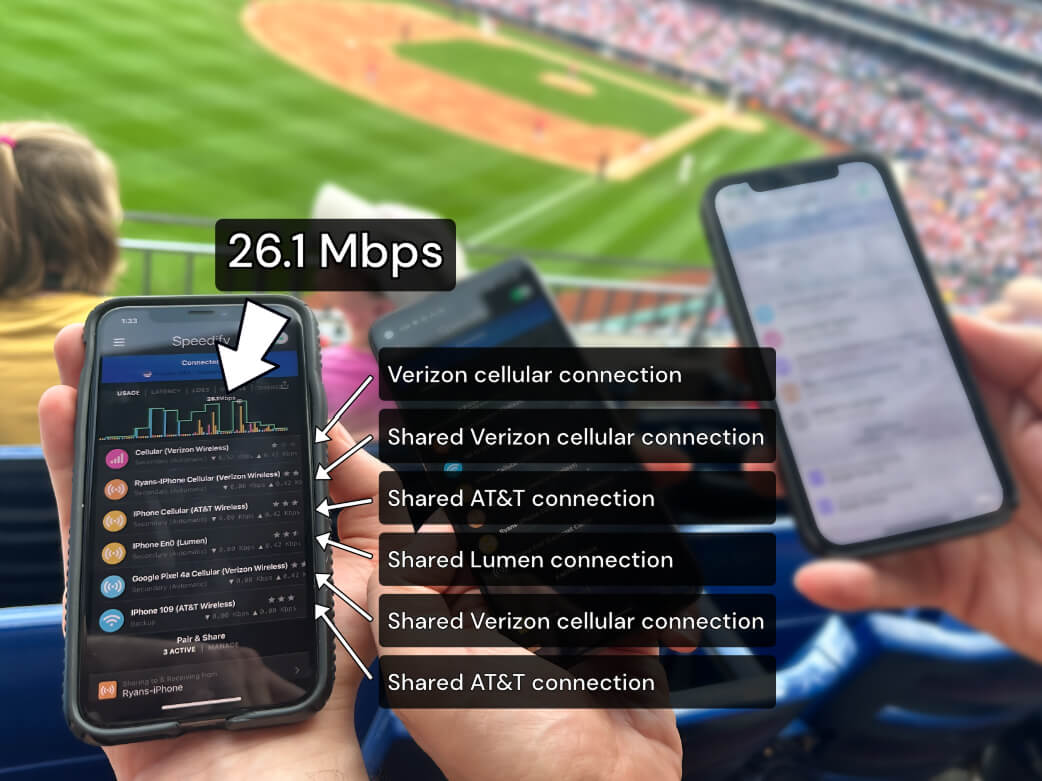
Most hotspots give. Speedify's Pair & Share gives and takes. Two devices running Speedify pair up and each uses the other's cellular connection simultaneously, so you both get faster uploads, faster downloads, and a steadier connection. No extra hardware, no new data plans, no setup beyond a tap.
Learn how Speedify's Pair & Share works ›
More speed
Every device you pair with adds its cellular to yours, and yours to theirs.
Stays connected
If a paired device drops out, Speedify keeps you online on the remaining links.
Always private
Every shared connection runs through AES-256 encryption. Your traffic is yours.
No new gear
Runs on devices already running Speedify, over your local network. Pair once, reconnects automatically.
Why Can’t I Log Into My Wi-Fi on My iPhone?
Network Authentication Problems
One of the most frequent reasons for iPhone not logging into Wi-Fi involves authentication failures. This typically occurs when your device has outdated network credentials stored, conflicting with current router settings or password changes.
iOS Software Bugs
Apple’s iOS updates sometimes introduce temporary Wi-Fi connectivity bugs that can prevent your iPhone from properly connecting to networks. These issues often manifest as connection timeouts or repeated password prompts even when entering correct credentials.
Router Compatibility Issues
Older routers may struggle with newer iPhone models due to outdated security protocols or firmware. Similarly, some enterprise networks use authentication methods that aren’t fully compatible with iOS devices.
Network Congestion
In crowded areas like airports, hotels, or office buildings, Wi-Fi networks become oversaturated, making it difficult for your iPhone to establish and maintain stable connections.
Step-by-Step Troubleshooting iPhone Wi-Fi Problems
Here are the most common troubleshooting steps you can take to try to fix your iPhone not logging into Wi-Fi issues:
Get Closer to the Wi-Fi Router
If possible, try to connect your iPhone to Wi-Fi closer to the router that broadcasts the wireless hotspot. If at home, go into the room where the router is placed. In public spaces it’s harder to determine where that is, but you can definitely see the strength of the Wi-Fi signal in your wireless networks list, before connecting.
Reset Network Settings
The most effective solution for iPhone not logging into Wi-Fi issues is resetting your network settings. Navigate to Settings > General > Transfer or Reset iPhone > Reset > Reset Network Settings. This clears all saved Wi-Fi passwords, VPN configurations, and cellular settings, giving your device a fresh start.
Forget and Reconnect to Networks
For specific network issues, go to Settings > Wi-Fi, tap the “i” icon next to the problematic network, and select “Forget This Network.” Then reconnect by selecting the network and entering your password again.
Update iOS and Router Firmware
Ensure your iPhone runs the latest iOS version through Settings > General > Software Update. Additionally, check if your router needs firmware updates, as manufacturers regularly release patches for connectivity improvements.
Toggle Airplane Mode
A quick airplane mode toggle can resolve temporary connectivity glitches. Enable airplane mode for 30 seconds, then disable it to reset your device’s wireless connections.
Restart Your iPhone and Router
Sometimes the simplest solutions work best. Restart both your iPhone and Wi-Fi router to clear temporary software conflicts that might prevent proper authentication.
Improve Your iPhone’s Wi-Fi Internet with Speedify
While fixing Wi-Fi connection issues is important, savvy iPhone users are discovering that combining multiple internet sources delivers superior performance and reliability. This is where Speedify’s channel bonding technology transforms your mobile internet experience.
Use Multiple Connections at Once with Speedify for Better Reliability
Combine Wi-Fi and Cellular for Ultimate Reliability
Instead of choosing between Wi-Fi or cellular data, Speedify allows your iPhone to use both connections simultaneously. When your iPhone not logging into Wi-Fi becomes a recurring problem, or when Wi-Fi performance is inconsistent, Speedify seamlessly bonds your cellular and Wi-Fi connections for enhanced speed and reliability.
This dual-connection approach ensures that if your Wi-Fi drops or slows down, your internet session continues uninterrupted using cellular data. Conversely, when Wi-Fi is working well, it supplements your cellular connection for faster overall speeds.
Cellular Sharing for Group Travel
Speedify’s peer-to-peer cellular sharing feature called Pair & Share enhances internet sharing for iPhone users traveling in groups. Unlike traditional hotspot sharing that creates a one-way connection, Pair & Share enables mutual connection sharing between devices.
When you pair your iPhone with friends’ or colleagues’ devices, everyone gains access to the combined power of all cellular connections in the group. For example, if you’re on Verizon and your travel companion uses AT&T, both of you benefit from the bonded strength of both networks simultaneously.
This collaborative approach is particularly valuable in challenging connectivity environments like international travel, remote locations, or crowded venues where individual network performance varies significantly.
Real-World Benefits for iPhone Users
The combination of proper Wi-Fi troubleshooting and Speedify’s bonding technology addresses the modern iPhone user’s connectivity needs comprehensively. You’ll experience faster download speeds, reduced buffering during video calls, and seamless internet access regardless of individual network performance.
For business travelers, content creators, and anyone who depends on reliable internet access, this dual approach ensures productivity isn’t hampered by iPhone not logging into Wi-Fi issues or poor network performance.
Speedify
Get started with Speedify today.
Combine Wi-Fi, 4G/5G cellular, Ethernet, Starlink, and more into one faster, steadier connection. Free to try — no credit card required.
🚀 Speed
Faster uploads and downloads by bonding all your connections at once.
📶 Stability
Automatic failover in under a second when any connection drops.
🔒 Security
AES-256 encryption on every connection, on every network you join.



15M+ downloads worldwide. 75K+ five-star reviews on iOS and Android.
Alex and the Speedify team are always exploring the latest in networking and security technology—like 5G, 6G, WiFi 7, laser and satellite internet—and sharing it in new discussion content across YouTube, TikTok, Instagram, and LinkedIn every week.
Got a tech question? Let's go deeper! Pop into Speedify Office Hours live every Wednesday at 10 AM Eastern. Speedify CEO Alex Gizis and our network engineers are standing by to break down your questions about networks, tech updates, and Speedify features.

