


Is the Clubhouse App Down or Is It You?
One of the hot results of the global pandemic is the Clubhouse app. In case you’re not familiar with it – it’s an invitation-only audio-chat social networking app. Since its launch in April 2020, it began gaining traction and is valued in February 2021 at over 1 billion USD.
Clubhouse has many clubs and virtual rooms with conversations on diverse topics. As of February 2021, it’s only available for iOS, but they mention they will begin work on their Android app soon.
In any case, give the particularity of the app, Clubhouse is prone to connectivity trouble. Meaning that if your Internet is flaky, unstable and disconnects a lot, you will not get to enjoy Clubhouse to its fullest. After all – who can join a discussion that is constantly stuttering or fading in and out. In this article we explain the potential causes of Clubhouse app issues and how to avoid them.
Should you have a backup 4G, 5G, Starlink, or cable internet connection?
Yes — every internet connection goes down, including Starlink, which drops for ~34 minutes a day on average. A backup connection from a different provider means one outage never takes you fully offline. The most common options are a 4G/5G cellular hotspot, a cable or DSL line, or a second satellite dish.
4G/5G cellular
Works anywhere. Just a SIM or hotspot — no installation needed.
Learn more →Cable / DSL
Best for fixed locations. Different network, so outages rarely overlap.
Learn more →Second Starlink
Adds redundancy and throughput for remote sites or heavy usage.
Learn more →Speedify bonds any two connections into one — automatic failover, more speed, no dropped calls.
Try Speedify free →Causes for Clubhouse App Issues
Is the Clubhouse app down for you? First step is to check if it’s their fault or not. Just check out their Twitter account and see if they mention anything about that.
If it’s not them, then it’s you. If your Internet is slow and unreliable, the Clubhouse App will have issues. These range from not being able to listen and chime in to discussions to the app actually not connecting.
Troubleshoot Clubhouse App Connectivity Issues
If it’s you, then there are a few simple steps you can take to fix the Clubhouse app:
- get closer to the wireless router / modem
- power cycle your router / modem where you connect to Wi-Fi on your iOS device
- Restart your iPhone / iPad
- Forget the Wi-Fi network and reconnect to it
- Try another Wi-Fi network or cellular (this latter option may generate data overages – use it with caution!)
Tried everything above and it still doesn’t work correctly? Then you need a faster, more reliable Internet connection, like the one you get by using Wi-Fi and cellular data together at once on your iPhone / iPad.
Speedify Lab Results after Testing Clubohuse
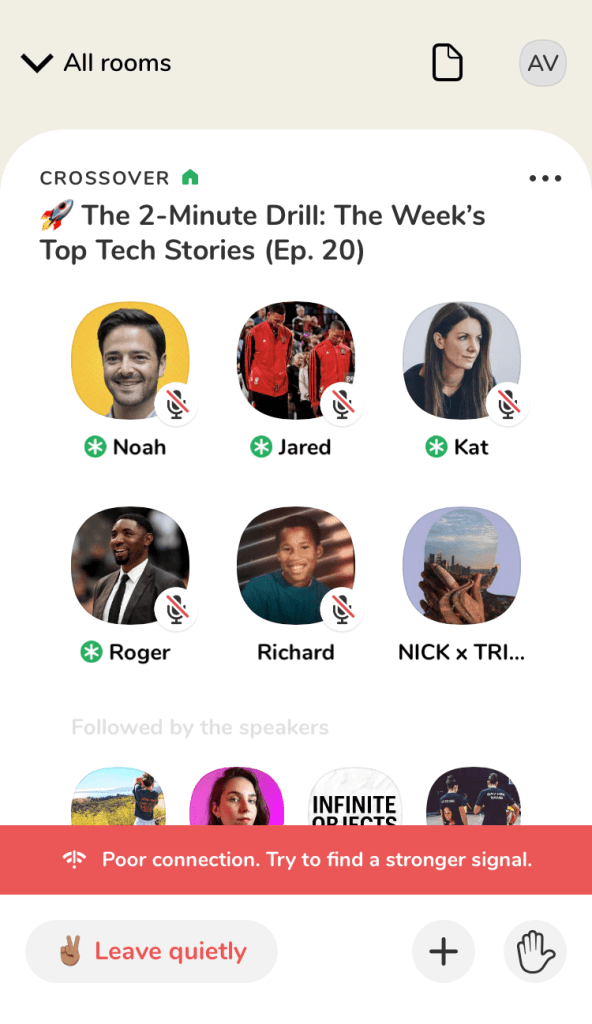
Without Speedify, when the Wi-Fi connection is poor or is dropped, Clubhouse will lose audio but still keep you in the chat room. You won’t get completely disconnected while your device switches to the cellular connection on its own. You can lose anywhere from 10 to 30 seconds of dialogue while the device switches the connection. You will also see a red banner with a message “poor connection”. Here’s how it looks like:
While Speedify was running, combining Wi-Fi and cellular data, we didn’t notice any lost audio stream in Clubhouse. The Wi-Fi signal was poor (edge of Wi-Fi) and also lost, but Speedify was seamless to keep Clubhouse alive by moving the traffic gradually to the cellular connection.
Speedify Fixes and Helps You Avoid Clubhouse App Issues
Think about it: you barely got an invite for the Clubhouse app and now you cannot enjoy it because of bad Internet. Don’t be frustrated – there’s an easy solution for this: Speedify.
Speedify is a fast bonding VPN that gets you a fast and secure Internet connection on your iOS device. It achieves this with channel bonding technology that uses your iPhone or iPad’s Wi-Fi and cellular data connections at the same time instead of switching between them.
What you get is increased bandwidth, which allows all of your apps to run faster. Including the Clubhouse app, that won’t ever be down because of you.
Speedify feature an auto failover mechanism, so if your mobile device keeps disconnecting from Wi-Fi, it will route all the data through the cellular connection until the Wi-Fi connection is restored. Speedify automates all of this activity. You don’t have to do anything, and you most likely won’t even notice anything different is happening.
As a VPN, Speedify provides advanced encryption, without forcing you to sacrifice speed or reliability. Speedify is compatible with all recent iPhones and iPads, including iPhone 5S and all versions of iPhone 6, iPhone 7, iPhone 8, iPhone X, iPhone 11, iPhone SE (2nd generation) and iPhone 12. It also supports all iPad Air and iPad Pro models, iPad 5th generation, iPad 6th generation, iPad 7th generation, iPad mini 2 and later devices.
Please check the updated system requirements on the download page.
Speedify is also available in the App Store. It only takes a few minutes to set up and requires no advanced technical skills or knowledge to use.
Alex and the Speedify team are always exploring the latest in networking and security technology—like 5G, 6G, WiFi 7, laser and satellite internet—and sharing it in new discussion content across YouTube, TikTok, Instagram, and LinkedIn every week.
Got a tech question? Let's go deeper! Pop into Speedify Office Hours live every Wednesday at 10 AM Eastern. Speedify CEO Alex Gizis and our network engineers are standing by to break down your questions about networks, tech updates, and Speedify features.


Speedify
Get started with Speedify today.
Combine Wi-Fi, 4G/5G cellular, Ethernet, Starlink, and more into one faster, steadier connection. Free to try — no credit card required.
🚀 Speed
Faster uploads and downloads by bonding all your connections at once.
📶 Stability
Automatic failover in under a second when any connection drops.
🔒 Security
AES-256 encryption on every connection, on every network you join.





15M+ downloads worldwide. 75K+ five-star reviews on iOS and Android.