
Wi-Fi That Drops Every Few Minutes, and the Fix That Actually Holds
Wi-Fi keeps disconnecting for a handful of reasons: too many devices on a shared network, a weak signal at the far end of the house, an overloaded or overheating router, or an internet provider that drops out for seconds at a time. If your provider is CenturyLink, see what to do when CenturyLink keeps disconnecting. Restarting the router clears the symptom. It comes back because the cause did not go away.
Speedify is an app that carries your internet over Wi-Fi, 4G/5G cellular, Ethernet, Starlink and satellite internet connections at the same time, so when the Wi-Fi drops out, the others are already carrying the traffic and your call or download keeps going. That needs a second internet connection, such as your phone’s 4G/5G cellular: on Wi-Fi alone, Speedify works as an encrypted VPN and cannot stop the Wi-Fi from disconnecting. Below: what causes the drops, which fixes actually hold, and how to stop it mattering.
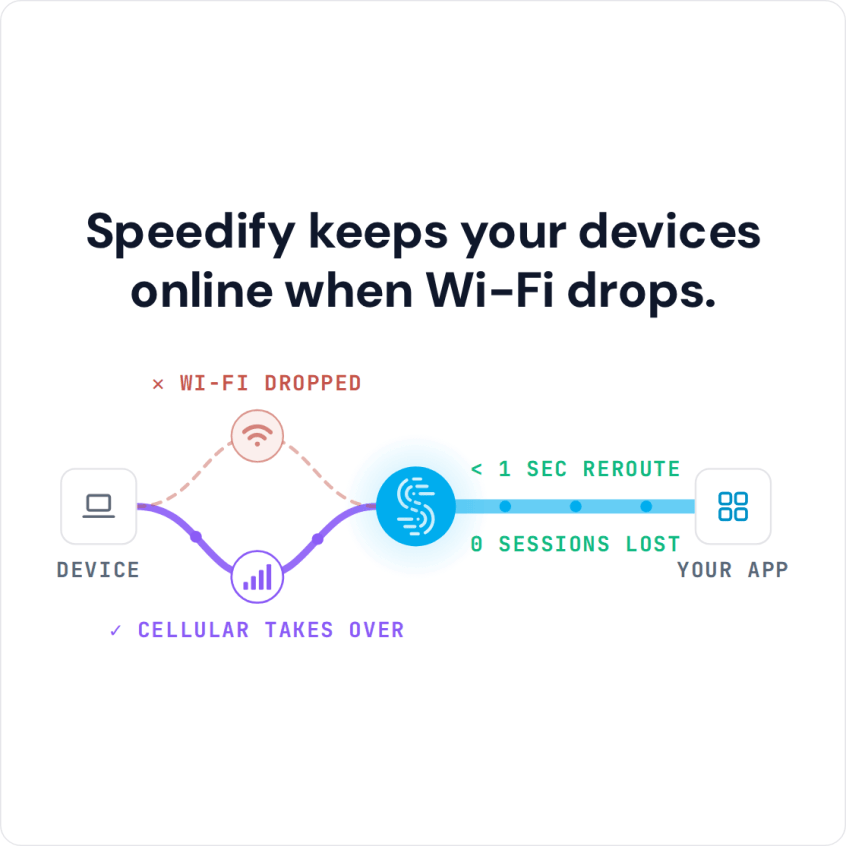
Speedify keeps your devices online when Wi-Fi drops.
How to Stay Online When Wi-Fi Keeps Disconnecting with Speedify
- Download Speedify on the phone or computer that keeps losing Wi-Fi (Windows, macOS, iOS, Android).
- Open Speedify and create a free account (the free tier includes 5 GB per month), or sign in.
- Give it a second internet connection: on a phone, keep Wi-Fi on and turn on cellular data; on a computer, add Ethernet or a phone connected by USB.
- Connect. Speedify uses both connections at once and moves your traffic to the working one when one drops.
- Keep working as usual; when the Wi-Fi drops, Speedify carries on over the other connection.
Common Causes of Wi-Fi That Keeps Disconnecting
These are the common causes when you connect to the internet over Wi-Fi:
- The Wi-Fi signal is too weak: you may be near the edge of the Wi-Fi network’s range.
- The Wi-Fi network is overloaded, which happens in crowded places such as streets, stadiums and concerts.
- You have to sign in to the network again on a captive portal (login page).
- Wireless interference (channel overlap) from other Wi-Fi networks or devices nearby.
- Outdated Wi-Fi adapter drivers or outdated router firmware.
- Problems with your internet provider (ISP), such as an outage or a line fault.
Two more causes are easy to miss: power-saving settings that turn the Wi-Fi adapter off to save battery (on laptops and phones), and an IP address conflict, where two devices on the network end up with the same address and knock each other offline.
All of the above assumes the Wi-Fi hotspot works when you are connected to it, and is not a bad Wi-Fi hotspot with no internet behind it.
If the same drops happen on a wired Ethernet connection, the cause is usually your internet provider, not the Wi-Fi.
Internet Keeps Disconnecting and Reconnecting: Fixes Step by Step
Windows users should run the troubleshooter in the operating system or see here for more solutions. Mac users should read here.
Here are some potential fixes for Wi-Fi that keeps disconnecting:
- Restart your router, then restart your phone or computer.
- Move closer to the Wi-Fi router or hotspot.
- Use a Wi-Fi analyzer app to check for interference. If you find it, move your router or set a fixed, less crowded channel in the router’s admin settings.
- Update your Wi-Fi adapter drivers and router firmware from the manufacturers’ websites.
- Contact your internet provider (ISP) and ask whether there are outages or line problems in your area.
- If you are on a public Wi-Fi network, connect to another one; it may just be a bad Wi-Fi hotspot.
On a Windows laptop, also turn off Wi-Fi power saving: open Device Manager, open your Wi-Fi adapter’s Properties and, on the Power Management tab, untick the option that lets the computer turn the device off to save power.
The Fix That Holds: Stop Relying on One Connection
If the drops keep coming back after all of that, stop relying on one connection. With Speedify, your device uses all of its internet connections at once (Wi-Fi, 4G/5G cellular, Ethernet), so one dropping does not cut you off.
How Speedify Stops Wi-Fi Disconnects From Reaching You
Speedify combines multiple internet sources into one connection for steadier, more secure live streaming, video calls and browsing, so a Wi-Fi drop does not reach what you are doing. Speedify is not a load balancer: Speedify splits your traffic across every connection at once and moves it to the remaining ones when one drops, keeping the same public IP address so calls and logged-in sessions carry on. Here is how that differs from load balancing.
Speedify can also prioritize sending data over Wi-Fi or Ethernet connections to keep metered connections (such as 4G/5G cellular) to a minimum. If your Wi-Fi drops, you stay online over cellular until the Wi-Fi works again.
Speedify also encrypts your traffic like a VPN, using advanced encryption to keep your data safe. Speedify works differently from traditional VPN apps that slow down your internet: Speedify sends data to and from the VPN server over several connections at once. On a single connection, Speedify works as an encrypted VPN and can be a little slower.
If your Wi-Fi keeps disconnecting, use Speedify with a second internet connection to stay online through the drops. Get Speedify now and try it with the free tier: 5 GB per month with a free account.
Speedify
Get started with Speedify today.
Speedify combines Wi-Fi, 4G/5G cellular, Ethernet, Starlink and satellite into one faster, more reliable internet connection. Free to try: 5 GB a month with a free account. No credit card required.
🚀 Speed
Faster uploads and downloads, because Speedify uses all your internet connections at once.
📶 Stability
If one internet connection drops, Speedify moves your traffic to the others in milliseconds.
🔒 Security
AES-256 encryption on every internet connection, on any network you join.



15M+ downloads worldwide. 75K+ five-star reviews on iOS and Android.