



Share an Unbreakable VPN Connection over Wi-Fi by Combining Starlink, Wi-Fi, 4G, 5G, and DSL with Speedify
Are you happy with the protection you get from your VPN service? Then you should think of extending that and protecting all your devices in your household. Most VPNs offer subscriptions that support multiple devices under the same account, but maybe you want to protect the online traffic going through your SmartTV, video streaming device (such as Chromecast, Roku, etc.) game console, a Microsoft Phone, etc.
In this case, the simplest way to protect all devices is to share the VPN connection over WiFi so that all devices benefit from it. If you can’t afford a good WiFi router with VPN embedded (prices start at $100, not including the VPN subscription), then you can easily use your Windows laptop.
Read below how to share VPN over WiFi in 5 minutes or less, without complicated “Run as Administrator” and “cmd” Windows steps.
Speedify delivers an unbreakable VPN connection by intelligently bonding multiple internet sources, ensuring continuous uptime and encrypted protection.
Should you have a backup 4G, 5G, Starlink, or cable internet connection?
Yes — every internet connection goes down, including Starlink, which drops for ~34 minutes a day on average. A backup connection from a different provider means one outage never takes you fully offline. The most common options are a 4G/5G cellular hotspot, a cable or DSL line, or a second satellite dish.
4G/5G cellular
Works anywhere. Just a SIM or hotspot — no installation needed.
Learn more →Cable / DSL
Best for fixed locations. Different network, so outages rarely overlap.
Learn more →Second Starlink
Adds redundancy and throughput for remote sites or heavy usage.
Learn more →Speedify bonds any two connections into one — automatic failover, more speed, no dropped calls.
Try Speedify free →Share VPN over WiFi Using a Windows Laptop and One Software App
Here’s what you need to share your VPN connection over WiFi:
- A working Windows laptop or PC with a WiFi card or dongle. This can be the laptop you’re currently using or an older laptop or PC that’s just collecting dust
- A fast VPN service that can deliver good speeds to all your devices at once – Speedify is a next generation mobile VPN that can combine multiple connections, giving you increased bandwidth
- A hotspot software app which can share the VPN Internet connection from the laptop or PC over WiFi – Connectify Hotspot is the most popular hotspot software available, basically a virtual router inside your Windows machine.
3 Steps to Share VPN over WiFi in 5 Minutes or Less
It’s time to get busy:
- Download and install Connectify Hotspot and Speedify on your Windows laptop or PC
- Open Speedify and connect to a server (usually the closest will be best). If you have multiple Internet connections from different networks, you can combine and use them at the same time with Speedify to create a super-connection with increased bandwidth and lower lag.
- Run Connectify Hotspot. Under Wi-Fi Hotspot mode give your hotspot a custom name and password, and select the “Speedify Virtual Adapter” from the Internet to Share drop-down menu. Then click “Start Hotspot”.
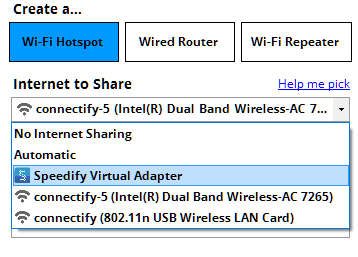

You can now connect all devices to the hotspot you configured using Connectify. All the traffic going through this wifi hotspot will be protected by Speedify, the fast, reliable and secure VPN.
Additional Benefits of Sharing VPN Over WiFi with Connectify Hotspot
Outside of helping you share VPN over WiFi easily, there are other perks of using Connectify as your personal hotspot app:
- Save bandwidth and time with the embedded universal ad blocker. You can also eliminate ads from native iPhone and Android apps.
- Boost your range instantly with Wi-Fi repeater mode: Easily extend the range of your existing Wi-Fi network!
- Save money while traveling: stuck at a hotel that charges for Internet per-device? With Connectify Hotspot, join the Wi-Fi, start a hotspot, and get all of your devices online for the price of one.
- Share any type of Internet Connection with All your Devices: With Connectify Hotspot you can share Internet from existing Wi-Fi networks, ethernet, 3G/4G, even tethered smart phones!
Speedify – Fast, Reliable and Secure VPN to Share Over WiFi
Using a VPN will protect you, but most of them will also slow down the Internet, as all data passes through their servers first before going to or from its final destination.
Speedify is a next generation mobile VPN built for speed and reliability that doesn’t slow down your online speed. Speedify uses a proprietary encryption algorithm that is fast and secure, to make sure you don’t compromise speed for security. This is very important when multiple devices will be using the same VPN connection.
Plus – most important – Speedify doesn’t log any data regarding your online activity, as other VPNs (or even your own ISP) might do, in order to sell your browsing data to marketing agencies – ever wondered how come “the ads” know you’ve been looking at something in particular?
It’s time you protect all traffic from your household with Speedify, a fast VPN built for speed, and Connectify Hotspot, a flexible personal hotspot app. This way, you’ll be using the Internet on your own terms.
Speedify provides the speed, security and reliability as the best VPN to share over WiFi. Get started with Speedify now – no strings attached, no email sign-up necessary!
Alex and the Speedify team are always exploring the latest in networking and security technology—like 5G, 6G, WiFi 7, laser and satellite internet—and sharing it in new discussion content across YouTube, TikTok, Instagram, and LinkedIn every week.
Got a tech question? Let's go deeper! Pop into Speedify Office Hours live every Wednesday at 10 AM Eastern. Speedify CEO Alex Gizis and our network engineers are standing by to break down your questions about networks, tech updates, and Speedify features.


Speedify
Get started with Speedify today.
Combine Wi-Fi, 4G/5G cellular, Ethernet, Starlink, and more into one faster, steadier connection. Free to try — no credit card required.
🚀 Speed
Faster uploads and downloads by bonding all your connections at once.
📶 Stability
Automatic failover in under a second when any connection drops.
🔒 Security
AES-256 encryption on every connection, on every network you join.





15M+ downloads worldwide. 75K+ five-star reviews on iOS and Android.