

How to Test if Your ISP is Throttling Your Internet Speed
Video that streamed fine last month now buffers every evening, always after eight, always on the same connection. Speed tests look normal. That pattern is what throttling looks like from the inside. ISP throttling is your internet provider deliberately slowing your connection, either for specific services such as video streaming or after you use a set amount of data, and an ISP throttling test compares your normal speed with the speed you get on those services.
Speedify is an app for your computer, phone or tablet that uses more than one internet connection at the same time and encrypts what travels over them, so your provider cannot single out one kind of traffic to slow down. The encryption works on a single connection; the extra speed and failover need two or more internet connections, and on one connection Speedify cannot stop that connection from dropping. Keep reading to see how to test whether you are actually being throttled, how to tell throttling apart from simply not having enough bandwidth, and what to do about it.
With Speedify, your internet stays on when one connection fails.
Before Testing for ISP Throttling: Are You Getting Enough Bandwidth?
The absolute first step is to check the contract that you have with your ISP (if you don’t have that anymore, just ask the ISP for a copy of it). It should state what are some minimum guaranteed speeds and/or maximum limits of traffic per month.
Then, run a speed test online and see if you’re getting speeds close to the one in the contract. In this context, run the test using a computer connected through an Ethernet cable to your router. If you run the test via WiFi, the performance of the router and the distance from it will alter the results.
If you are getting speeds close to what’s in the contract, you may proceed to testing for ISP throttling (see below).
If the speed you’re getting is much lower than in the contract, then you should definitely contact your ISP about this: most surely there are issues related to the physical connection to your home, performance of the router (it may need to be changed) or you may have gone over your maximum allotted traffic that specific month.
4 Tools to Test if Your ISP is Throttling Your Internet Connection
Assuming that you are getting the speeds you’re paying for (see above paragraph), here are 4 tools to determine if you’re the “lucky beneficiary” of ISP throttling:
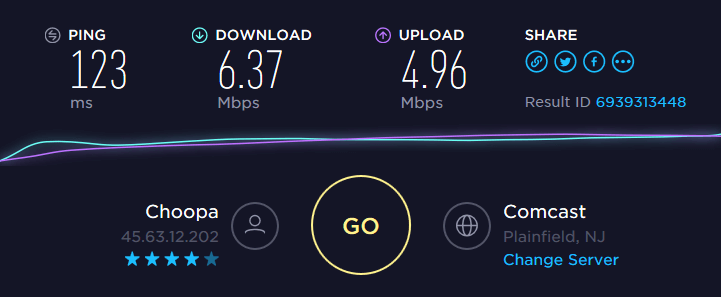
- For control purposes, run a speed test on your device. If you’re watching Netflix on your laptop, run the speed test on that device. This will give you an idea of the real bandwidth available for you from your ISP for general purposes.
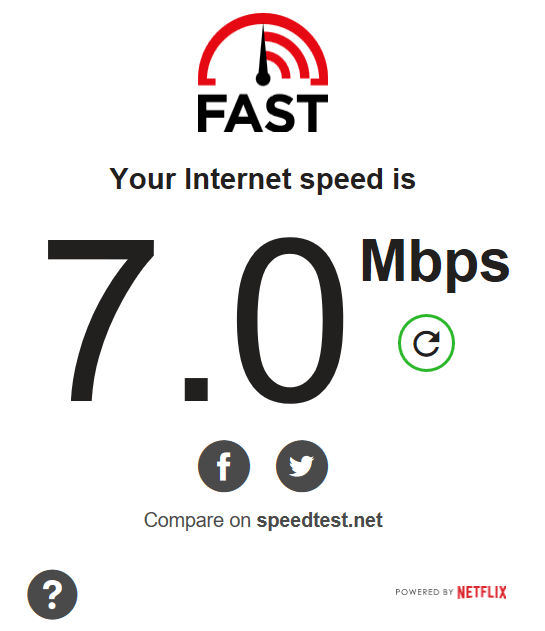
- Do you see Netflix loading slowly or even buffering? Run the Netflix FAST speed test and if the speed is much lower than the control speed test, then it’s most likely your ISP is throttling connections to Netflix.
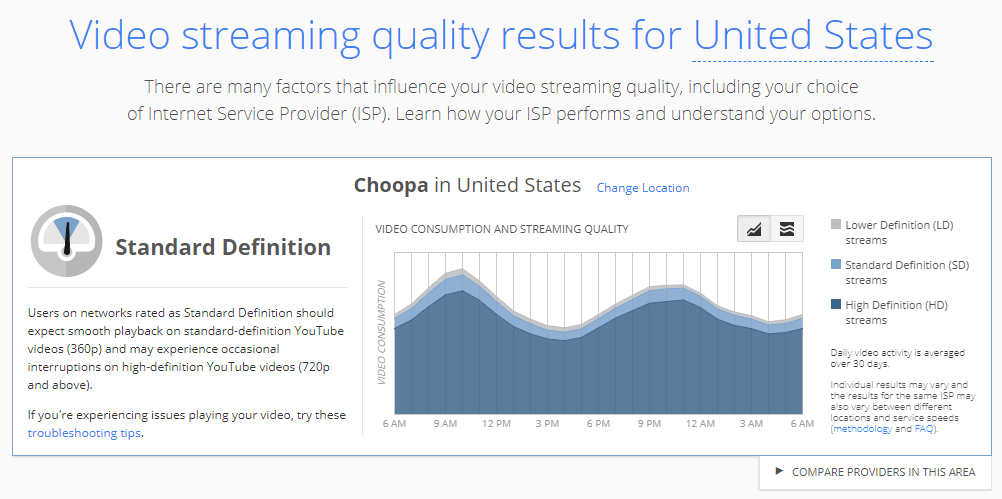
- If you’re having issues with YouTube, you can also check out the Google Video Quality report. It shows the performance of your Internet connections to YouTube’s servers. If the connection quality to YouTube is poor, but your Internet connection is fast, your ISP is most likely throttling connections to YouTube.
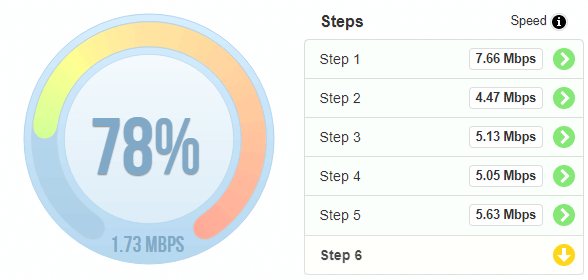
- Run the Internet Health Test by Battle for the Net. This checks your Internet connection to see if there are problems at points of interconnection. Sometimes ISPs may throttle the performance at these points so that the other ISP pays an additional fee. It checks a number of different routes and detects if you’re experiencing degraded performance at one or more interconnection points. So, if you see a big difference in speeds between consecutive tests, you’re being throttled by your ISP.
Naturally, if there’s no evidence of ISP throttling after running the tests above, you may just need to upgrade to an Internet plan that delivers more bandwidth to you. You should contact your ISP for that.
How to Stop ISP Throttling Using Speedify
Most cases of ISP throttling are specifically tied to certain websites / services. Your ISP analyzes your traffic and, depending on the services you’re accessing, it may have a policy to intentionally slow down that traffic.
If your ISP would not be able to “inspect” your traffic, it couldn’t throttle your Internet speed for certain services. A VPN is the easiest and most affordable solution to fix ISP throttling, as it secures all Internet traffic on your device, so that ISPs will not be able to distinguish between traffic.
Speedify is an app for your computer and phone that encrypts your online data like a VPN and combines internet connections for faster, more reliable internet, with internet failover protection. Combining connections goes further than load balancing: Speedify splits traffic per packet across all of them.
If your ISP is throttling your Internet connection, it’s time to get started with Speedify. You will be able to use the bandwidth you pay for, with your traffic encrypted and, with a second internet connection, more reliable internet.
Speedify
Get started with Speedify today.
Speedify combines Wi-Fi, 4G/5G cellular, Ethernet, Starlink and satellite into one faster, more reliable internet connection. Free to try: 5 GB a month with a free account. No credit card required.
🚀 Speed
Faster uploads and downloads, because Speedify uses all your internet connections at once.
📶 Stability
If one internet connection drops, Speedify moves your traffic to the others in milliseconds.
🔒 Security
AES-256 encryption on every internet connection, on any network you join.



15M+ downloads worldwide. 75K+ five-star reviews on iOS and Android.