
Unbreakable VPN Connection to Browse Anonymously by Combining Starlink, Wi-Fi, 4G, 5G, and DSL with Speedify
Without encryption, every request your browser makes is visible to the company selling you internet access, and in the United States that company is allowed to sell what it collects.
Speedify encrypts those requests, so your internet provider sees only an encrypted connection to a Speedify server, not the sites you visit. Speedify can also combine Wi-Fi and 4G/5G cellular at the same time for faster downloads and uploads; that gain needs two or more internet connections, and on one connection Speedify works as an encrypted VPN and can be a little slower. Everything below is about browsing without leaving that record with your provider, and about what using Speedify gives you in return.
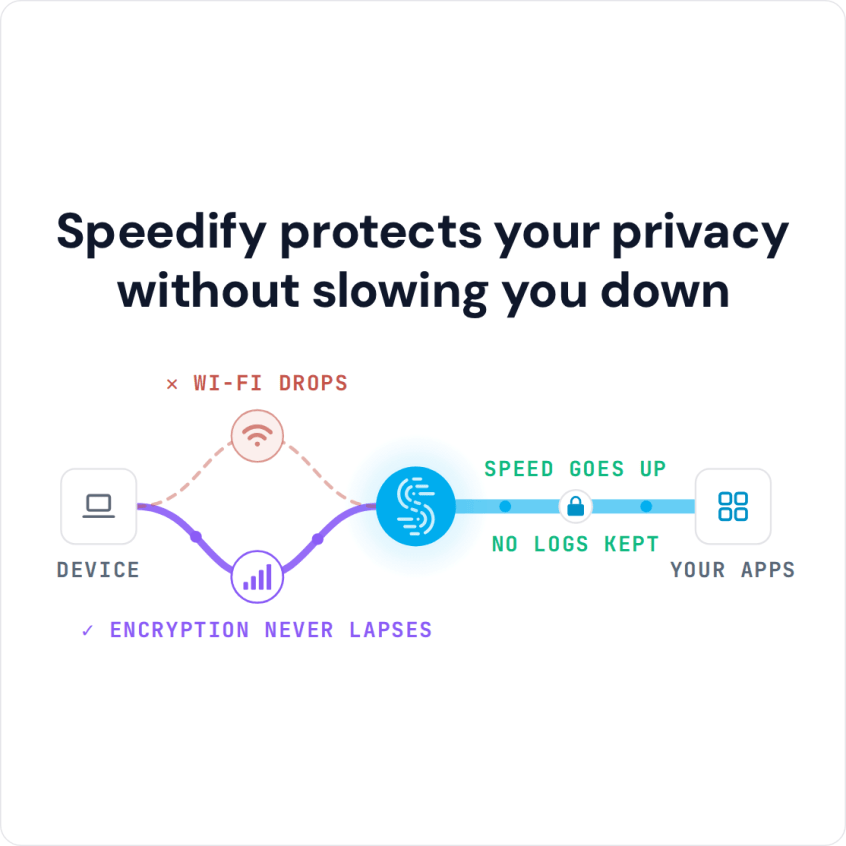
Speedify protects your privacy without slowing you down
How to Hide Browsing History from an Internet Provider in Five Steps
- Download Speedify on the phone or computer you browse on (Windows, macOS, iOS, Android and Linux).
- Open Speedify and create a free account (the free tier includes 5 GB per month on Windows, macOS, iOS and Android; Linux needs a paid plan), or sign in.
- On a phone, tap Allow when your phone asks to add a VPN configuration.
- Speedify connects to a Speedify server automatically. Your internet provider and the Wi-Fi network now see only an encrypted connection to that server, not the sites you visit.
- Keep Wi-Fi and 4G/5G cellular both on if you want Speedify to combine them for faster downloads and uploads, then browse as usual.
What Encryption Hides from Your Internet Provider
A VPN encrypts all of the data you send over the internet. Traditional VPNs add an extra hop and encryption overhead, which can slow down gaming, video streaming, page loads and form submissions.
Speedify encrypts your traffic with DTLS 1.2 and AES-256-GCM or ChaCha20-Poly1305 and sends it to a Speedify server, which passes it on to the internet. Between your device and that server, nobody on the network can read it.
When you are using Speedify on your PC or your mobile device, your ISP cannot see your browsing history, because the sites you visit are inside the encrypted connection. Speedify also protects you on compromised Wi-Fi networks, where others on the same network could otherwise read your traffic.
Use Wi-Fi and 4G/5G Cellular Together for Faster Private Browsing
One of the key ways Speedify is different from a standard VPN is that it can also add bandwidth. By default, most devices use only one internet connection at a time: a phone uses either Wi-Fi or its 4G/5G cellular connection, and all traffic goes back and forth through that single connection.
A PC works the same way: it usually connects either through Wi-Fi or through a wired Ethernet connection.
Speedify lets your devices use multiple internet connections simultaneously, all while continuing to encrypt your data like a VPN.
When you run Speedify on your phone, you connect to the internet through Wi-Fi and 4G/5G cellular at the same time. The combined connection gives your apps faster downloads and uploads, which matters most when gaming, streaming video, traveling and with other bandwidth-heavy activities.
Speedify also has automatic failover: if one of your connections becomes unstable, Speedify reroutes all traffic through the remaining internet connections, and starts using the lost connection again once it is back. Your public IP address stays the same during the switch, because your traffic reaches the internet from the Speedify server, so websites where you are logged in do not see a new address.
What Speedify Records and What It Keeps Private
Speedify runs in the background once you download it and finish the short setup. Here is what Speedify records about that connection and what it keeps private.
Speedify keeps no record of the sites you visit and does not sell personal data. Speedify does record connection metadata (your IP address, device ID, connection time and the amount of data used), as its privacy policy explains.
What a Wi-Fi Router, an Employer and Websites Can Still See
On any Wi-Fi network, the router and whoever runs it see only an encrypted connection from your device to a Speedify server, not the sites you visit. That makes your browsing private from the network, but not anonymous: Speedify records connection metadata as described above, and websites you sign in to still know it is you. On a computer or phone your employer manages, monitoring software on the device itself can still see your activity, so check your employer’s rules.
You already pay your ISP every month, and your browsing history should not be part of the deal. Speedify keeps it out of your provider’s view and, with two or more connections, gives you faster downloads and uploads.
Ready for private browsing on any Wi-Fi? Get started with Speedify for FREE today: create a free account and use up to 5 GB per month.
Speedify
Get started with Speedify today.
Speedify combines Wi-Fi, 4G/5G cellular, Ethernet, Starlink and satellite into one faster, more reliable internet connection. Free to try: 5 GB a month with a free account. No credit card required.
🚀 Speed
Faster uploads and downloads, because Speedify uses all your internet connections at once.
📶 Stability
If one internet connection drops, Speedify moves your traffic to the others in milliseconds.
🔒 Security
AES-256 encryption on every internet connection, on any network you join.



15M+ downloads worldwide. 75K+ five-star reviews on iOS and Android.