

Unbreakable VPN Connection by Combining Starlink, Wi-Fi, 4G, 5G, and DSL with Speedify
A VPN that speeds your internet up instead of slowing it down is possible when the connection runs over every available network at once. Speedify is an app that combines two or more internet connections at the same time, such as Wi-Fi and 4G/5G cellular, while encrypting all of the traffic like a VPN.
Unlike a traditional VPN tied to one connection, Speedify keeps traffic encrypted, adds the speed of both connections, and stays online if one connection drops out.
Speedify is a VPN that adds your connections together
How do I use WiFi and 4G/5G cellular at the same time with Speedify?

Pick your two internet connections and your device below and we'll take you to the step-by-step setup guide.


Why Traditional VPNs Slow Down and Disconnect
A Virtual Private Network (VPN) is software that adds security and privacy to your network. VPNs can either be used by companies to give remote employees access to their internal private networks, or to protect users’ connections to the Internet. VPNs protect your privacy by encrypting all of your traffic so it cannot be spied on, and also by changing your IP address to that of the VPN server to make you harder to trace.
Traditional VPNs, like IPSEC or OpenVPN, all work on the same principle: they first create an AES encrypted socket to a VPN server and then take all Internet traffic from the client, and encapsulate the packets to put them inside of that single secure socket. When the packets get to the server, they are decrypted, unencapsulated, and put out on the Internet by the VPN server. Anyone trying to “listen in” on the connection only sees encrypted packets on their way to the VPN server. They cannot see the end destination, or what servers are being visited.
But this single socket design has big downsides. First, there is no failover: if the internet connection the socket was created on stops working, the client gets disconnected, even if another working connection is available on the device. There is also no way to combine connections: even if you are connected to the internet over Wi-Fi and cellular, the software picks just one and you are stuck on it.
Nearly all VPNs use AES encryption to protect data. AES is a tried and true, standards based encryption method, but on mobile processors without AES hardware support it is slow and drains the battery.
Speedify, a New Kind of VPN
Speedify was designed from the ground up for wireless users and runs on the Speedify protocol, which combines connections, encrypts traffic quickly and corrects errors. Speedify can combine any available internet connections, such as Wi-Fi, Ethernet, cable, DSL, Starlink, 4G/5G cellular and tethered smartphones, into a single faster and more reliable connection.
On a phone, Speedify uses Wi-Fi and 4G/5G cellular at the same time, so if one of them disappears or disconnects, Speedify shifts traffic to the other without dropping the session. Using both connections cuts dropped video calls, stalled streams and slow downloads. To save cellular data, set cellular to Backup priority: Speedify then uses it only when Wi-Fi fails, which helps you stay under your data cap.
Three design features make this work:
Parallel Sockets on Every Internet Connection
Speedify creates sockets on every internet connection on your device. This means that it can send some packets over one internet connection, and some over another connection, and they are reassembled on the server.
Parallel sockets let Speedify do things regular VPNs cannot. If one internet connection goes down, Speedify moves to the other connection, and your apps do not notice: sockets and downloads move from one connection to another without breaking.
Fast, Strong Encryption for Mobile Processors
Speedify offers encryption tailored to your device. On newer devices, Speedify uses AES since these have hardware AES engines. If your processor does not support AES acceleration, Speedify will use the ChaCha encryption algorithm to deliver fast, secure performance, which works even on older phones. Although ChaCha may be a funny name, it’s serious technology backed up by open standards.
Another key piece of Speedify’s security is Datagram Transport Layer Security (DTLS), which is TLS (SSL) over UDP. DTLS lets Speedify handle error correction itself (for better performance on unreliable connections or with lost packets) while providing the same level of security that protects HTTPS websites like Gmail and Facebook.
The encryption in Speedify is provided using DTLS (TLS over UDP) using TLS_ECDHE_ECDSA_WITH_CHACHA20_POLY1305_SHA256. This is implemented using Google’s BoringSSL library, which is a fork of OpenSSL.
IP Optimization and Error Correction
Speedify automatically optimizes your network traffic for better performance. One important part of this is error correction that automatically detects and recovers lost packets, often before a TCP connection considers the packet lost. This prevents TCP connections from slowing down in the face of lost packets. On a lossy network, TCP connections can perform much better when running over Speedify.
Speedify vs. OpenVPN: How the Tests Were Run
Speedify’s engineers compared Speedify with an OpenVPN access server (v2.1.2), with both servers installed on the same Linode server in Newark, NJ. The OpenVPN server used AES-128-GCM to take advantage of hardware acceleration on most devices. Performance was measured with iPerf3.
Encryption Performance
For this test, each device was connected to a Wi-Fi connection and iPerf3 was used to test the speed of the Wi-Fi network without a VPN, with Speedify, and with OpenVPN.
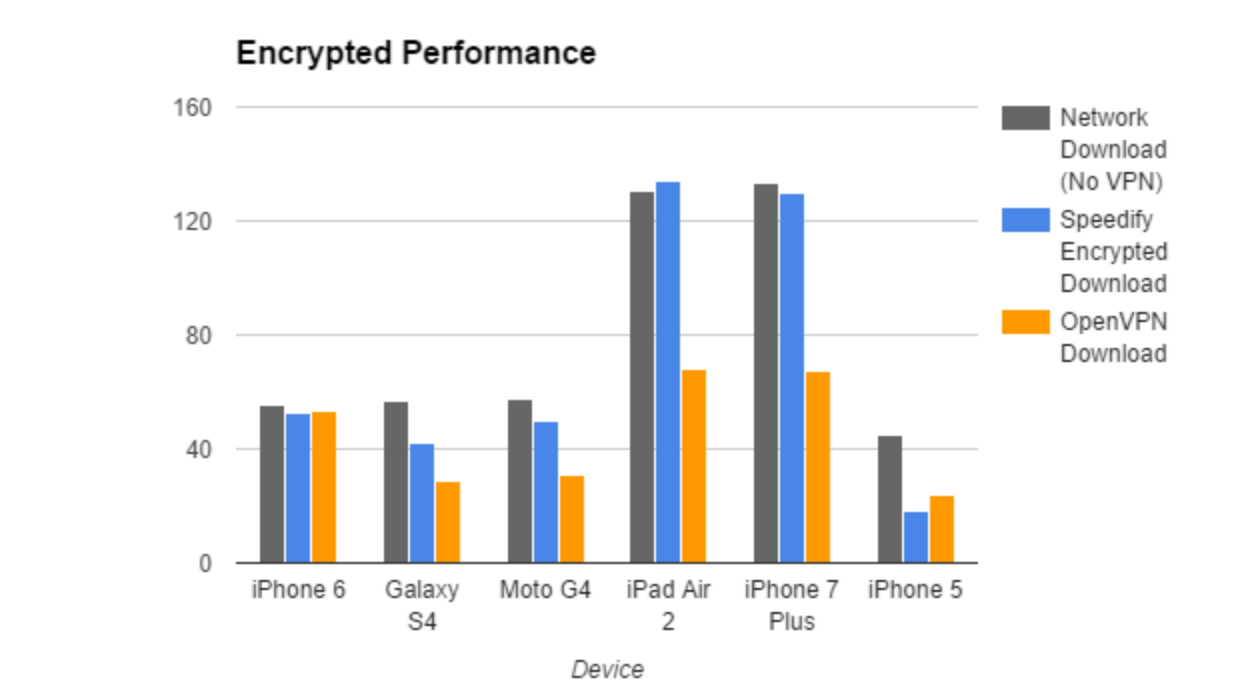
The processing power of the device has a big impact on the top speed it can reach with encryption. With most of the devices, Speedify was faster than OpenVPN, mostly because of Speedify’s ChaCha encryption versus OpenVPN’s AES cipher. With the iPad Air 2 on a 130 Mbps Wi-Fi network, Speedify was 97% faster than OpenVPN. In some cases, with the iPhone 5 for example, OpenVPN outperformed Speedify.
Packet Loss Performance
To compare Speedify and OpenVPN under packet loss, the test used network emulation to add varying amounts of packet loss. The table below shows the results with the iPhone 6.
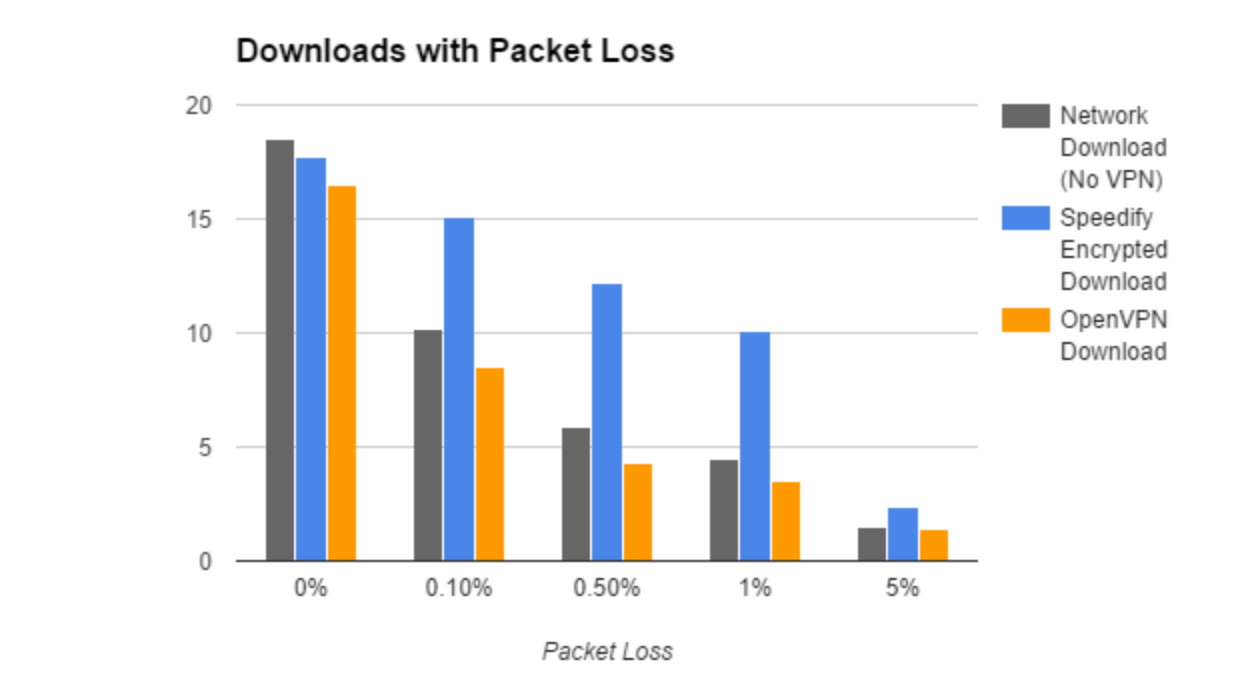
In short, packet loss is bad. Even 0.1% packet loss costs both OpenVPN and the bare network around 40% of performance. At 1% packet loss, they both lose over 75% of their speed.
Here you can see the benefits of Speedify’s error correcting techniques. Speedify is almost unaffected by 0.1% loss, and although 1% loss slows Speedify by 40%, it’s 188% faster than OpenVPN on the same network conditions.
Failover Performance
To compare what happens during a connection failure, a 15 second iPerf test ran on an iPhone 6, and the Wi-Fi was shut off about 6 seconds in. The table shows the speed of each test over time.
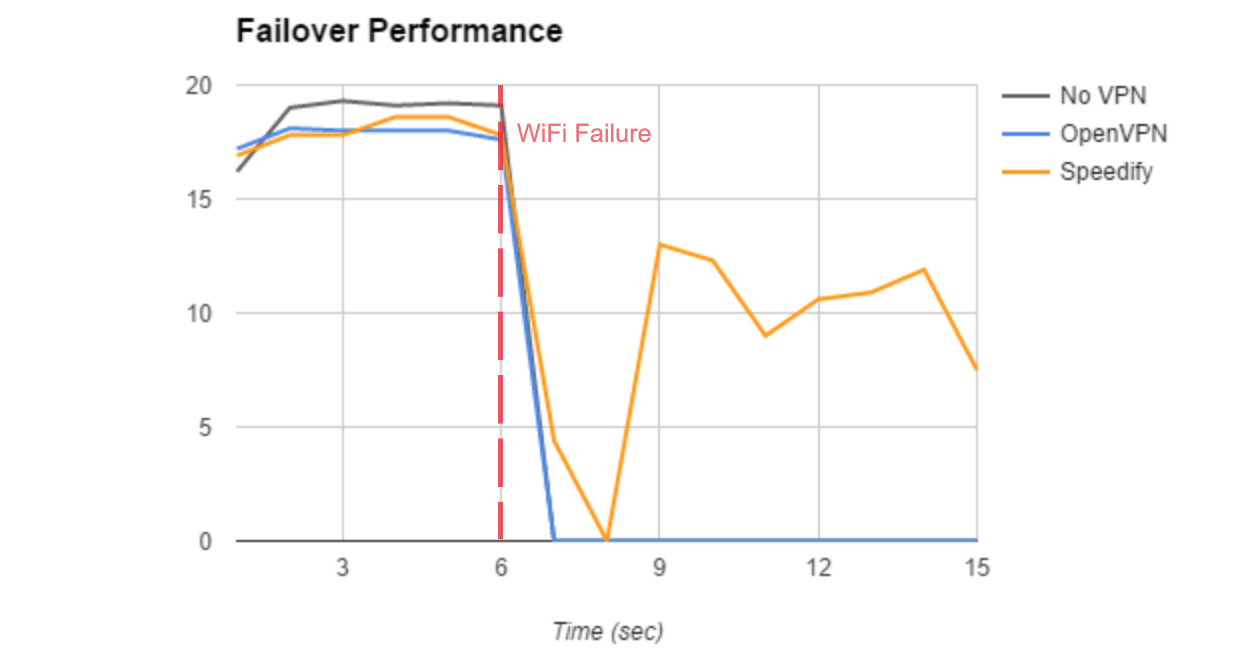
With no VPN and with OpenVPN, shutting off the Wi-Fi completely kills the test. Even though the phone has an active cellular connection, the iPerf socket breaks and the test has to be restarted to use the cellular connection. With Speedify running, there is a brief dip in speed as Speedify detects that the Wi-Fi connection is gone and moves the traffic to the cellular connection. The stream continues over the cellular connection for the rest of the 15 seconds.
Combined Wi-Fi and Cellular Performance
Speedify can combine multiple internet connections for higher speeds. A traditional VPN uses only one internet connection at a time, limiting you to the speed of that connection.
Below are results of Speedify combining a 20Mbps Wi-Fi connection with the Cellular connection on different mobile devices. iPerf3 was used to run all tests.
| Device | Wi-Fi Download (Mbps) | Cellular Download (Mbps) | Speedify Download Wi-Fi + Cellular (Mbps) |
| iPhone6 | 18.6 | 25.6 | 41.9 |
| Galaxy S4 | 18.6 | 5.7 | 26 |
| Moto G4 | 18.5 | 31 | 46.5 |
In every test, the combined download speed was higher than either connection alone.
Speedify vs. OpenVPN Test Results in Brief
In head to head tests against OpenVPN, Speedify demonstrated:
- Encrypted downloads: 97% faster than OpenVPN on an iPad Air 2
- Downloads with 1% packet loss: 188% faster with Speedify
- Failover: only Speedify completed the test
- Combining Wi-Fi and cellular: Speedify used both connections to reach speeds faster than the Wi-Fi connection alone
Speedify
Get started with Speedify today.
Speedify combines Wi-Fi, 4G/5G cellular, Ethernet, Starlink and satellite into one faster, more reliable internet connection. Free to try: 5 GB a month with a free account. No credit card required.
🚀 Speed
Faster uploads and downloads, because Speedify uses all your internet connections at once.
📶 Stability
If one internet connection drops, Speedify moves your traffic to the others in milliseconds.
🔒 Security
AES-256 encryption on every internet connection, on any network you join.



15M+ downloads worldwide. 75K+ five-star reviews on iOS and Android.