

Combining WiFi + Ethernet + Cellular on Raspberry Pi
A Raspberry Pi normally uses one internet connection at a time, but with Speedify it can combine four or more at once for more speed and automatic failover if one drops. Speedify is an app that combines Wi-Fi, 4G/5G cellular, Ethernet, Starlink and satellite internet connections into one faster, more reliable connection, and encrypts your traffic like a VPN.
This guide shows how the Speedify Labs team combined four connections on a Raspberry Pi 4, and how to do it yourself.
Speedify runs on the router and bonds the connections for everything behind it
How do I use WiFi and 4G/5G cellular at the same time with Speedify?

Pick your two internet connections and your device below and we'll take you to the step-by-step setup guide.


How Many Internet Connections a Raspberry Pi Can Use at Once
Normally, a Raspberry Pi can only use a single internet connection at a time. Even if you plug an Ethernet cord into the Ethernet port and USB network adapters into all of the available USB ports, your upload and download traffic will only go through one of those connections.
With Speedify for Linux, a Raspberry Pi 4 can use all these connections at the same time and combine them into one faster, more reliable internet connection. Speedify for Linux needs a paid Speedify plan, since the free tier is not available on Linux.
How to Combine Four Internet Connections on a Raspberry Pi 4
The Speedify Labs setup combined three Wi-Fi networks plus one tethered smartphone on the Raspberry Pi. Here’s what you need:
Requirements
- 1 x Raspberry Pi 4B
- 2 x USB external Wi-Fi adapters
- 1 x Smartphone with active data plan with USB data cable
Setup & Steps
- Connect the 2 USB external Wi-Fi adapters to the USB ports.
- Tether your smartphone to another USB port.
- Use the operating system (Linux) to connect the internal Wi-Fi and the external adapters to different Wi-Fi networks.
If you are using an iPhone for tethering, you’ll need to install additional software on the Pi such as usbmuxd for it to work (normally “sudo apt install usbmuxd”). Here’s a video link with further instructions for combining connections with a tethered iPhone. - Install and run Speedify for Linux (Ubuntu, Debian or Raspberry Pi OS). Speedify detects all active connections and combines them automatically.
Share the Combined Connection from the Raspberry Pi with Your Other Devices
Speedify for Ubuntu and Raspberry Pi OS can share the combined connection over Ethernet or the internal Wi-Fi card. Your other devices then connect to the Raspberry Pi and use the combined connection, which turns the Raspberry Pi into a small wireless or wired router.
The setup above leaves the Pi’s Ethernet port free, so you can share the four combined connections with another device that has an Ethernet port. See this article with steps on how to turn your Raspberry Pi into a wired router.
Combine More Connections by Linking Several Raspberry Pi Routers
Speedify works best when the internet connections it combines come from different upstream networks. The Speedify Labs team had plenty of those available, so during testing the team tried a bigger setup:
- using a second Raspberry Pi 4 with the same setup, so two Raspberry Pi 4s each combine four connections;
- using Speedify and sharing the combined connections over Ethernet on both Raspberry Pis;
- connecting both of them to a third Raspberry Pi 4 and sharing the combined connections again over Wi-Fi using Speedify for Linux.
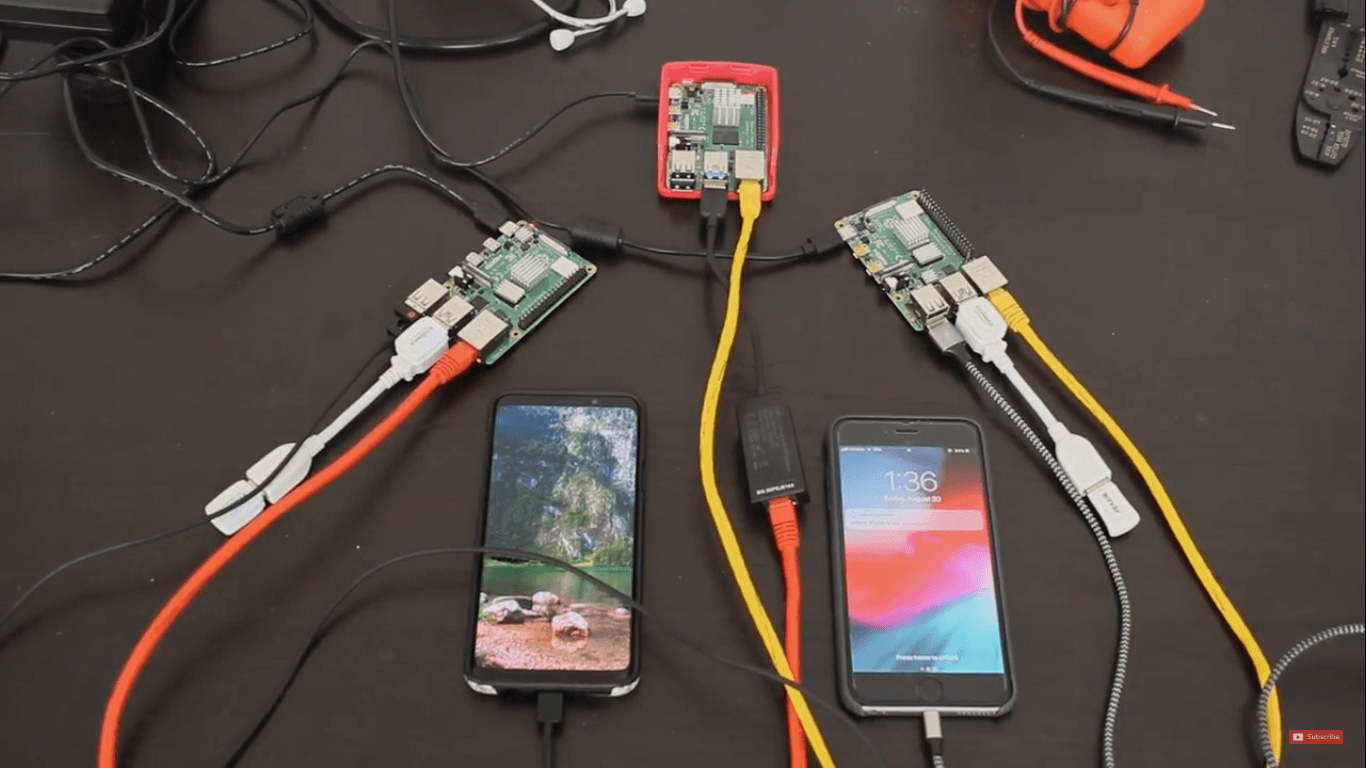
The setup worked: three Raspberry Pi 4s, each running Speedify, created a Wi-Fi router that combines a total of 8 different connections. Any Wi-Fi device can connect to this hotspot and use the combined, encrypted Speedify connection.
Conclusion: Speedify for Linux turns a Raspberry Pi 4 into a Wi-Fi or wired router that combines internet connections. That helps with live streaming, online gaming, IRL streaming and other apps that need a stable, fast connection.
Speedify
Get started with Speedify today.
Speedify combines Wi-Fi, 4G/5G cellular, Ethernet, Starlink and satellite into one faster, more reliable internet connection. Free to try: 5 GB a month with a free account. No credit card required.
🚀 Speed
Faster uploads and downloads, because Speedify uses all your internet connections at once.
📶 Stability
If one internet connection drops, Speedify moves your traffic to the others in milliseconds.
🔒 Security
AES-256 encryption on every internet connection, on any network you join.



15M+ downloads worldwide. 75K+ five-star reviews on iOS and Android.