
Get Faster Upload and Download Speeds when Live Streaming Video to Twitch. Use Speedify to Combine Wi-Fi, 4G / 5G Cellular, Ethernet, Starlink and Other Satellite
Get the best quality video stream, avoid buffering and disconnects. Speedify gets you faster internet upload and download speeds by combining Wi-Fi, 4G / 5G cellular, Ethernet, Starlink and other satellites together for stronger optimized Twitch live streams.
Forget about slow Twitch that keeps buffering or drops out and unblock Twitch content anywhere with Speedify.
Speedify Dynamically Optimizes Live Streams to Twitch for Best Performance and Quality
Tired of trying to live stream to Twitch and only getting choppy, low-quality video, buffering and even stream dropouts?
Speedify automatically prioritizes live streams on Twitch based on how good your Internet connectivity is. Streaming data will be more important than other types of traffic. This will minimize packet loss and eliminate dropped frames due to poor Internet, and also minimize lag when live streaming to Twitch.
Use Speedify! Don't Let Poor Connectivity Slow Down Your Gaming and Live Streaming
With Speedify, you can use all of your available Internet sources at the same time for the best performance - Wi-Fi, 4G / 5G cellular, Ethernet, Starlink and other satellites. This helps you no matter how high packet loss rates are, where you are or what device you’re on.
The Real Cause of Bad Twitch Live Streams
Most of the time, slow and unreliable Twitch live streams are a result of a bad internet connection. Even when you are on Wi-Fi, your Internet connection may still be too slow to get the full benefit of streaming Twitch videos and live action game-play.
The problem is that your computer or mobile device you're streaming to Twitch from isn’t taking full advantage of its capabilities. Your device sends all the data through one connection only. If that breaks, it takes time until the device automatically switches, which translates in poor video being broadcast, buffering for your audience or even total stream dropouts.
You might have already seen OBS dropping frames, problems with Streamlabs, Restream internet connectivity issues and other things you should avoid when live streaming online.
Speedify Improves Twitch Live Streaming
Speedify is the only app that can combine multiple internet sources into one bonded super-connection for faster internet upload and download speeds and more stable and secure live streaming, video calling, and web browsing.
Not only will you enjoy the combined speed of all your connections, but if one of them disappears or disconnects Speedify will instantly and seamlessly shift your streaming and other types of traffic to the other working connection(s) without skipping a beat.
This way, you can be sure that your Twitch live streams will look the best when using any encoder (OBS, Streamlabs, ECamm, etc.) with any available Internet connection. And if you're by any chance playing a game while streaming, it won't affect your K/D ratio.
Speedify Holds a Twitch Stream Steady Through Packet Loss
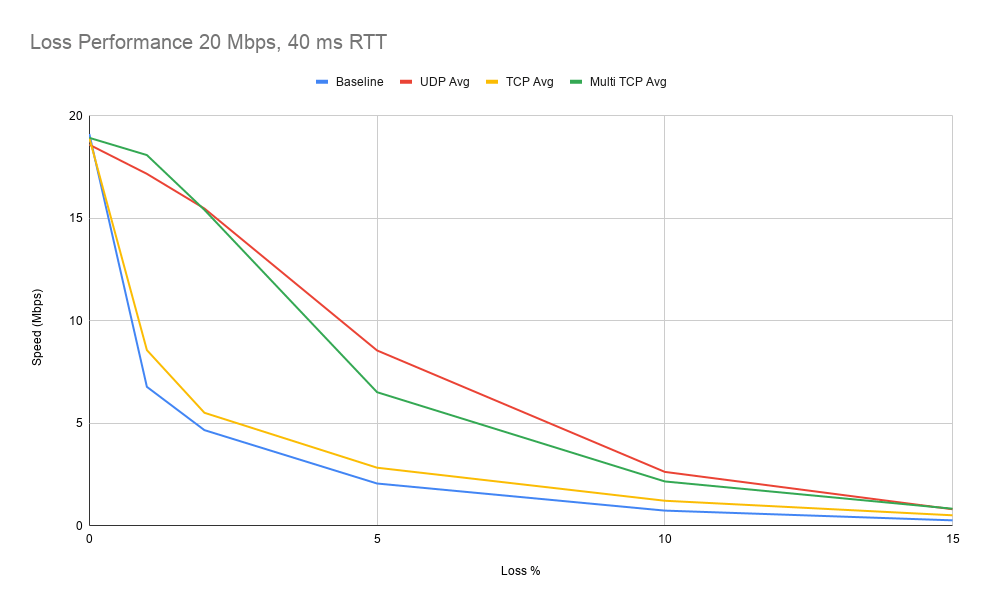
On a single connection, Speedify shields a stream from the damage that normally begins at around 1% packet loss. At 5% loss, throughput over Speedify is well over double that of regular TCP. Across two connections, Speedify's UDP and Multi TCP modes typically deliver about 200% of the throughput of the same setup without Speedify.
Alessia Santeramo Streams Chess on Twitch Six Days a Week
Alessia Santeramo started playing chess at eight and won the Italian under-ten championship at nine. She began streaming chess on Twitch in Italian in June 2019, moved to a fixed English-language schedule three times a week within six months, and now broadcasts most days for a couple of hours at a time.
Chess is a talking, thinking, hours-long format. A broadcast that freezes mid-game costs an audience that took months to build, and the internet connection decides whether that happens. Alessia moved from Wi-Fi to wired Ethernet first, then looked for a way to use both connections at once.
Alessia now runs Speedify with a Speedify Dedicated Server. The stream saves show up in her reports rather than in her broadcasts, which is the point.
Her next step is adding a cellular connection alongside the wired and Wi-Fi lines, so a router failure cannot end a broadcast. Her advice to other streamers is to give Speedify at least two internet connections to work with.
"I was completely new, I didn't know what Speedify was. I did some research on how it works and actually it's a VPN. Most VPNs give you privacy and security, but they are known also that they make your internet a bit slower, because you got to connect to another server. Speedify is really the exception, because you can just put inside all the different connections that you have and you feel the difference: you just don't lose the connection, you don't experience problems."
— Alessia Santeramo, chess champion and Twitch streamer
Speedify
Get started with Speedify today.
Speedify combines Wi-Fi, 4G/5G cellular, Ethernet, Starlink and satellite into one faster, more reliable internet connection. Free to try: 5 GB a month with a free account. No credit card required.
🚀 Speed
Faster uploads and downloads, because Speedify uses all your internet connections at once.
📶 Stability
If one internet connection drops, Speedify moves your traffic to the others in milliseconds.
🔒 Security
AES-256 encryption on every internet connection, on any network you join.



15M+ downloads worldwide. 75K+ five-star reviews on iOS and Android.