

Speedify’s Audio Tracking Lets You Align a Starlink Dish Without Watching the Screen
Aiming a Starlink dish usually means one hand on the hardware and both eyes on a phone screen that is hard to see outdoors. Speedify is an app that helps you use all of your internet connections at the same time – including one or more Starlink dishes – for faster uploads and downloads and a more reliable connection. Speedify can also guide Starlink dish aiming with sound, so a tone rises as the aim improves and no screen is needed. This guide explains how Speedify’s audio aiming works and when it helps most.
Starlink disconnects all the time for ALL Starlink users. The Speedify Starlink Index report found that Starlink connections are down for an average of ~33 min per day. Plus, all Starlink dishes experience small drops and packet loss every 15 seconds, when the moving Starlink satellites hand off the connection to the next satellite overhead.
The best way to fix Starlink's connection drops is to combine your Starlink connection with another internet connection, such as 4G/5G cellular, cable, fiber, DSL, or another Starlink connection. Speedify makes this possible with channel bonding.
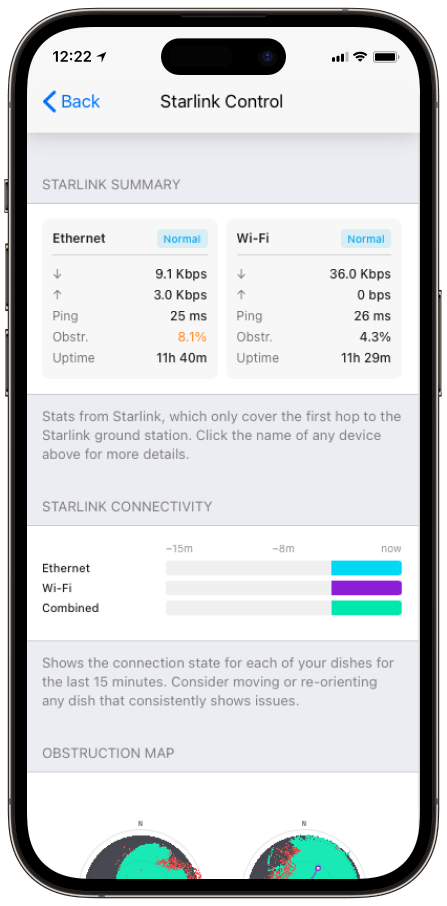
Monitor your Starlink dish performance inside Speedify.
Speedify’s built-in Starlink Control Center gives you real-time visibility into your dish’s health — without opening a separate app.
How Speedify’s Starlink Alignment with Audio Tracking Works
Select any dish in the Dish Orientation card to open the Alignment Wizard for that dish. From there:
- Speedify calculates the target heading for the selected dish.
- As you physically rotate the dish, Speedify measures the gap between its current heading and the target.
- The beeps get faster as that gap closes, and reach a steady fast tone at the target.
You keep your hands on the dish and your eyes on the mount instead of on a screen you can’t reach.
When Speedify’s Starlink Audio Tracking Earns Its Keep
Audio tracking matters most exactly where dishes tend to go: on a roof, on a mast, on a vessel’s hardtop, or anywhere the screen is out of sight while your hands are on the hardware. It also speeds up the work of getting two dishes onto different sky, since you can aim each one to its Speedify-calculated heading without climbing back down to check. Starlink’s guidance on giving each antenna a clear, unobstructed view sets the target; audio tracking helps you hit it.
How Proper Starlink Dish Alignment Improves Speedify’s Bonding
Good alignment isn’t the goal on its own. The point is two dishes on different sky, each with a low obstruction percentage, feeding Speedify’s channel bonding technology. Speedify combines the aligned dishes into one connection, distributes traffic across them at the packet level, and fails over instantly if one is blocked. The cleaner each dish’s aim, the more capacity Speedify has to work with.
Who Benefits from Speedify’s Starlink Audio Tracking
- Rooftop and mast installers. No more squinting at a phone propped on a ladder.
- Maritime crews. Aligning a dish on a moving deck is far easier by ear than by eye.
- Anyone aiming two dishes apart. Audio tracking makes the second dish quick to set without constant screen checks.
Speedify and Starlink: Align Fast, Then Bond
Audio tracking gets each Starlink dish onto its target heading with your eyes on the hardware. Speedify’s channel bonding technology takes the well-aimed dishes and combines them into one faster, more resilient connection. For the full set of alignment tools, see how to use Speedify’s Starlink Control Center.
Speedify
Get started with Speedify today.
Combine Wi-Fi, 4G/5G cellular, Ethernet, Starlink, and more into one faster, steadier connection. Free to try — no credit card required.
🚀 Speed
Faster uploads and downloads by bonding all your connections at once.
📶 Stability
Automatic failover in under a second when any connection drops.
🔒 Security
AES-256 encryption on every connection, on every network you join.



15M+ downloads worldwide. 75K+ five-star reviews on iOS and Android.