
The Best Way to Livestream From Your Phone Without Dropping
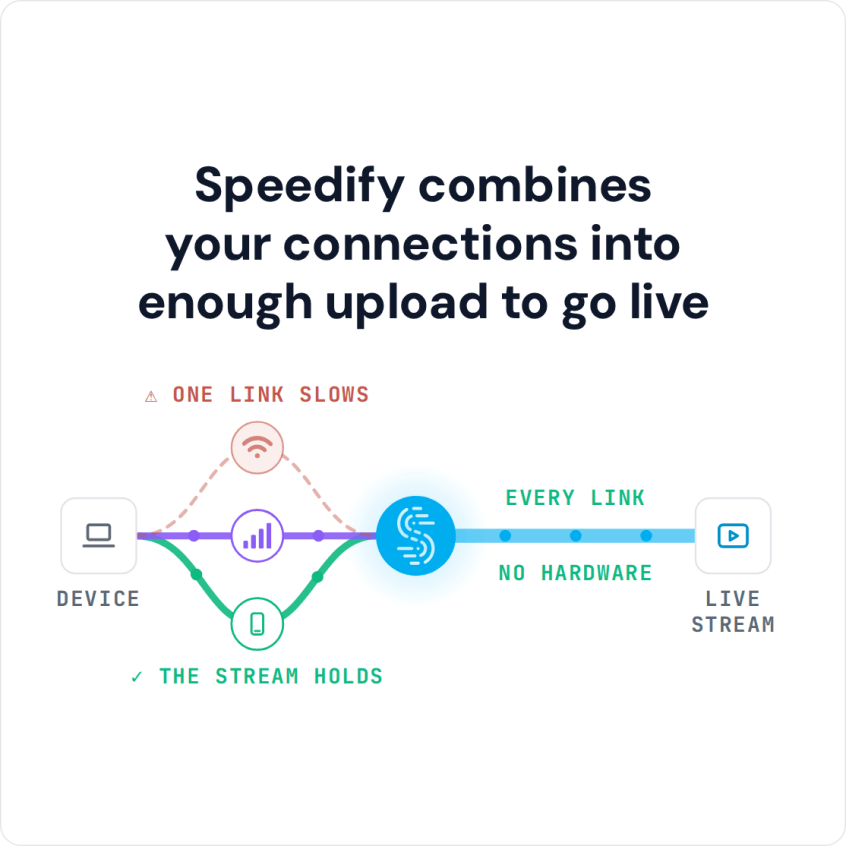
Live streaming over 4G/5G cellular from a phone stays online when the upload speed behind it stays steady, even in a crowd or a moving vehicle. Speedify is an app that combines Wi-Fi, 4G/5G cellular, Ethernet, Starlink and satellite internet connections at the same time. On a phone, that means 4G/5G cellular and Wi-Fi working together as one faster, steadier upload. On cellular alone, Speedify works as an encrypted VPN and cannot make that one connection faster or stop it from dropping.
If your mobile stream has frozen in front of a live audience, you are not the only one with this problem. When one connection weakens or drops, Speedify shifts the stream to the others automatically, so the broadcast keeps running. Here is how to set up a phone for streaming that does not drop out.
How do I use WiFi and 4G/5G cellular at the same time with Speedify?

Pick your two internet connections and your device below and we'll take you to the step-by-step setup guide.


Why Mobile Livestreams Drop: Single-Carrier Network Congestion
When you stream from an iPhone or Android phone on one carrier, your phone competes for the same tower capacity as every other phone nearby, and a crowded venue, a busy street or a packed stadium pushes that shared capacity past its limit. Upload suffers first, because cellular networks give far less capacity to upload than to download. A stream that looks fine on the walk to the venue can degrade the moment a crowd forms around you.
Combining 4G/5G Cellular and Wi-Fi for a Stable Upload
Speedify combines your phone’s 4G/5G cellular with any available Wi-Fi network, even a weak or busy one, into a single, sturdier upload. When the cellular network gets congested, Speedify sends more of the upload over Wi-Fi automatically, and the other way around when the Wi-Fi falters. Two connections working together, rather than one strong one, keep your broadcast stable through a crowd, a moving vehicle or a venue with unpredictable signal.
How to Set Up a Phone for IRL Streaming with Speedify
To set up an in-real-life (IRL) stream, start by adding every connection you can to the phone you broadcast from. Speedify’s cellular sharing feature lets a second phone running Speedify share its 4G/5G cellular connection with your streaming phone, adding a second carrier’s upload capacity without extra hardware. Both phones need to be on the same local network: if there is no Wi-Fi, turn on Personal Hotspot on one phone and connect the other phone to it. Shared data counts as hotspot data on the sharing phone’s plan. The second phone can ride along in a backpack or pocket for the whole broadcast.
Redundant Mode, Bitrate and a Gear Checklist for Mobile Livestreams
For the moments that matter most, such as a product reveal, a big play or a live Q&A, Speedify’s Redundant mode sends a copy of every packet over both connections, using more data in exchange for a stream that survives one connection failing completely. For routine streaming, Speedify’s Streaming Mode, which is on by default, gives the live upload priority over background traffic on the same connections and keeps the bitrate steady without full redundancy. A 1080p stream needs several megabits per second of steady upload, and combining two modest connections often clears that bar even when neither one would alone.
Before you head out to broadcast, run through this short checklist:
- Download Speedify on the primary streaming phone and any secondary device being paired.
- Fully charge both devices and bring a battery pack for longer streams.
- Confirm both connections show active in the Speedify interface before going live.
- Set the streaming app’s bitrate a notch below the combined connection’s tested maximum.
Combining connections has a limit: Speedify needs at least two working connections to add capacity, and cannot create upload bandwidth that neither the cellular network nor the Wi-Fi has. In a location with no cellular signal and no Wi-Fi in range, there is nothing to combine. No livestreaming app stays live with no internet at all; what Speedify does is keep the stream up when one of two connections drops.
Mobile Livestreaming: FAQ
Can Speedify combine two different phones for one stream?
Yes. Through Speedify’s cellular sharing feature, a second phone adds its own carrier’s 4G/5G cellular upload to your stream, set up as described in the IRL section above.
Does combining connections help more than just switching to a better carrier?
Speedify combines whatever connections are available rather than relying on one carrier, which protects a stream from congestion that affects that carrier specifically.
What bitrate does Speedify support for a combined 1080p stream?
Speedify supports whatever upload capacity the combined connections deliver. Two decent connections combined are commonly enough for a steady 1080p bitrate.
Is redundant mode necessary for every livestream?
No. Redundant mode is best kept for high-stakes moments, because it duplicates every packet and uses more data. Streaming Mode, on by default, handles routine broadcasts on its own.
Speedify
Get started with Speedify today.
Speedify combines Wi-Fi, 4G/5G cellular, Ethernet, Starlink and satellite into one faster, more reliable internet connection. Free to try: 5 GB a month with a free account. No credit card required.
🚀 Speed
Faster uploads and downloads, because Speedify uses all your internet connections at once.
📶 Stability
If one internet connection drops, Speedify moves your traffic to the others in milliseconds.
🔒 Security
AES-256 encryption on every internet connection, on any network you join.



15M+ downloads worldwide. 75K+ five-star reviews on iOS and Android.