



Live Streaming with Low Packet Loss? Use Speedify!
One of the issues live streamers are having when broadcasting online is the high packet loss rates they usually have. This is usually generated by network congestion. You will surely recognize the presence of packet loss while streaming on Twitch when you’re dropping frames and your video becomes blocky due to bitrate fluctuations.
However, there’s a solution to all this, which has (once again) been confirmed recently by members of the Twitch community: Speedify!
Okay, @speedify update. The stream ran perfectly smooth tonight. After 3 months, 10+ Cox techs, and min 20% consistant packet loss… this tool seems to have fixed my issue.
Streamed for 4 hours. Packet loss ended at .3% compared to the 20%+ normally.
— Firebottle (@firebottletv) January 23, 2018
Read below to see how Speedify can help solve your packet loss issues when streaming.
Should you have a backup 4G, 5G, Starlink, or cable internet connection?
Yes — every internet connection goes down, including Starlink, which drops for ~34 minutes a day on average. A backup connection from a different provider means one outage never takes you fully offline. The most common options are a 4G/5G cellular hotspot, a cable or DSL line, or a second satellite dish.
4G/5G cellular
Works anywhere. Just a SIM or hotspot — no installation needed.
Learn more →Cable / DSL
Best for fixed locations. Different network, so outages rarely overlap.
Learn more →Second Starlink
Adds redundancy and throughput for remote sites or heavy usage.
Learn more →Speedify bonds any two connections into one — automatic failover, more speed, no dropped calls.
Try Speedify free →Minimizing Packet Loss while Streaming – the Hard Way
The first thing you should do when you encounter heavy packet loss while streaming is check your Internet connection health with a specialized Twitch tool or network diagnostics tool. You may run speed and latency tests just to discover that due to network congestion, faulty or outdated hardware or even software bugs, the bitrate of your Internet connection is fluctuating and even dropping at times, which automatically generates packet loss while live streaming.
So, then, you might want to take this up with your ISP, but that won’t always fix your issue, and it’ll certainly not be a fast fix. Resetting your modem, router and network adapters might lower the rate temporarily, but eventually if you’re getting a lossy Internet connection, you’ll be right where you started, with high packet loss rates while streaming.
How Speedify fixes Packet Loss while Streaming on Twitch
Then, there’s the easy way to minimize packet loss while streaming live – using Speedify to run while you’re broadcasting on Twitch!
Speedify is a next generation channel bonding mobile VPN service that allows you to combine multiple Internet connections at the same time into one super pipe for increased bandwidth and reliability, while lowering latency and minimizing packet loss when streaming.
The secret lays in Speedify’s fast error correction features, even with just one Internet connection. It instantly detects when a network packet has been lost, and resends it before the Internet protocol realizes that. Thereby, slowdowns are prevented before they occur.
Speedify’s Performance on Minimizing Packet Loss While Streaming
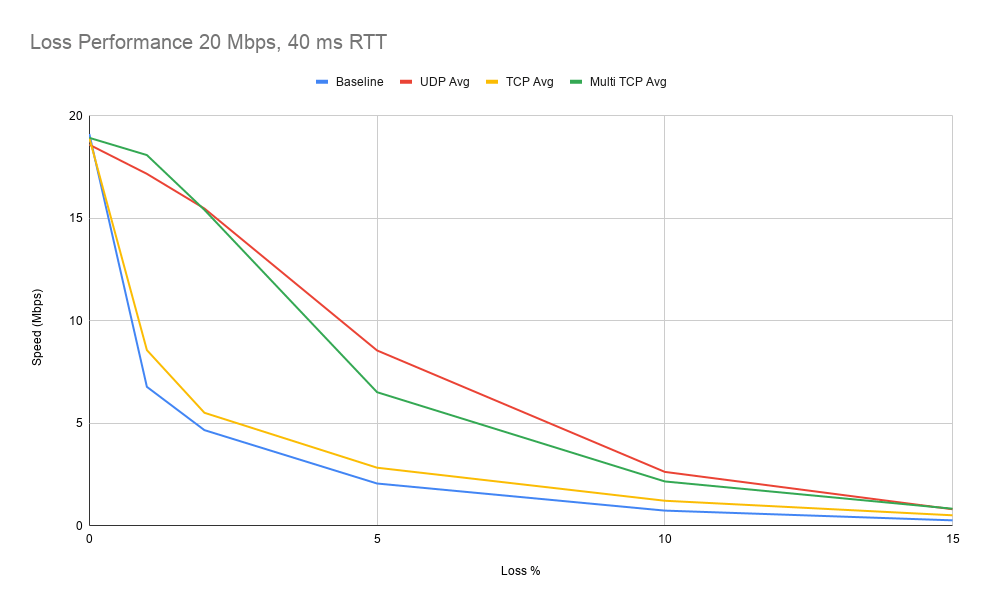
In the tests we’ve ran with Speedify, even on a single link you’re largely shielded from damages caused by losing over 1% of the packets. More impressive still, at 5% packet loss the throughput over Speedify is well over double that of regular TCP. And this goes on while also keeping your private information safe!
While using 2 connections at the same time, Speedify’s UDP and Multi TCP proved to be even more reliable, as we typically got a connection that was 200% faster with Speedify than without.

If you’re tired of dealing with heavy packet loss while streaming on Twitch, YouTube or any other platform, get started with Speedify today!
Alex and the Speedify team are always exploring the latest in networking and security technology—like 5G, 6G, WiFi 7, laser and satellite internet—and sharing it in new discussion content across YouTube, TikTok, Instagram, and LinkedIn every week.
Got a tech question? Let's go deeper! Pop into Speedify Office Hours live every Wednesday at 10 AM Eastern. Speedify CEO Alex Gizis and our network engineers are standing by to break down your questions about networks, tech updates, and Speedify features.


Speedify
Get started with Speedify today.
Combine Wi-Fi, 4G/5G cellular, Ethernet, Starlink, and more into one faster, steadier connection. Free to try — no credit card required.
🚀 Speed
Faster uploads and downloads by bonding all your connections at once.
📶 Stability
Automatic failover in under a second when any connection drops.
🔒 Security
AES-256 encryption on every connection, on every network you join.





15M+ downloads worldwide. 75K+ five-star reviews on iOS and Android.