


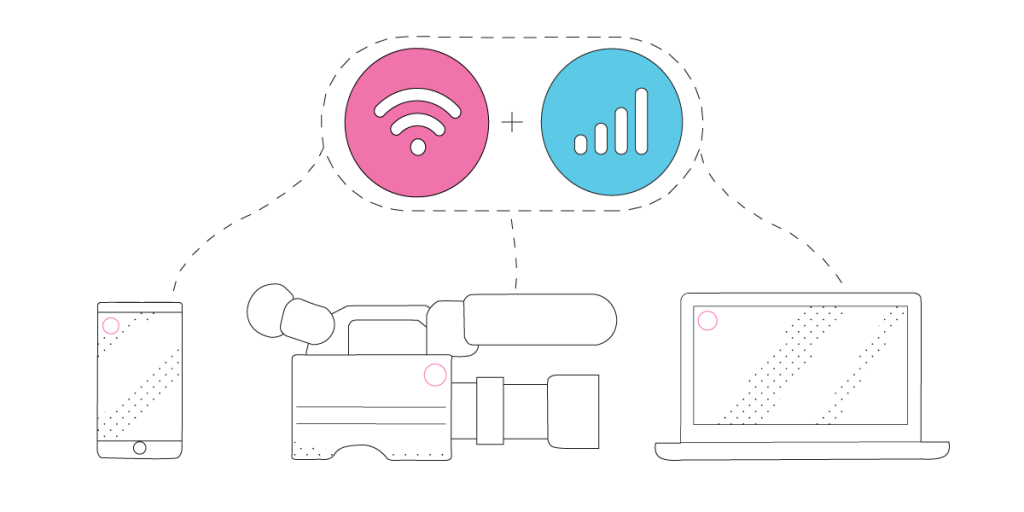
Live Streaming Anywhere on Multiple Platforms with Switchboard Live
Switchboard Live‘s main selling point for live streamers is its capability to reach more viewers with the help of their StreamShare functionality. That allows others to carry one stream to their audience, increasing viewership and helping grow the audience on YouTube, Facebook, Twitter and LinkedIn.
As a browser based live streaming tool, Switchboard Live can be used on any platform, for any purpose. They particularly appeal to live broadcasts for houses or worship, artists, technology creators, sports and media, as well as the educational space.
This article explains how to go live with Switchboard Live and avoid any live streaming issues, especially those related to Internet connectivity.
Should you have a backup 4G, 5G, Starlink, or cable internet connection?
Yes — every internet connection goes down, including Starlink, which drops for ~34 minutes a day on average. A backup connection from a different provider means one outage never takes you fully offline. The most common options are a 4G/5G cellular hotspot, a cable or DSL line, or a second satellite dish.
4G/5G cellular
Works anywhere. Just a SIM or hotspot — no installation needed.
Learn more →Cable / DSL
Best for fixed locations. Different network, so outages rarely overlap.
Learn more →Second Starlink
Adds redundancy and throughput for remote sites or heavy usage.
Learn more →Speedify bonds any two connections into one — automatic failover, more speed, no dropped calls.
Try Speedify free →Fast and Stable Internet: Requirements for a Successful Live Stream on Switchboard Live
Internet is what makes or breaks a successful live broadcast, no matter what live streaming software you’re using, be it Switchboard Live or another one. That’s why you should definitely think this through.
Having an extra Internet source while live streaming helps, but you have to think how long it takes for you and/or your streaming device (camera, computer, mobile device) to switch between the 2 connections. It’s usually a minimum of 10-20 seconds – and that’s an optimistic estimate.
That’s why you need to use all available Internet connections at once instead of keeping them as a backup and switching between them. That is called Internet bonding (a.k.a. channel bonding, link aggregation, etc.). Speedify is the only app that can combine multiple internet sources into one bonded super-connection for more stable and secure live streaming, video calling, online gaming and web browsing.
Getting Started with Switchboard Live
To get started with live broadcasting with Switchboard Live, just make sure you have the essentials:
- camera – dedicated (like a GoPro, for example), the computer webcam, or your smartphone’s camera.
- streaming device – computer or smartphone
- Switchboard Live account – they price their plans based on streaming minutes, so make sure you choose the right one for you depending on how much you live stream monthly.
- Speedify account – for stable Internet connection. The idea is to use two or more connections together at once with Speedify to hit your target bitrate and avoid flaky Internet problems while live streaming to Facebook, Twitter, YouTube, etc. with Switchboard Live.
Additional accessories – such as an external battery pack, dedicated microphones, extra lighting, etc. – may be required especially if you’re doing IRL streaming.
Step by Step Guide on How to Go Live with Switchboard Live
1. CONNECT ALL AVAILABLE INTERNET SOURCES TO YOUR STREAMING DEVICE
Use one or multiple of the following on your streaming device:
- wired Ethernet connection – computer only
- external USB 5G / 4G LTE cellular adapter – computer only
- Wi-Fi hotspot
- cellular data
- tethered smartphone
Real world example: If you’re live streaming IRL outside your home / studio, the easiest way is to carry two cellular phones. One can be your streaming device and the other one would just be used for its cellular data – you would create a Wi-Fi hotspot to connect the streaming device to it. That way you would combine cellular data with Wi-Fi from the second phone on the streaming device.
2. GET STABLE INTERNET BY BONDING YOUR CONNECTIONS WITH SPEEDIFY
If you don’t have a Speedify subscription yet, you can get it from our website store, the Apple App Store or the Google Play Store.
Run Speedify and log into your account. All the active Internet sources you connected at step 1 should be recognized by Speedify. All you have to do now is choose a server to connect to – the fastest server options usually works best.
3. CONFIGURE Switchboard Live
Follow the instructions on the Switchboard Live website to get started with live streaming to Facebook, YouTube, Twitter and LinkedIn.
Here’s a video guide on multistreaming with Switchboard Live.
4. FINAL CHECK, GO LIVE
Before going live with your stream, make sure:
- you are in Switchboard Live and are able to see the video you want to broadcast in the preview window
- audio is working
- Speedify is running, and it combines the Internet sources you’re connected to.
Ready to go? Just hit the button and make it big!
The good thing about Speedify is that it prioritizes your live streams over other Internet traffic. Thus, you are avoiding issues such as low quality, choppy and laggy videos, buffering and even disconnects from the streaming server.
Alex and the Speedify team are always exploring the latest in networking and security technology—like 5G, 6G, WiFi 7, laser and satellite internet—and sharing it in new discussion content across YouTube, TikTok, Instagram, and LinkedIn every week.
Got a tech question? Let's go deeper! Pop into Speedify Office Hours live every Wednesday at 10 AM Eastern. Speedify CEO Alex Gizis and our network engineers are standing by to break down your questions about networks, tech updates, and Speedify features.


Speedify
Get started with Speedify today.
Combine Wi-Fi, 4G/5G cellular, Ethernet, Starlink, and more into one faster, steadier connection. Free to try — no credit card required.
🚀 Speed
Faster uploads and downloads by bonding all your connections at once.
📶 Stability
Automatic failover in under a second when any connection drops.
🔒 Security
AES-256 encryption on every connection, on every network you join.





15M+ downloads worldwide. 75K+ five-star reviews on iOS and Android.