
Combine All Your Available Internet Connections – Starlink, 4G, 5G, DSL – with Speedify for Smoother Live Streaming without Any Buffering or Dropouts
Every internet bonding product for live streaming promises the same outcome, a broadcast that stays up when one internet connection weakens, and they get there in very different ways: some with a hardware box that travels on the truck, some with software on machines you already own.
Speedify belongs to the second group: it sends your stream over Starlink, 4G/5G cellular, DSL, Wi-Fi and Ethernet at the same time, on a router, a computer or a phone. Like every internet bonding product, Speedify needs two or more internet connections to keep the stream up; on a single connection Speedify works as an encrypted VPN and cannot stop that connection from dropping.
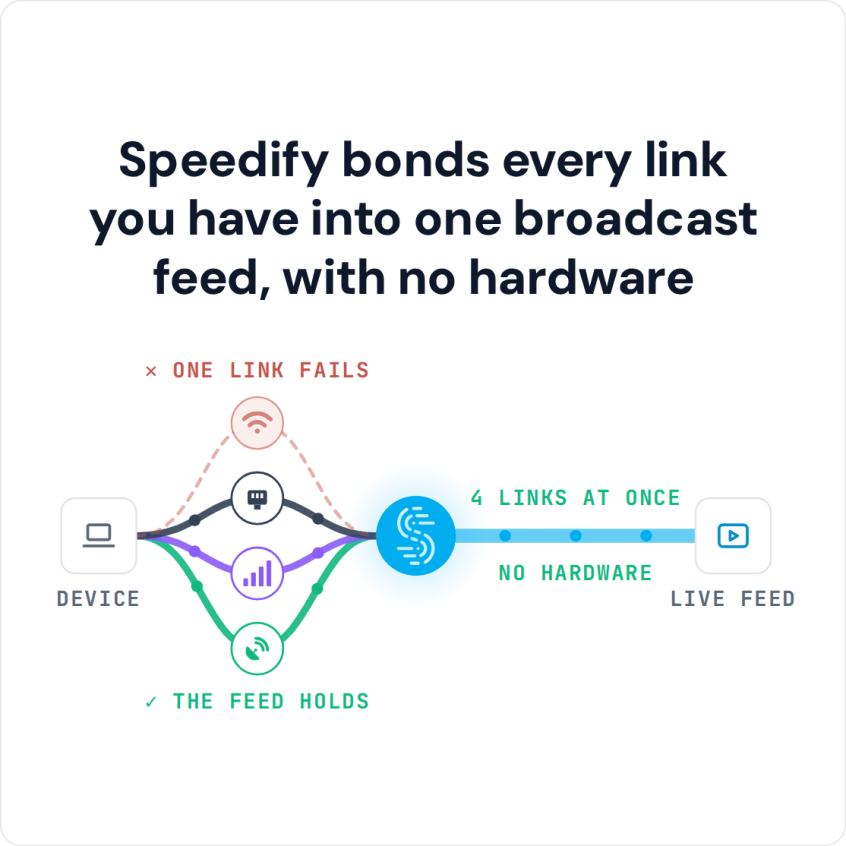
Speedify bonds every link you have into one broadcast feed, with no hardware
Further down, a side-by-side sheet compares the internet bonding options and sets out what a broadcast team gains from the software route. Speedify’s team can size it for your setup.
Watch now
How Speedify combines internet connections on any hardware
Get started with Speedify for your business
Speedify offers three commercial paths. They work together, and most enterprise customers use two or more.
01
Speedify Teams
Speedify on every supported OS for every team member
Centralized dashboard for billing, user provisioning, and usage analytics
CSV import/export and a RESTful management API
02
Speedify for Routers
License for supported OpenWrt routers
Powered by Speedify hardware lineup ready to deploy out of the box
Miri, GL.iNet and other partner models
Covers every device on the network, with no per-device install
03
Embed Speedify into your product
A · DIY
Build it yourself with the Speedify SDK.
Integrate Speedify into your iOS, Android, Windows, macOS, Linux or QNX product. Full developer documentation, sample code and supported integration paths. Your team owns the build, and the Speedify SDK handles combining the internet connections.
B · CUSTOM ENGINEERING
Have the Speedify team build it for you.
Why Live Video Broadcasts Combine Several Cellular Connections
When broadcasting live video online, reliable internet connectivity is essential. Live media producers are constantly looking for solutions to get the job done without low quality video, stuttering, buffering or dropouts.
The problem is that a single internet connection can fail at any time during a live stream, through infrastructure problems, weak wireless coverage or congestion. That’s why it’s best to use two or more internet connections. Here is how to improve your live streaming internet.
Internet bonding for live streaming is the norm for broadcasting video nowadays. It usually means using multiple cellular connections simultaneously (cellular bonding) through dedicated hardware. A bonded internet connection keeps a live stream up when one of those connections weakens or drops.
But what is the best internet bonding solution for live streaming? The comparison sheet below covers hardware and software solutions: LiveU, Peplink, Teradek, Mushroom Networks, Streambox, TVU Networks, Dejero and Speedify.
How Combining Internet Connections Works for a Live Stream
Bonded internet (internet bonding) splits traffic across two or more internet connections packet by packet and puts it back together at a server on the far side, which forwards it to the streaming platform. The platform sees one connection from one IP address. The stream’s upload can use the sum of every connection, and a connection that drops only removes its share of the bandwidth instead of ending the stream.
That server is what separates bonding from load balancing. A load-balancing router puts each stream on one connection, so the stream is limited to that connection and restarts when it fails. Cellular bonding is the same idea built from several 4G/5G cellular connections, usually from different carriers, which is how most broadcast backpacks work.
Hardware and Software Solutions for Combining Connections When Live Streaming, Compared
The sheet covers the most popular solutions for bonded internet when broadcasting live video online, compared on equipment, maximum bitrate supported and cost.
| Dejero | LiveU | Mushroom Networks | Peplink | Speedify | Streambox | Teradek | TVU Networks | |
| Typical equipment | Dedicated hardware bonding device | Dedicated hardware bonding device + streaming service subscription | Dedicated hardware bonding device | Dedicated hardware bonding device | Software subscription to run directly on supported hardware devices | Dedicated hardware bonding device + streaming service subscription | Dedicated hardware streaming / bonding device + streaming / bonding service subscription | Dedicated hardware bonding device |
| Portability | No | Some solutions only, e.g. LiveU Solo | Some solutions only, e.g. Streamer, Streamer Pro | Some solutions only, e.g. SpeedFusion Engine Series | Yes, depending on the device it’s running on: laptop, mobile device | Some solutions only, e.g. AVENIR Mini 5 | Some solutions only, e.g. Teradek Bond, Teradek LinkPro | Some solutions only, e.g. TVU One / Nano |
| Supported connection types | Ethernet (Gateway 211 only), Wi-Fi, cellular | Ethernet, Wi-Fi, cellular | Ethernet, Wi-Fi, cellular | Ethernet, Wi-Fi, cellular | Ethernet, Wi-Fi, cellular | Ethernet, Wi-Fi, cellular | Ethernet, Wi-Fi, cellular | Ethernet, Wi-Fi, cellular |
| Maximum bonding speed | 1 Gbps | 20 Mbps for streaming / 60 Mbps for file transfer (LU600 HEVC) | Streamer Pro: 30 Mbps max. throughput Streamer: 1 Gbps (standalone), 30 Mbps (RTMP) max. throughput |
200 Mbps with SpeedFusion Cloud | Up to 300 Mbps on Speedify public servers; up to 1 Gbps with a dedicated server | 1 Gbps | According to streaming settings, limited by ingest servers | 1 Gbps for the 5G TVU One Router (portable) |
| Technology | Smart Blending Technology | LiveU Reliable Transport (LRT) | Broadband bonding | SpeedFusion and other business-oriented ones | Combining internet connections, Speedify protocol | Network bonding | Sharelink, Core | IS+ cellular bonding |
| Cost | Approx. $4000 for the Gateway 211 | Starting at $995 for the LiveU solo + $450 / year for the LRT service | Starting at $10,000 | Starting at $499 for the Peplink UBR LTE + SpeedFusion Cloud subscription starting at $20 / 6 months / 500 GB | $89.99 / year; optional additional cost for the dedicated server(s) | Starting at $495 for the Streambox Cloud Event Package + the cost of the Avenir Mini 5 | Starting at $4,990 for the Teradek LinkPro Backpack + $25 / month for the Sharelink service + additional cost per GB over 50 GB | Upon request; likely at least a few hundred dollars for the TVU Router Nano |
All solutions work very well for use cases such as:
- IRL live streaming
- remote learning
- online and hybrid events, including wedding videography and concerts
- reporting from the field
- entertainment
- houses of worship
Reasons to Go with Speedify Software Internet Bonding for Live Streaming
As you can see above, there are three main differentiators when it comes to Speedify vs. any of the other bonded Internet solutions for live streaming:
- hardware vs. software-only: Speedify’s internet bonding solution prioritizes live streaming while running on any computer, mobile device, supported router or other appliance. As a software-only service, Speedify runs on equipment you already have, with no extra space, power source or box to set up for live streaming or file transfers.
- Cost: all hardware-based internet bonding solutions (Dejero, LiveU, Mushroom Networks, Peplink, Streambox, Teradek and TVU Networks) have an initial investment of at least $495 plus a subscription to a cloud service. With Speedify, you only pay for the monthly or yearly subscription.
- Flexibility: instead of being committed to dedicated cellular bonding hardware, with Speedify you can turn any supported device into an internet bonding machine for live streaming. If you want, you can even create your own bonded Internet router and use it in a similar way to a hardware device.
For a real-world case, read about Doug Piper’s decision to live stream beer tasting using Speedify after considering a LiveU setup.
Live Stream over Combined Internet Connections with Speedify on a Router, Computer or Phone
Speedify provides mission critical solutions for consumers and businesses of all sizes. Speedify spreads individual packets across all of your available internet connections, so even large single-socket transfers such as streaming video, uploading or downloading files can use the combined speed; Speedify says that reaches up to 95% of the combined upload and download speed.
Alongside the app itself, available for Windows, macOS, Linux, iOS, Android and OpenWrt routers, Speedify can also be embedded into other software apps via the Speedify SDK, or into networking, IoT and hardware products via the Powered by Speedify program.
A recent example of a Powered by Speedify hardware implementation is the Miri Technologies X510 network router. The Miri X510 can use up to 7 connections through its ports and another 20 phones through Speedify’s cellular sharing feature.
Speedify Business Solutions
Speedify Teams
Speedify for Routers

Speedify Embedded Solutions and Integrations
Add Speedify to your own app or hardware with the Speedify SDK. Your product then combines internet connections, fails over automatically when one drops, and encrypts the traffic, using the same technology as the Speedify app.