
You Can Combine Hotel Wi-Fi with 4G / 5G Cellular Data at Once with Speedify for Faster, More Reliable Internet at Hotels
You can get faster uploads and downloads and more reliable internet in a hotel room by using the hotel Wi-Fi and your phone’s 4G/5G cellular connection at the same time. Speedify is an app that combines Wi-Fi, 4G/5G cellular, Ethernet, Starlink and satellite internet connections into one connection, so uploads, downloads and video calls keep moving even on slow hotel Wi-Fi. On hotel Wi-Fi alone, Speedify works as an encrypted VPN and cannot make that Wi-Fi faster.
Below is how Speedify does that on a laptop and on a phone, and how to set it up in four steps.
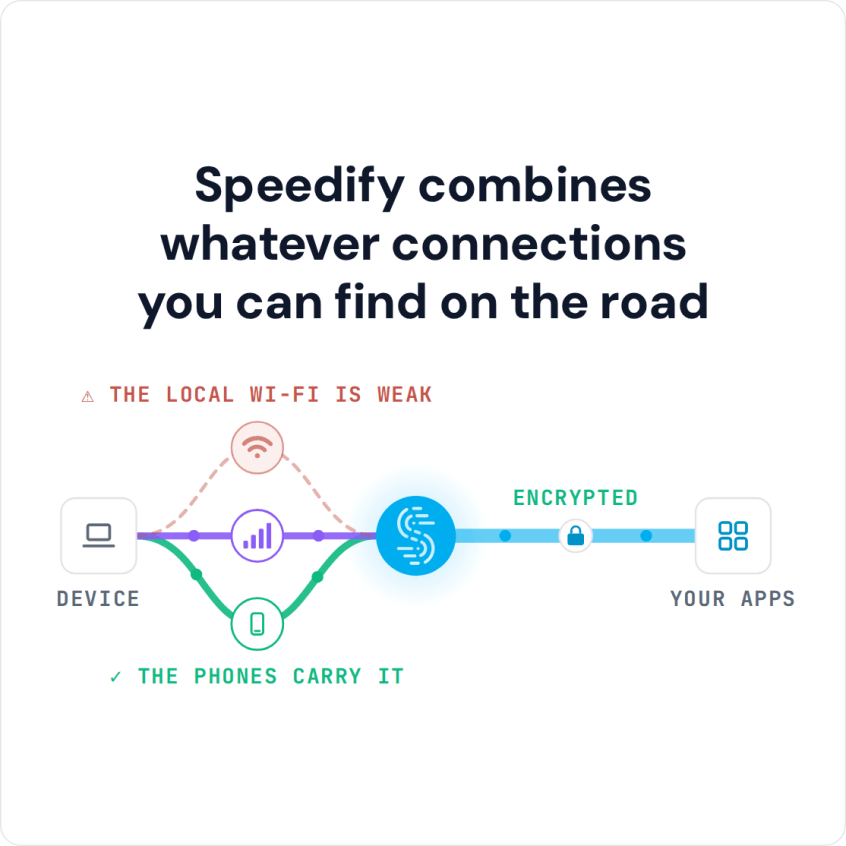
Speedify combines whatever connections you can find on the road
How do I use WiFi and 4G/5G cellular at the same time with Speedify?

Pick your two internet connections and your device below and we'll take you to the step-by-step setup guide.


How Speedify Speeds Up Hotel Internet on a Laptop or Phone
On a laptop or desktop, Speedify combines the hotel Wi-Fi with 4G/5G cellular from a tethered phone, or with a wired Ethernet port if the room has one, for faster uploads and downloads. Even when one connection stops working, Speedify keeps your transfer going on the other until both are available again.
On an iPhone or Android phone, Speedify combines the hotel Wi-Fi and your 4G/5G cellular connection. If the hotel Wi-Fi goes down, Speedify moves your traffic to cellular, so video streams, file uploads and messages keep going without buffering.
Hotel Wi-Fi is shared by every guest, so it slows down when many guests are online at once, and you’re far from the only one fighting it. Speedify helps whether you’re traveling for work or on a family vacation.
How to Combine Hotel Wi-Fi and 4G/5G Cellular with Speedify
- Download Speedify on your laptop or phone. It runs on Windows, macOS, iOS, Android and Linux.
- Connect to the hotel Wi-Fi and finish the hotel’s login page if it shows one.
- Add 4G/5G cellular. On a phone, keep cellular turned on. On a laptop, connect your phone with a USB cable and turn on USB tethering (Personal Hotspot on an iPhone); on a Mac, use an iPhone for this, because Android USB tethering does not work with Speedify on a Mac.
- Open Speedify and sign in, or create a free account, which includes 5 GB per month. Speedify uses both connections at once and keeps you online on cellular if the hotel Wi-Fi drops.
Speedify
Get started with Speedify today.
Speedify combines Wi-Fi, 4G/5G cellular, Ethernet, Starlink and satellite into one faster, more reliable internet connection. Free to try: 5 GB a month with a free account. No credit card required.
🚀 Speed
Faster uploads and downloads, because Speedify uses all your internet connections at once.
📶 Stability
If one internet connection drops, Speedify moves your traffic to the others in milliseconds.
🔒 Security
AES-256 encryption on every internet connection, on any network you join.



15M+ downloads worldwide. 75K+ five-star reviews on iOS and Android.