
Speedify Makes Starlink a More Reliable Internet Connection for Farming Operations
Farms can run on Starlink, which reaches the fields, barns and remote acres that cable and fiber never did, with downloads of 45 to 280 Mbps and uploads of 10 to 30 Mbps.
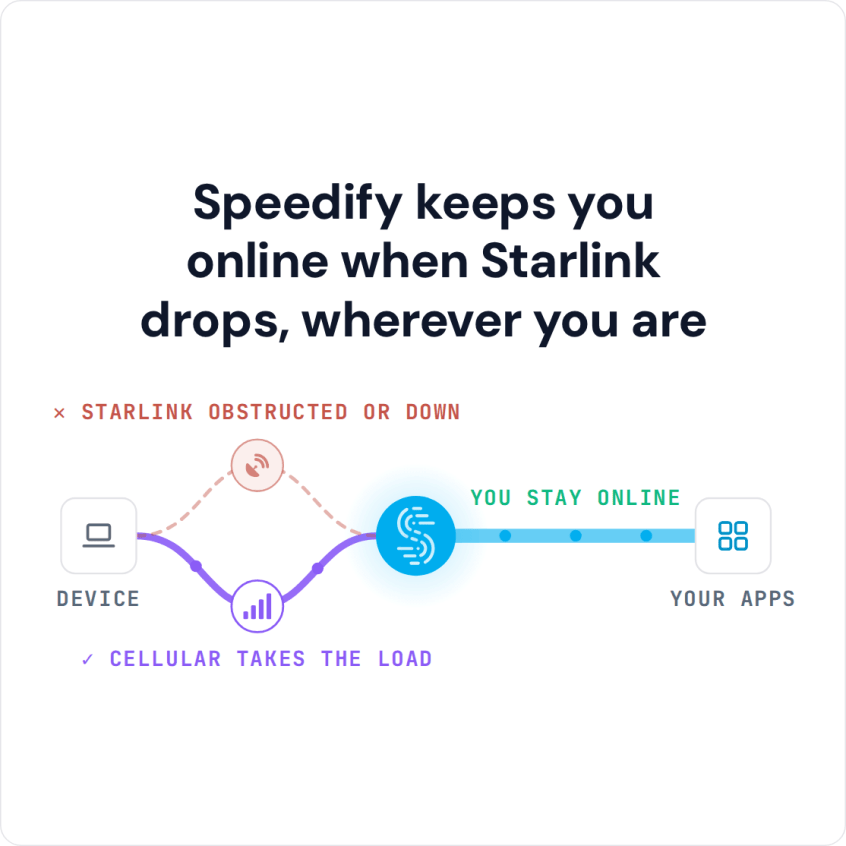
Barn cameras, farm software and calls with buyers and suppliers all need an internet connection that doesn’t cut out halfway through the day. Speedify is an app that uses Starlink and 4G/5G cellular at the same time, so when a storm or a tree blocks Starlink, the farm stays online over cellular. With Starlink alone, Speedify works as an encrypted VPN and cannot stop Starlink from dropping.
Watch now
How Speedify combines internet connections on any hardware
Get started with Speedify for your business
Speedify offers three commercial paths. They work together, and most enterprise customers use two or more.
01
Speedify Teams
Speedify on every supported OS for every team member
Centralized dashboard for billing, user provisioning, and usage analytics
CSV import/export and a RESTful management API
02
Speedify for Routers
License for supported OpenWrt routers
Powered by Speedify hardware lineup ready to deploy out of the box
Miri, GL.iNet and other partner models
Covers every device on the network, with no per-device install
03
Embed Speedify into your product
A · DIY
Build it yourself with the Speedify SDK.
Integrate Speedify into your iOS, Android, Windows, macOS, Linux or QNX product. Full developer documentation, sample code and supported integration paths. Your team owns the build, and the Speedify SDK handles combining the internet connections.
B · CUSTOM ENGINEERING
Have the Speedify team build it for you.
How Starlink Helps Farms That Need Better Internet
Farming runs on the internet more every season. Precision farming systems use GPS, field sensors and cloud software to plan planting, watering and harvest. Farm management software tracks stock, equipment, money and paperwork. Security and wildlife cameras upload video. Smart irrigation, livestock sensors and automated equipment all send data that needs a steady internet connection.
Farms without cable or fiber have been stuck with slow DSL or patchy cellular. A Starlink dish gives the farm enough speed to run all of these systems at once, alongside everyday office work.
Speed isn’t the whole story, though. A camera that goes dark in a storm, or farm software that fails to sync field records, causes real problems. Starlink Wi-Fi covers the buildings around the Starlink dish, not the far fields, so machines out in the field usually rely on their own cellular connection. Your Starlink dish also switches satellites about every 15 seconds, which causes short drops.
Keep the Farm Online When Starlink Internet Drops, with Speedify
Speedify runs on the farm’s router or office computer and uses Starlink and 4G/5G cellular at the same time. When both are working, the farm gets faster downloads and uploads than either one gives alone. When Starlink drops, Speedify moves all farm traffic to cellular on its own. Cameras, farm software and the farm office keep working. For cameras in particular, see keeping security cameras online during an outage.
Speedify needs that second internet connection. With Starlink alone, Speedify can’t add speed or stop drops. On a family farm with no cellular modem, cellular sharing in Speedify lets the family’s phones on the farm Wi-Fi share their cellular connections with the office computer.
Speedify also encrypts all internet traffic, which protects farm business data and financial records.
How to Set Up Speedify with Starlink on a Farm
Step 1: Install the Starlink Dish at the Farm
Mount the Starlink dish on a farm building or in a central spot with a clear view of the sky. Open, flat land with few trees is ideal. Check the Starlink app for obstructions and signal.
Step 2: Add a 4G/5G Cellular Internet Connection
Connect a 4G/5G cellular router or a USB cellular modem to the farm router or to the computer running Speedify. Even one bar of rural cellular signal gives Speedify a second internet connection to use when Starlink drops.
Step 3: Install Speedify on the Farm Router or Office Computer
Download Speedify and install it on the office computer, or on a compatible router to cover the whole farm network. Speedify finds every internet connection and starts using them right away.
Which Farms Need a Second Connection for Starlink Internet
- Row crop and grain farms using precision farming software and field sensors that report back to the farm network
- Livestock farms running herd health monitors, automatic feeders and barn cameras
- Orchards, greenhouses and specialty crop farms with automatic irrigation and climate control
- Agribusinesses and farm management companies running several farms that each need a steady internet connection
- Farm families who run the farm business from home and talk to suppliers, buyers and government offices online
Speedify Is Used on Millions of Devices Worldwide
Speedify has made internet connections faster and more reliable for businesses and individuals since 2014.
15M+
Speedify downloads worldwide75K+
5-star reviews for Speedify on iOS and Android82
Speedify server points of presence in 50+ cities on 6 continents500TB+
Of internet traffic carried by Speedify every weekSpeedify Partners
Speedify works with these companies to bring faster, more reliable internet and networking technology to their customers and employees.


See Starlink Dish Status on the Farm
Speedify shows real-time Starlink dish alerts in the app. If your Starlink dish has a problem, such as overheating, Speedify shows the alert. On a farm, where the Starlink dish sits in full sun, dust and seasonal weather, an early alert gives you time to act before the internet goes down.
For farm families and single farms: Download Speedify to use Starlink and cellular together on the farm.
For agribusinesses and farm management companies: Speedify can combine Starlink and cellular at every farm you run. Contact Us to plan the setup.
Speedify Business Solutions
Speedify Teams
Speedify for Routers

Speedify Embedded Solutions and Integrations
Add Speedify to your own app or hardware with the Speedify SDK. Your product then combines internet connections, fails over automatically when one drops, and encrypts the traffic, using the same technology as the Speedify app.