


You Can Combine Starlink with Another Connection - Starlink, 4G, 5G, DSL - with Speedify to Fix Slow and Unreliable Starlink
When it comes to performance, Starlink is on par with other Internet service providers out there, on average. You have to take into account both remote areas, where Starlink performs very well, and urban areas, where fiber Internet does better.
Regardless of where it is used, Starlink can be rather slow and unreliable. This website, unaffiliated with Starlink, centralizes community based Starlink stats from around the world. Here are some interesting numbers, as of April 2025:
- average ping: ~33 ms
- average download speeds: 152 Mbps
- average upload speeds: 18 Mbps
This article explains how you can make sure your Starlink connection is faster and more reliable when compared to the other providers - just use Speedify to combine it with other connections - read below for more details.
Quick answer
Should you get a backup connection for Starlink?
Yes. Starlink goes down every day — an always-on dish averages about 34 minutes of downtime daily from routine satellite handoffs. A second connection keeps you online when Starlink drops.
What’s the best backup connection for Starlink?
A 4G/5G cellular hotspot or SIM is the most practical backup for most Starlink users — it works anywhere Starlink works, requires no installation, and uses a different network so outages rarely overlap. Cable or DSL broadband is a strong option if you have it at a fixed location. A second Starlink dish is also possible if you need maximum throughput.
How do you use two internet connections at once with Starlink?
Speedify combines Starlink with any other connection — cellular, cable, Wi-Fi, or a second dish — into one bonded connection. Speedify runs on your phone, laptop, or router. When Starlink drops, Speedify moves your traffic to the backup instantly, so calls don’t cut out and downloads don’t stall. Speedify is free to try.
71% of Speedify’s Starlink users already run a second connection. The data below shows why.
Try Speedify free →Speedify Starlink Index — real-world performance from 6,209 Starlink users: 2.4% downtime, about 34 minutes a day for always-on connections
Starlink goes down every day.
Here’s what that actually looks like.
Speedify passively monitors every connection it bonds. These figures come from 6,209 Starlink users over 14 days — compared in real time against the other connections on the same devices. No speed tests, no lab conditions.
Daily downtime
~34 min
2.4% of connected time unreachable
Median latency
60 ms
p90 spikes to 257 ms
Avg packet loss
0.17%
vs 0.08% on T-Mobile
71% ran at least one other connection simultaneously — 4,381 of 6,209 users. Cellular is the most common backup.
Use Speedify to stay online during satellite handoffs every 15 seconds
Research confirms Starlink switches between satellites every 15 seconds on a fixed schedule. Each satellite handoff is a potential dropout, and on a congested network or with any obstruction, those Starlink dropouts become real interruptions.
Speedify fixes Starlink connection drops by combining your Starlink internet connection with another satellite dish, Wi-Fi, 4G/5G cellular, or wired Ethernet at the same time. When Starlink drops, Speedify keeps your traffic moving on the backup internet connection instantly.


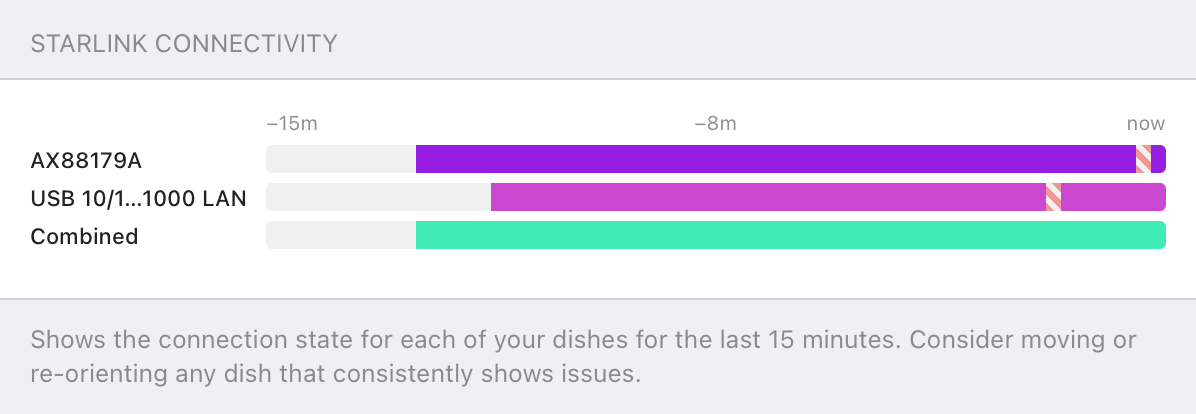

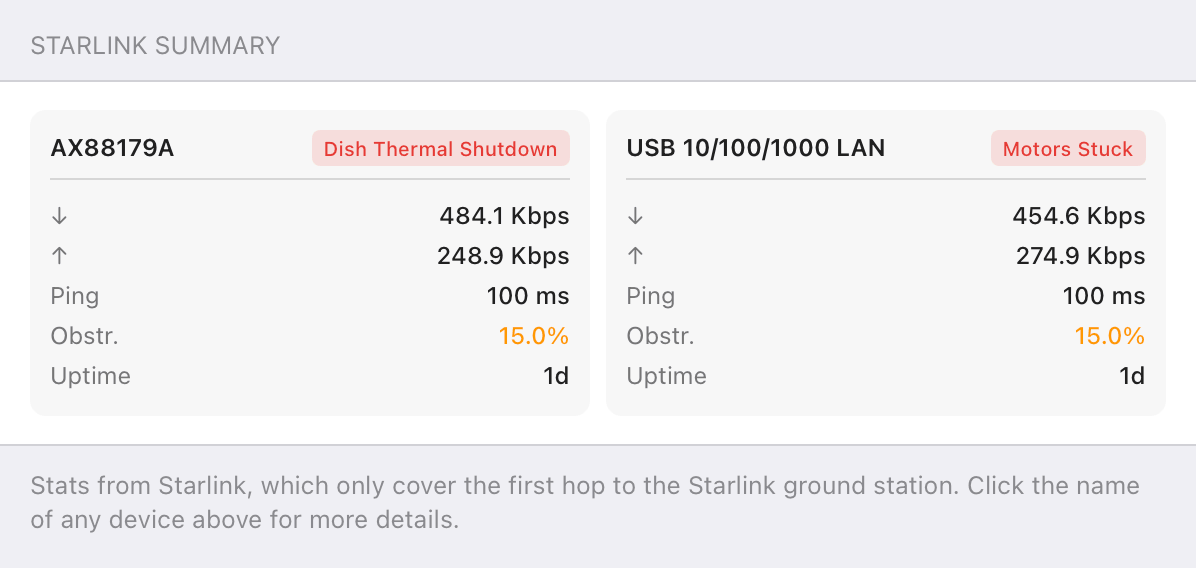

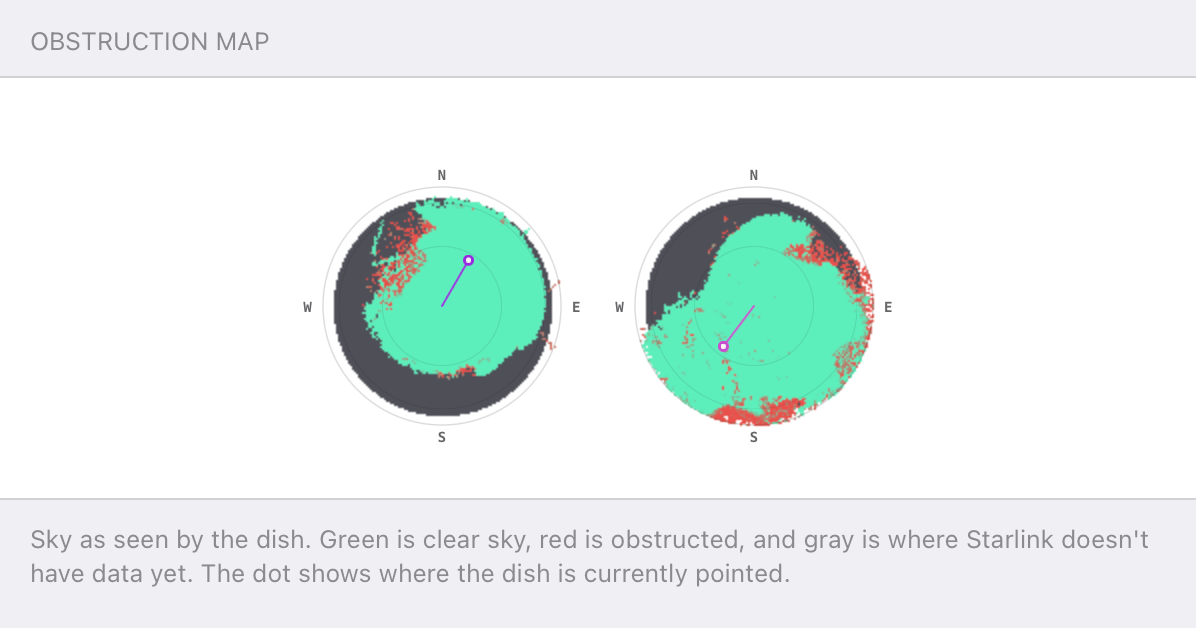
Speedify alerts you about your Starlink dish status
Speedify software alerts you about your Starlink dish status as soon as your dish experiences an issue - e.g. when your actuator motor is stuck, the mast is not vertical or there's a thermal throttle.
Speedify's Starlink Control Center helps you monitor all your Starlink dishes, read obstruction maps, and align multiple dishes all in the Speedify app. Get a real-time view of each dish's health and optimize the position of each Starlink dish, so you get the best possible performance out of your Starlink connections.
Speedify
Speedify gives you faster, steadier internet by combining Wi-Fi, cellular, and Starlink
Speedify bonds Wi-Fi, 4G/5G cellular, Ethernet, and Starlink into one connection at the same time, giving you more speed, automatic failover when one drops, and AES-256 encryption on every link.
Download Speedify ›More speed
Upload and download speeds combine across every active connection on your device.
Automatic failover
If a connection drops, Speedify moves your traffic to another in milliseconds. Calls stay connected.
Always encrypted
Every link runs through an encrypted tunnel, including public Wi-Fi, cellular, and Starlink.


Speedify Feature · Pair & Share
Speedify Pair & Share: share cellular between your devices, both ways
Most hotspots give. Speedify's Pair & Share gives and takes. Two devices running Speedify pair up and each uses the other's cellular connection simultaneously, so you both get faster uploads, faster downloads, and a steadier connection. No extra hardware, no new data plans, no setup beyond a tap.
Learn how Speedify's Pair & Share works ›More speed
Every device you pair with adds its cellular to yours, and yours to theirs.
Stays connected
If a paired device drops out, Speedify keeps you online on the remaining links.
Always private
Every shared connection runs through AES-256 encryption. Your traffic is yours.
No new gear
Runs on devices already running Speedify, over your local network. Pair once, reconnects automatically.



Two Connections Are Always Better Than One, Including Starlink
All Starlink and satellite Internet users should be aware of this. A satellite connection is by its nature more unreliable when compared to wired connections like optical fiber or cable. Trees, storms and other elements can easily affect the performance. That's why it's important you are prepared, as a Starlink user.
Having a backup connection helps in this case. When Starlink is not working, you can switch to the backup and use it. You can get any type of backup connection - usually a 4G / LTE, 5G cellular data from your smartphone should be sufficient for basic Internet needs. If you need more bandwidth, think cable, DSL, etc.
If you want to go a step further and avoid Starlink disconnects altogether through seamless failover to your backup connection, you should use a channel bonding service. Speedify , for example, allows you to combine all your available connections at the same time and get faster, more reliable Internet connectivity.
An interesting review of using Starlink with Speedify was published on Nelson's log. The whole idea is similar to the above - solving the Starlink Internet reliability issues by using an additional Internet connection at the same time.
The thing that Nelson noticed is that Speedify managed to significantly minimize the packet loss rate, until it became better than on either ISP alone - Starlink and Wi-Fi backup.
In terms of results he saw, the increase in the upload rate was meaningful - the Starlink satellite connection's limited upload was supplemented by Wi-Fi.
Using Starlink with a Secondary Backup Connection - User Reviews
Here's a recent article on how to get Starlink working. The problem the author was having is an "odd blip for a second or so every now and again whilst on video calls". So he researched about load balancing WAN, but that doesn't work, as switching between connections can take even more than just waiting for Starlink Internet to resume. He finally found Speedify channel bonding VPN which he uses to combine his reliable, but slow FTTC connection with his less reliabe but faster Starlink connection. This way, he gets uninterrupted and reliable Starlink Internet.
This post on Reddit has a lot of testimonials of Starlink users with backup connections:
- prior to getting Starlink, someone had a "pitiful DSL connection" that they were going to cancel. But it turned out to be useful to pick up Starlink outages when used with Speedify.
- someone has a more complex setup, involving a 10/1 Mbps DSL connection, a 20/3 Mbps microwave connction and Starlink 50/15 Mbps. They are using a multi WAN router with the first two connections and bonding that together with the Starlink connection.
Here's another Reddit post under the same r/Starlink subreddit which talks about was to avoid Starlink disconnects. You'll find a lot of Speedify users there.
Starlink Will Work Flawlessly when Using a Backup Connection for Protection
Starlink is a great solution for those in remote and rural areas. As the deployment of all their 12,000 satellites into orbit advances, the speed, latency and reliability of the system will greatly improve.
But until you get Starlink to work flawlessly - and even after, given there might be network congestion issues in certain areas - it's best you have a secondary backup connection hooked up. This can be your tethered phone or even a cheap DSL / cable connection, if you get any of those. It will save you from those unwanted moments when your main Starlink Internet will be slow or unreliable.
Using Speedify to combine your Starlink Internet with a secondary / backup connection is the best idea for fast, uninterrupted Internet.
You can even use Speedify with Starlink alone, without any secondary connection. That's because it includes strong error correction algorithms that will optimize your Starlink connection by minimizing its packet loss rate.
As a bonding VPN, all your traffic will be secured by Speedify's advanced encryption. This will protect your online privacy and sensitive data from hackers and cyber criminals.


Get started with Speedify today!
With Speedify you can combine Wi-Fi, 4G / 5G cellular, Ethernet, Starlink and other satellites into one bonded super-connection to improve livestreaming, video calling, gaming, web browsing, and everything else you do online.






Speed
Stability
Security
Speedify engineers love talking tech on YouTube, Tiktok, and Instagram!
Alex Gizis and the Speedify engineers discuss and explain technology including Starlink satellites, Wi-Fi 7 routers, Apple networking features, fiber optics, broadband internet, 5G mobile networks, AI, networking protocols, and much more. Follow Speedify on YouTube, TikTok, Instagram, and LinkedIn!
Alex and the Speedify team are always exploring the latest in networking and security technology—like 5G, 6G, WiFi 7, laser and satellite internet—and sharing it in new discussion content across YouTube, TikTok, Instagram, and LinkedIn every week.
Got a tech question? Let's go deeper! Pop into Speedify Office Hours live every Wednesday at 10 AM Eastern. Speedify CEO Alex Gizis and our network engineers are standing by to break down your questions about networks, tech updates, and Speedify features.

