
Zwei Starlink-Verbindungen kombinieren für besseres Internet in Deutschland
Ja, du kannst einen zweiten Starlink zu deinem Konto hinzufügen und beide Antennen gleichzeitig nutzen, um in Deutschland ein schnelleres und stabileres Internet zu bekommen. Diese Anleitung zeigt, wie du die zweite Verbindung aktivierst und was das wirklich kostet.
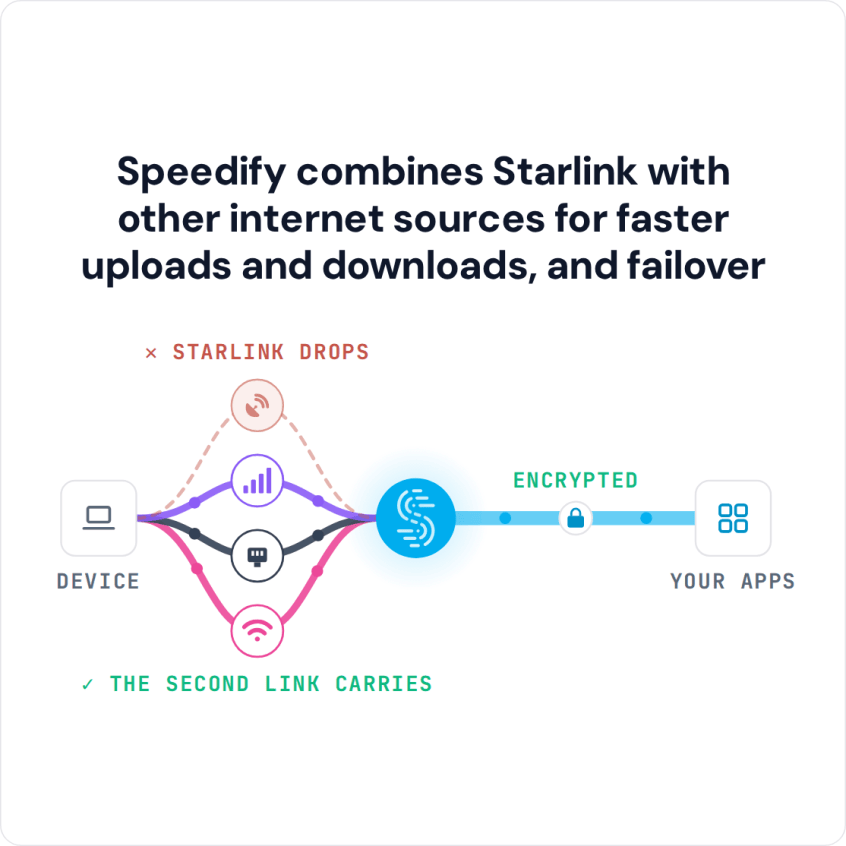
Speedify ist eine App, die mehrere Internetverbindungen gleichzeitig kombiniert, zum Beispiel zwei Starlink-Antennen oder Starlink und die Mobilfunkverbindung deines Handys. Das Ergebnis: schnellere Uploads und Downloads, und wenn eine Verbindung ausfällt, bleibst du online, weil Speedify automatisch auf die andere umschaltet. Dafür braucht Speedify die zweite Verbindung: Mit Starlink allein arbeitet Speedify als verschlüsselte VPN-Verbindung und kann Aussetzer von Starlink selbst nicht verhindern.
Starlink Internet Connection Dropouts Happen to Everyone
Speedify measures thousands of Starlink users in more than 150 countries. From 29 September to 12 October 2026, fixed Starlink dishes went offline for about 37 minutes a day on average, and Starlink dishes on RVs and boats for about 61 minutes a day.
Starlink also switches each dish to a new satellite every 15 seconds, and a switch can cause a short dropout. Even a perfectly installed Starlink dish goes offline, and about 7 in 10 Starlink users on Speedify use Starlink together with a second internet connection, like 4G/5G cellular.
Speedify combines Starlink with other internet sources for faster uploads and downloads, and failover
Zweite Starlink-Antenne zum selben Konto hinzufügen: 2 Methoden
Starlink erlaubt mehrere Abonnements unter einem Konto: im Residential-Tarif bis zu 8 Antennen, im Business-Tarif ohne Begrenzung. Jede Antenne braucht eigene Hardware und ein eigenes monatliches Abonnement.
Methode 1: Neue Subscription bestellen
- Bei starlink.com einloggen.
- Den Tab Abonnements öffnen.
- Oben rechts auf Add Subscription klicken.
- Tarif auswählen und Bestellung abschließen.
Methode 2: Vorhandene Hardware aktivieren
- starlink.com/activate aufrufen.
- Existing Account wählen.
- Aktivierungsschritte für die zusätzliche Antenne durchführen.
Warum Starlink in Deutschland häufig schwankt
Starlink ist in Deutschland seit 2021 verfügbar und hat sich besonders in ländlichen Regionen als Alternative zu langsamem DSL etabliert. Laut starlink.com liegen typische Geschwindigkeiten bei 45 bis 280 Mbps im Download und 10 bis 30 Mbps im Upload. Die häufigsten Ursachen für Einbrüche:
- Satelliten-Congestion: Abends teilen sich mehr Nutzer die Satellitenkapazität. Ein einzelner Anschluss bekommt dann weniger Bandbreite zugeteilt.
- Wetter: Starkregen, dichte Bewölkung und Schnee auf der Antenne dämpfen das Signal erheblich.
- Satellitenwechsel: Jede Starlink-Antenne wechselt alle 15 Sekunden den Satelliten. Bei Videoanrufen und Internettelefonie ist das als kurzes Stocken spürbar.
- Hardware-Kapazitätsgrenzen: Eine einzelne Antenne hat physikalische Bandbreitenlimits, die kein Troubleshooting überwindet.
Kosten für einen zweiten Starlink in Deutschland (Stand 2026)
| Kostenposition | Einmalig | Monatlich |
|---|---|---|
| Starlink Standard Hardware | ~349 EUR | – |
| Starlink Residential (Abo) | – | ~50 EUR |
| Starlink Local Priority (Business) | – | ab ~250 EUR |
| Montagehalterung (optional) | 30-80 EUR | – |
| Speedify (App zum Kombinieren von Verbindungen) | – | 89,99 USD pro Jahr (ca. 7,50 USD im Monat) |
Die Starlink-Preise sind ungefähre Werte inklusive 19 % MwSt. Aktuelle Preise immer auf starlink.com prüfen.
Zwei Starlink-Antennen gleichzeitig nutzen: Was Speedify dafür tut
Ohne spezielle Software nutzt das Betriebssystem immer nur eine Verbindung, und die zweite Antenne liegt brach. Speedify kombiniert beide Starlink-Verbindungen: Beide laufen gleichzeitig, und Speedify verteilt den Traffic in Echtzeit Paket für Paket auf die zwei Antennen.
- Automatische Erkennung: Speedify erkennt beide Interfaces ohne manuelle Konfiguration.
- Bandbreiten-Aggregation: Zwei Anschlüsse mit je 120 Mbps ergeben kombiniert rund 200-220 Mbps.
- Failover ohne Abbruch: Fällt eine Verbindung aus, übernimmt die zweite sofort, und laufende Anrufe und Downloads werden nicht unterbrochen.
- Verschlüsselung: Sämtlicher Traffic läuft verschlüsselt, was für Homeoffice und datenschutzsensible Anwendungen wichtig ist.
Beispielwerte: Zwei Starlinks ohne und mit Speedify
| Szenario | Ohne Speedify | Mit Speedify |
|---|---|---|
| 2x Starlink Standard (je 120/15 Mbps) | 120 Mbps Down / 15 Up | ~220 Mbps Down / ~28 Up |
| Satellitenwechsel | Videoanruf friert ein | Beide Antennen wechseln gleichzeitig, nur eine Mobilfunkverbindung überbrückt den Wechsel |
| Abend-Congestion (30 Mbps) | Alle Apps verlangsamen sich | Traffic auf beide Anschlüsse verteilt |
| Wetterbedingte Dämpfung | Verbindungsabbruch möglich | Zweite Verbindung übernimmt; trifft das Wetter beide Antennen, hilft Mobilfunk |
Für wen sich ein zweiter Starlink in Deutschland lohnt
Homeoffice und Remote-Arbeit: Wer beruflich auf stabile Verbindungen angewiesen ist und außerhalb der Glasfaserversorgung lebt, profitiert direkt. Fällt eine Antenne aus, etwa durch ein Hindernis oder einen Defekt, läuft die Videokonferenz über die zweite weiter. Die Satellitenwechsel alle 15 Sekunden überbrückt nur eine zusätzliche Mobilfunkverbindung, weil beide Antennen gleichzeitig wechseln.
Landwirtschaftliche Betriebe und Gewerbe im ländlichen Raum: Viele Betriebe in Deutschland liegen außerhalb jeder Glasfaserversorgung. Zwei kombinierte Starlink-Anschlüsse liefern dort die Bandbreite beider Antennen, und fällt eine Antenne aus, bleibt der Betrieb über die zweite online.
Content Creator und Livestreamer: Die Upload-Geschwindigkeit ist der limitierende Faktor. Zwei kombinierte Anschlüsse addieren ihre Upload-Bandbreite, im Beispiel oben von 15 auf rund 28 Mbps, und verkürzen große Uploads entsprechend.
Mehrpersonenhaushalte: Wenn mehrere Personen gleichzeitig im Homeoffice arbeiten oder streamen, wird ein einzelner Anschluss schnell zum Engpass. Zwei Anschlüsse verteilen die Last gleichmäßig.
Mobil mit Starlink Roam: Wer in Deutschland und Europa unterwegs ist, kann Starlink Roam mit Speedify und einer 4G/5G-Mobilfunkverbindung kombinieren. Bricht Starlink unterwegs ab, etwa unter Bäumen oder Brücken, läuft die Verbindung über Mobilfunk weiter.
Zwei Starlinks mit Speedify einrichten: 5 Schritte
- Zweiten Starlink-Anschluss zum Konto hinzufügen: per Bestellung auf starlink.com oder Aktivierung vorhandener Hardware auf starlink.com/activate.
- Zweite Antenne mit freiem Blick zum Himmel montieren. In der Starlink-App zeigt „Check for Obstructions“ an, was die Sicht blockiert.
- Beide Verbindungen mit dem Gerät verbinden: über zwei WLAN-Netze, zwei Ethernet-Anschlüsse oder einen Router, der Verbindungen kombiniert, wie den Miri X510.
- Speedify herunterladen: verfügbar für Windows, macOS, iOS, Android, Linux und OpenWrt.
- Speedify öffnen und verbinden. Speedify erkennt beide Verbindungen automatisch und kombiniert sie. Das Dashboard zeigt Echtzeit-Werte für jede Verbindung.
Häufige Fragen zu einem zweiten Starlink
Muss ich zwei verschiedene Starlink-Tarife buchen?
Nein. Beide Anschlüsse können denselben Tarif nutzen, zum Beispiel zweimal einen Residential-Tarif. Es ist auch möglich, einen Residential- und einen Local-Priority-Anschluss zu kombinieren.
Funktioniert Speedify auch mit Starlink und 4G/5G-Mobilfunk kombiniert?
Ja. Speedify kombiniert beliebige Verbindungstypen: Starlink mit 4G/5G-Mobilfunk, Starlink mit DSL oder zwei Starlinks. Die Kombination aus Starlink und einem deutschen Mobilfunkanschluss (Telekom, Vodafone, o2) kostet weniger als ein zweites Starlink-Abonnement und überbrückt auch die Satellitenwechsel alle 15 Sekunden, was eine zweite Antenne nicht kann.
Wie hoch ist der Stromverbrauch einer zweiten Antenne?
Eine Starlink Gen3-Antenne verbraucht durchschnittlich 50-75 Watt. Bei deutschen Strompreisen von rund 0,30-0,35 EUR/kWh entstehen monatliche Zusatzkosten von etwa 11 bis 19 EUR.
Gilt in Deutschland das Widerrufsrecht für Starlink-Hardware?
Ja. Als Verbraucher hast du gemäß EU-Recht ein 14-tägiges Widerrufsrecht für online bestellte Hardware.
Auf wie vielen Geräten läuft Speedify gleichzeitig?
Ein Speedify-Individual-Abo (für eine Person) läuft auf bis zu 5 Geräten gleichzeitig. Installieren kannst du Speedify auf beliebig vielen Geräten, aktiv sein können aber nur 5 zur selben Zeit. Damit alle Geräte im Netzwerk die kombinierten Verbindungen nutzen, eignet sich ein Router mit OpenWrt oder ein Router mit integriertem Speedify wie der Miri X510.
Zwei Starlink-Anschlüsse bringen mehr Bandbreite und eine zweite Verbindung, falls eine Antenne ausfällt. Speedify sorgt dafür, dass beide gleichzeitig genutzt werden: für höheren Durchsatz, automatischen Failover und verschlüsselten Traffic. Für die Satellitenwechsel alle 15 Sekunden kombinierst du zusätzlich eine Mobilfunkverbindung.
Speedify herunterladen und beide Starlink-Verbindungen ab heute kombinieren.
Speedify
Get started with Speedify today.
Speedify combines Wi-Fi, 4G/5G cellular, Ethernet, Starlink and satellite into one faster, more reliable internet connection. Free to try: 5 GB a month with a free account. No credit card required.
🚀 Speed
Faster uploads and downloads, because Speedify uses all your internet connections at once.
📶 Stability
If one internet connection drops, Speedify moves your traffic to the others in milliseconds.
🔒 Security
AES-256 encryption on every internet connection, on any network you join.



15M+ downloads worldwide. 75K+ five-star reviews on iOS and Android.