


Can You Link Two Starlinks Together? Yes, with the Speedify app
Some of the nicest places to live in the United States also happen to be too remote to get DSL or cable Internet connections. If you live in one of these places chances are that you have Starlink service. However, satellite Internet connections like Starlink come with a series of issues in terms of reliability.
Using two or more Starlinks together will make your Internet connection faster and more reliable. Speedify helps you do that – read on to see how.
Starlink disconnects all the time for ALL Starlink users. The Speedify Starlink Index report found that Starlink connections are down for an average of ~33 min per day. Plus, all Starlink dishes experience small drops and packet loss every 15 seconds, when the moving Starlink satellites hand off the connection to the next satellite overhead.
The best way to fix Starlink's connection drops is to combine your Starlink connection with another internet connection, such as 4G/5G cellular, cable, fiber, DSL, or another Starlink connection. Speedify makes this possible with channel bonding.

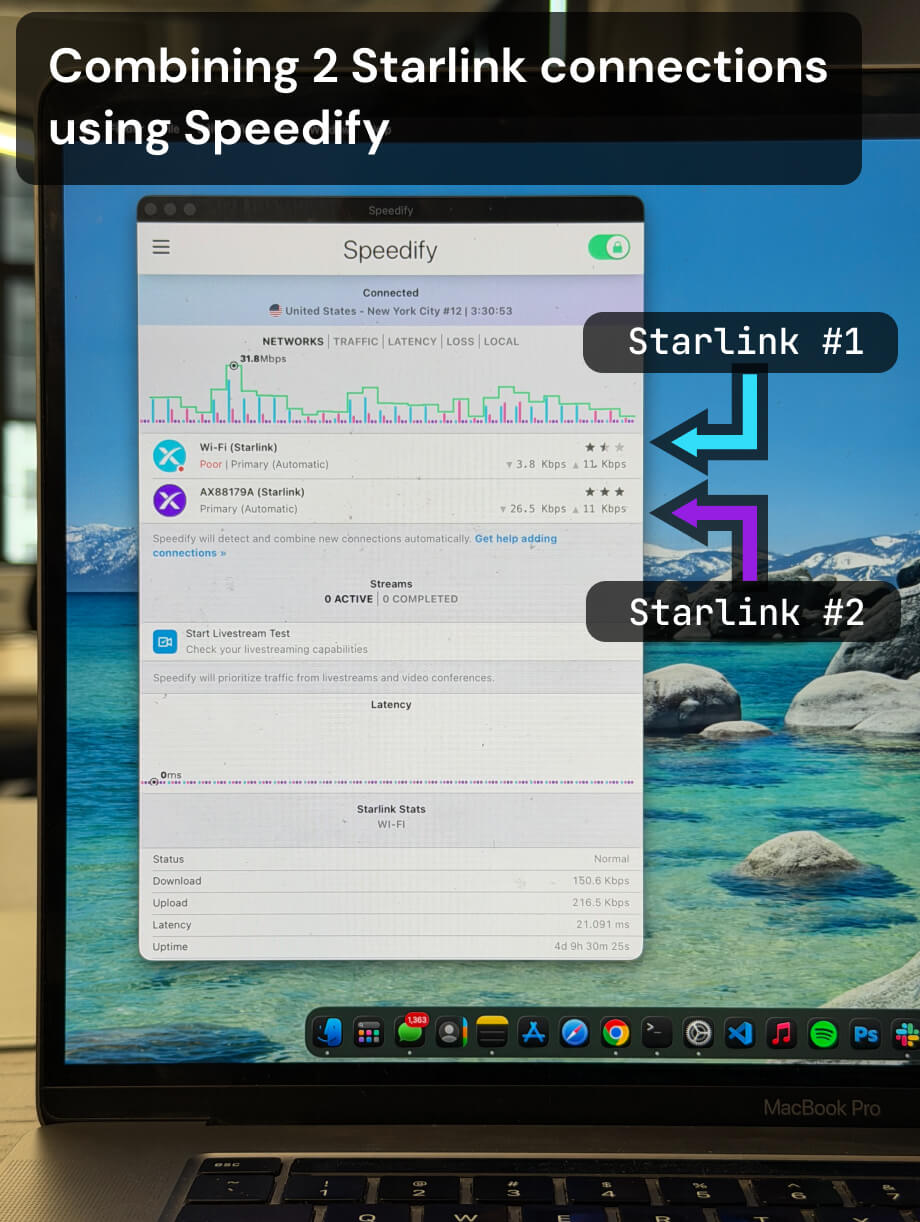
Multiple Starlink dishes, one faster and more reliable connection.
Speedify bonds all your Starlink dishes simultaneously — so you get the combined bandwidth of all your Starlink dishes, and stay online when any one drops.
Per-dish daily downtime
~33 min
2.3% of connected time — every dish, every day
Bonded uptime
>99%
When one dish drops, the others keep you online
How to Deal with Slow Starlink Internet
When your Starlink internet is slow, it’s hard to stream videos, use VPNs, or even stream music and download files. There is not much you can do to increase the speed of a single satellite link.
However, you can combine two or more Starlink Internet connections into a single fast pipe that gives you a true high-speed Internet experience.
How to Combine Two Starlinks with Speedify for Faster, More Reliable Internet
The first step is to download the Speedify app. It’s available for all major operating systems: Android, iOS, Linux, MacOS, Windows and even OpenWrt routers. You can use Speedify to combine any type and number of connections, but for the purpose of this article, we’ll stick to computers.
Once you have installed Speedify on your computer or supported router, you will need to connect your computer, mobile device or router to the first Starlink. Most laptops and desktop computers can connect to multiple Internet connections, but they only use one at a time. You can connect the first Starlink through your computer’s Ethernet port.
Next, you will need to connect the second Starlink in a similar manner. Because your computer most likely only has one Wi-Fi card and one Ethernet port, the easiest way to connect to the second Starlink is via Wi-Fi or a second Ethernet port through a USB adapter.
The last step once you have connected to two Starlinks is to open the Speedify app. Speedify will combine the two separate channels into a single fast pipe. You will be able to easily stream videos, music, and use other data intensive websites and apps.
Here’s a guide to bonding connections on OpenWrt. And if you prefer an out-of-the-box solution to connect two Starlinks together, you can also use the Miri X510 powered by Speedify network bonding router.
Speedify Helps Connect Two Starlinks Together for Uninterrupted Internet
Speedify does much more than just combine two or multiple Starlinks. It uses channel bonding technology to give you a faster, more reliable and secure internet experience. Its protocol is optimized for streaming and internet-intensive applications.
If one of your Starlinks becomes unreliable, Speedify will keep you connected by rerouting all your traffic through the other Starlink until the lost connection is brought back online. You don’t have to anything once Speedify is up and running. Everything happens automatically in the background. You get a fast, reliable, and secure Internet experience every time.
Plus – you can always add more internet sources, such as cellular data, into the internet mix, to make it even more reliable. Speedify’s Pair & Share feature allows you to easily share and combine LTE, 4G, and 5G cellular connections between devices to create a faster, more reliable connection for everyone.
Don’t settle for slow Internet, even if you’re in a remote location!
Alex and the Speedify team are always exploring the latest in networking and security technology—like 5G, 6G, WiFi 7, laser and satellite internet—and sharing it in new discussion content across YouTube, TikTok, Instagram, and LinkedIn every week.
Got a tech question? Let's go deeper! Pop into Speedify Office Hours live every Wednesday at 10 AM Eastern. Speedify CEO Alex Gizis and our network engineers are standing by to break down your questions about networks, tech updates, and Speedify features.


Speedify
Get started with Speedify today.
Combine Wi-Fi, 4G/5G cellular, Ethernet, Starlink, and more into one faster, steadier connection. Free to try — no credit card required.
🚀 Speed
Faster uploads and downloads by bonding all your connections at once.
📶 Stability
Automatic failover in under a second when any connection drops.
🔒 Security
AES-256 encryption on every connection, on every network you join.





15M+ downloads worldwide. 75K+ five-star reviews on iOS and Android.