

Speedify Protocol – More Internet Traffic Lanes for Improved Reliability and Unbreakable VPN Connection by Combining Starlink, Wi-Fi, 4G / 5G Cellular and DSL with Speedify
Speedify works by sending your internet traffic over every internet connection you have at the same time: Wi-Fi, 4G/5G cellular, Ethernet, Starlink and satellite. Speedify is an app for Windows, macOS, iOS, Android and Linux that splits your traffic across those connections packet by packet for faster downloads and uploads, moves it to the others if one drops (failover), and encrypts it like a VPN.
The Speedify protocol is the technology underneath. Its newest version opens up to 8 connections to the Speedify server over each internet connection, for up to twice the performance of the old protocol on fast connections, on connections with high delay (latency) and on connections that lose packets. Here is how the Speedify protocol works, and how it differs from Multipath TCP (MPTCP).
Speedify combines every connection you have into one faster, steadier one
How do I use WiFi and 4G/5G cellular at the same time with Speedify?

Pick your two internet connections and your device below and we'll take you to the step-by-step setup guide.


How the Speedify Protocol Works
TCP (Transmission Control Protocol) is one of the transport protocols used for network and internet communication. TCP divides the information being sent and received into chunks, adds a TCP header to each one and creates a TCP segment. Each TCP segment then travels across the network through a path of “hops” until it reaches the destination. You can read more on how the Internet works in this article.
Warning: technical details ahead!
The old Speedify protocol opened one TCP socket over each internet connection: one over Wi-Fi, one over 4G/5G cellular, one over wired Ethernet and so on. The new protocol opens several sockets over each internet connection, for example 8 over Wi-Fi, 8 over 4G/5G cellular and 8 over wired Ethernet.
If there’s packet loss on one of the TCP sockets, only the network packets being sent over that socket are delayed, as the TCP protocol will keep trying to send those, while the other sockets can continue sending other packets. This will minimize the negative effects of high latency and packet loss on connection performance, including the cases when you use Speedify with a single Internet connection.
In plain words
If each connection that Speedify uses were to be represented by a one lane road (e.g. Wi-Fi, cellular, Ethernet, etc.) which cars (network packets) use to get to the destination, the new Speedify protocol adds extra lanes, so that cars are distributed over all the lanes available.
When there’s a traffic event on one of the lanes, the cars on the other lanes will keep going without being dependent on the lane that’s stuck. If that lane remains stuck, the cars that have already been sent on it will be rerouted through the other lanes.
Performance Improvements for Speedify’s Protocol
In tests in the Speedify Testing Lab, the new protocol improved speed the most on:
- Fast internet connections, where a single TCP connection can’t use the full speed
- Connections with packet loss, especially wireless ones such as Wi-Fi and 4G/5G cellular
- Connections with high latency (delay), such as satellite internet, including Starlink
- Connections to servers far away, for example remote workers connecting to servers in other countries.
Here’s a graphic on how high speed is maintained when using the new Speedify protocol vs. not using Speedify:
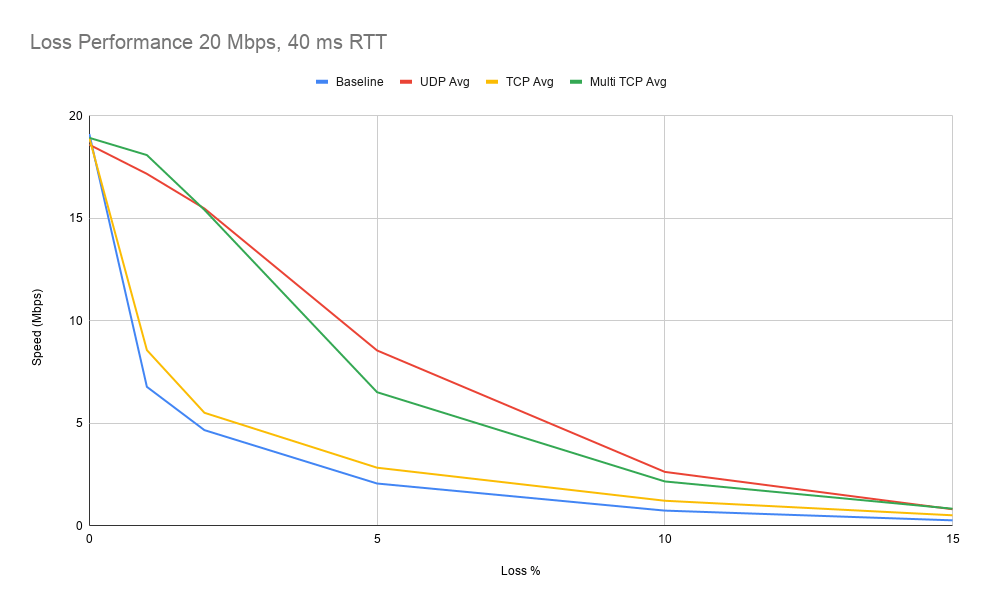
In the test of a distant server, the Speedify Testing Lab connected from Philadelphia to a server in Singapore. A single TCP socket reached about 100 Mbps of download speed; with multiple TCP sockets, the same connection reached 200 to 300 Mbps.
Speedify’s Multiple TCP Protocol Is Not Multipath TCP (MPTCP)
The new Speedify protocol opens several TCP sockets inside one internet connection, whereas Multipath TCP (MPTCP) works over several connections, much like the way Speedify combines internet connections. So MPTCP is closer to Speedify as a whole than to the new protocol. Here is how MPTCP works.
As its name suggests, Multipath TCP sends data from source to destination over multiple routes (paths), which requires more than one internet connection. MPTCP creates a TCP subflow for each connection and sends data along the different paths.

Data is flowing through multiple flows from origin to destination. The TCP header of each segment contains, along with the source and destination IP addresses, a data sequence number, so the receiver will get the data from the multiple subflows in the original order, without any corruption. The protocol also has mechanisms for congestion control, which decide what happens when one of the connections becomes slow or unreliable.
Find out more about how MPTCP works in the video below:
How Speedify Works Differently from MPTCP: Connection Priorities and Cost Awareness
MPTCP has only a limited “backup flow” option. Speedify decides how to use each internet connection based on its measured performance and on the connection priorities you set (Automatic, Primary, Secondary, Backup or Never). Speedify sends as much data as it can on:
- non-metered connections, such as wired Ethernet and Wi-Fi, before sending large amounts of data over 4G/5G cellular
- lower latency connections, such as wired (cable, DSL), before wireless (cellular, satellite)
- higher bandwidth connections before slower ones.
Speedify checks the quality of each internet connection all the time and decides how much data to send over each one, so your overall internet connection performs as well as it can. All of that traffic is encrypted, so others on the same network can’t read your internet traffic.
Here’s a comparison table between MPTCP and Speedify:
|
Feature |
Multipath TCP (MPTCP) |
Speedify |
|
Allows the use of all available connections |
yes |
yes |
|
Failover protection |
yes |
yes |
|
Error correction and packet loss |
yes |
yes |
|
Software-only solution implementation |
Linux, MacOS 10.10+ |
Linux, macOS, Windows, iOS, Android |
|
Communication security (encryption) |
When running secure protocols over MPTCP (i.e. HTTPS) |
Native |
|
Able to dynamically use other protocols (i.e. UDP) |
no |
yes |
|
Connection priority |
limited |
yes |
|
Cost aware |
no |
yes |
|
Maximizes bandwidth |
yes, limited to the implementation logic |
yes |
|
Solution cost |
depends on type of implementation (dedicated hardware / software-only) and support needed to set up and maintain |
as low as $4.99 / month |
Compared with existing MPTCP implementations, Speedify adds encryption, connection priorities, cost awareness and apps for every major platform. You can try Speedify with a free account that includes 5 GB per month.
Speedify Security: Encryption and What Speedify Records
Speedify encrypts all traffic between your device and the Speedify server, so other people on the same Wi-Fi network can’t read it. Speedify keeps no record of the sites you visit and does not sell personal data. Speedify does record connection details such as IP address, device ID, connection time and data used.
How Speedify Helps You Get Faster, More Reliable Internet
Speedify helps most when your internet connections are slow, unreliable or wireless, as they often are for RV travelers, commuters, remote workers and live streamers.
Wireless internet connections such as Wi-Fi, 4G/5G cellular and satellite are prone to coverage problems and high latency. When you are far from the hotspot or cellular tower, the internet connection is slow and lags. When your device switches from Wi-Fi to cellular or between Wi-Fi networks, the internet drops while the new connection is set up. Live streaming, video calls and gaming suffer most.
By using all your available connections at once, Speedify protects you from most of these drops. The apps you’re running don’t notice when one internet connection weakens, because Speedify automatically adjusts how much data it sends through each connection.
To learn more about Speedify, start by visiting the Speedify website, or download Speedify and try it with a free account.
Speedify
Get started with Speedify today.
Speedify combines Wi-Fi, 4G/5G cellular, Ethernet, Starlink and satellite into one faster, more reliable internet connection. Free to try: 5 GB a month with a free account. No credit card required.
🚀 Speed
Faster uploads and downloads, because Speedify uses all your internet connections at once.
📶 Stability
If one internet connection drops, Speedify moves your traffic to the others in milliseconds.
🔒 Security
AES-256 encryption on every internet connection, on any network you join.



15M+ downloads worldwide. 75K+ five-star reviews on iOS and Android.