
Use Speedify to Join Multiple Phones’ Hotspots at the Same Time to Fix Slow Internet in Camping / RV
To get internet while camping, use more than one internet connection at once, such as the campground or RV-park Wi-Fi plus your phone’s 4G/5G cellular. Speedify is an app that combines Wi-Fi, 4G/5G cellular, Ethernet, Starlink and satellite internet connections into one faster, steadier connection. That matters at a campsite, where the Wi-Fi is often slow and oversubscribed, and weaker the farther your pitch is from the access point.
When that isn’t enough, Speedify’s cellular sharing feature pairs your phones and pools their 4G/5G cellular connections for more speed, with no cables and no new data plans.
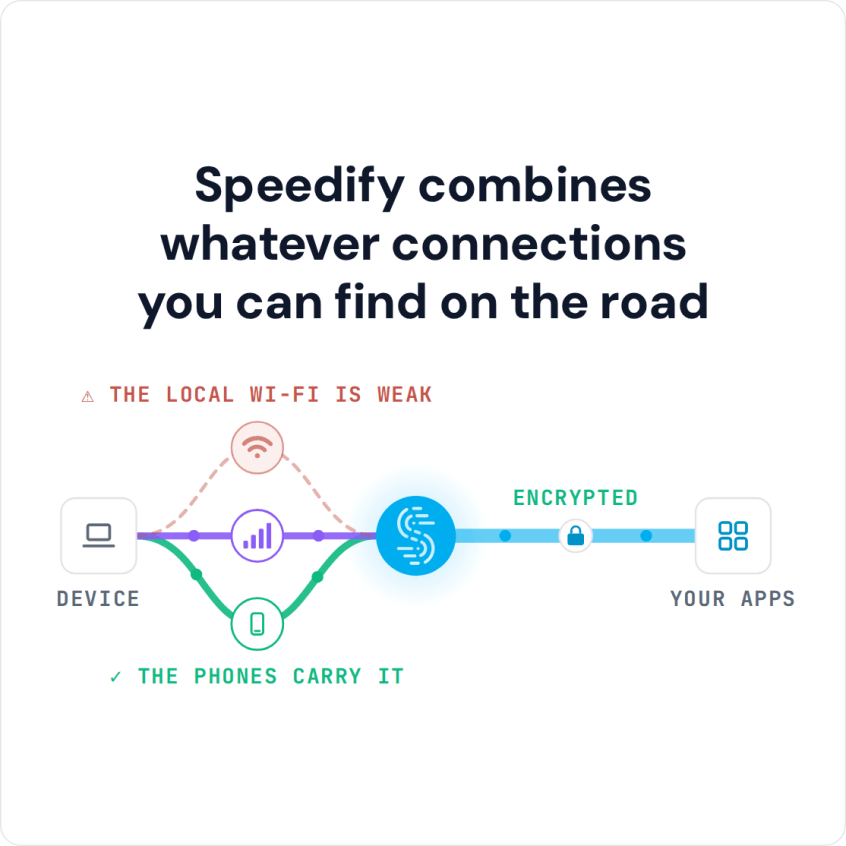
Speedify combines whatever connections you can find on the road
How do I use WiFi and 4G/5G cellular at the same time with Speedify?

Pick your two internet connections and your device below and we'll take you to the step-by-step setup guide.


Reasons for Slow Camping Internet
When you stay at a campsite or in your RV, you need internet you can rely on, and you’re not the only camper who finds that watching videos, making video calls or just browsing can be a hassle. Here are the main reasons camping internet is slow and unreliable:
- Crowded camping Wi-Fi: when the campground is fully booked, hundreds of people share the same Wi-Fi hotspot, and they all split its limited bandwidth.
- Distance from the hotspot: if your pitch is far from the Wi-Fi access point, the signal weakens over the distance and through the walls of your RV.
Combining several internet connections with Speedify gets around both problems: when one connection slows down or drops, the others carry the traffic.
3 Steps to Fix Slow and Unreliable Camping Internet
The easiest way is Speedify’s cellular sharing feature, which combines several phones’ 4G/5G cellular connections for more bandwidth for everyone. For more ways to speed up one phone, see how to make your hotspot faster.
Cellular sharing works like a personal hotspot in both directions: instead of one device sharing its internet, every paired device can share and receive connections at the same time.
Here is how to set up cellular sharing:
- Install Speedify on all your devices and connect them to the same Wi-Fi network, such as the campground Wi-Fi. If there is no Wi-Fi, or the campground Wi-Fi does not let devices see each other, turn on Personal Hotspot on one phone and connect the other devices to it.
- In Speedify, go to Settings > “Pair & Share”, turn on Sharing and/or Receiving, tap “Start by Pairing a Device”, pick the other device under Discovered Devices, and have the other person accept.
- Speedify now uses your own connection and the shared 4G/5G cellular connections together, for faster, more reliable internet at the campsite or in your RV. Shared data counts as hotspot data on the sharing phone’s plan.
Traffic between devices is fully encrypted, and you always keep full control over which devices can do what: set permissions and limits (10 Mbps per device by default), or unpair from other devices at any time.
For more details, see Speedify’s knowledge base article series on cellular sharing.
Speedify’s Cellular Sharing Fixes Slow Camping and RV Internet
With more than one phone to help, ideally on different carriers, Speedify’s cellular sharing feature combines every available connection and keeps you online at the campsite when one signal fades.
Speedify
Get started with Speedify today.
Combine Wi-Fi, 4G/5G cellular, Ethernet, Starlink, and more into one faster, steadier connection. Free to try — no credit card required.
🚀 Speed
Faster uploads and downloads by bonding all your connections at once.
📶 Stability
Automatic failover in under a second when any connection drops.
🔒 Security
AES-256 encryption on every connection, on every network you join.



15M+ downloads worldwide. 75K+ five-star reviews on iOS and Android.