
Why Is My Internet So Slow When Everyone Is Home?
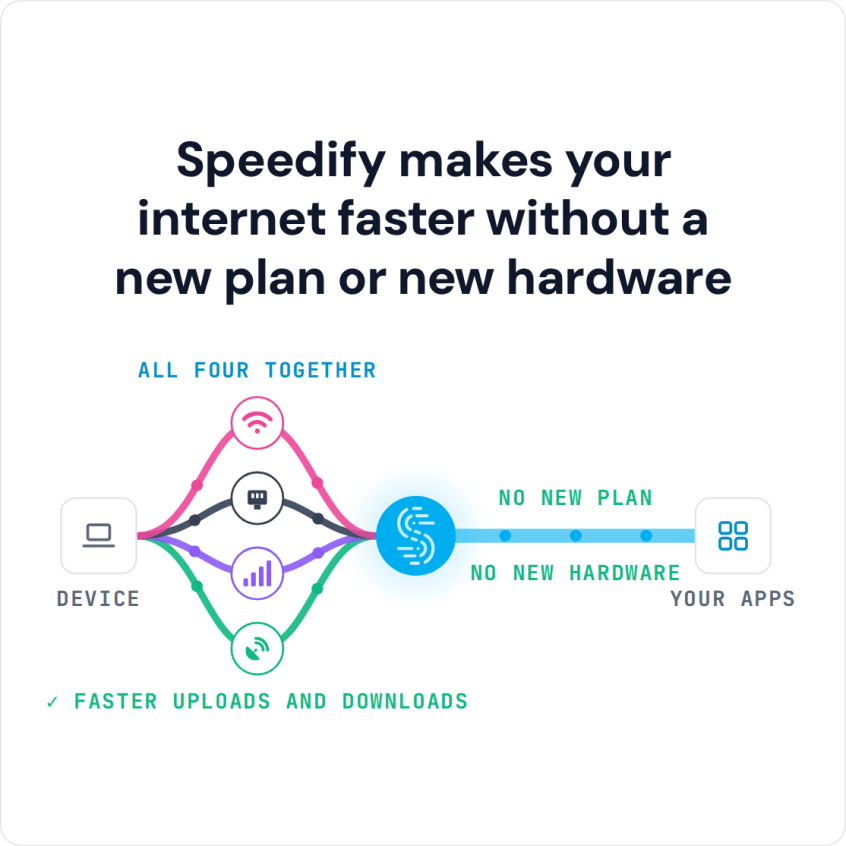
Internet slows down when everyone is home because every laptop, phone and TV shares one connection, and its upload lane fills first. Faster downloads and uploads come from adding a second internet connection, which often helps more than paying for a bigger plan. Speedify is an app that combines Wi-Fi, 4G/5G cellular, Ethernet, Starlink and satellite internet connections at the same time into one faster, steadier connection.
If your connection crawls every evening, you are not the only one. With two connections working together, a busy evening no longer forces every device to fight over a single connection.
Speedify makes your internet faster without a new plan or new hardware
How do I use WiFi and 4G/5G cellular at the same time with Speedify?

Pick your two internet connections and your device below and we'll take you to the step-by-step setup guide.


What Internet Congestion Is: Shared Bandwidth and Upload Limits
- Shared bandwidth. Every device on the network (laptops, phones, smart TVs, game consoles) draws from the same connection at once, and the total gets divided among them.
- Upstream limits. Uploads, video calls, and cloud backups often ride on a much smaller upload allocation than the download number suggests, and that lane fills fast during a busy evening. Here is how to get faster upload speeds for streams and big files.
- Router overhead. A router juggling a dozen active devices spends more time managing traffic than delivering it, adding delay even before the connection itself is at capacity.
None of this shows up on a morning speed test, which is why the problem seems to appear out of nowhere at 7pm.
Why a Faster Internet Plan Does Not Always Fix Evening Slowdowns
Upgrading to a faster plan raises the ceiling, but it does not fix a household where every device is still funneled through one connection and one router. A family that needs reliable internet for working from home can pay for gigabit speeds and still watch a call stutter the moment a smart TV starts a 4K stream, because a single connection has exactly one path for all that traffic to share.
Speedify changes the math by adding paths instead of adding speed to one path. On the device running it, Speedify’s Streaming Mode, which is on by default, gives video calls and live streams priority over other traffic, so a call holds up when a download starts.
How Speedify Adds a Second Internet Connection to Expand Bandwidth
Speedify combines a second internet connection (a phone’s hotspot or USB tethering, a second ISP line, or Starlink) with the existing home connection, so the two work as one combined connection for the device running Speedify. Traffic splits across both in real time, with more routed over whichever connection has room to spare. To cover every device in the home at once, Speedify can also run on a supported router, which needs a Router License.
One strained connection becomes two connections sharing the load, with spare bandwidth at the peak hours when one connection would bottleneck.
Keeping Work Calls Steady at Peak Hours: Cellular, Plan Upgrades and a Checklist
During peak hours, the device that matters most is usually the work laptop. Run Speedify on that laptop with your phone’s 4G/5G cellular as a second internet connection, and its video calls draw on both connections instead of competing for the home connection with a game console downloading an update or a tablet streaming in another room.
Whether to add cellular or upgrade the plan depends on where the bottleneck sits. If the connection is fast in the morning but bogs down every evening, the problem is contention, and combining a second internet connection helps directly. If the plan is too slow even when nobody else is online, upgrading it raises the base speed, and a second connection adds on top. Speedify does not create bandwidth: it combines what at least two working connections already have.
A short checklist for the next slow evening:
- Check whether the slowdown happens at a specific time each day, which points to shared bandwidth rather than a broken connection.
- Add a second internet connection, such as a phone hotspot, to the device that needs it most.
- Download Speedify on that device, and on any other device that needs a stable connection during the busiest hours (an Individual plan covers up to 5 devices at once). Speedify combines both connections so you never switch between them by hand.
Slow Internet When Everyone’s Home: FAQ
Why does my internet slow down every evening at the same time?
The usual cause is peak-hour congestion: every device in the house competes for the same shared bandwidth at once, while neighboring homes on the same internet provider are busy at the same hour.
Will upgrading my internet plan fix slow speeds when everyone is home?
Not always. If the slowdown comes from devices competing for one connection, a second internet connection combined with Speedify often helps more than a faster plan. If the plan is too slow even when the house is quiet, an upgrade helps.
How does Speedify add more internet bandwidth to a home network?
Speedify combines a second internet connection, like a phone’s 4G/5G cellular, with the existing home connection on the device running Speedify, so both work together as one larger pool of bandwidth. To cover the whole home network, run Speedify on a supported router.
Does Speedify work if there’s only one internet connection in the house?
Speedify needs at least two working connections to combine, so with only one you will not see faster speeds. Your phone’s 4G/5G cellular usually works as the second.
Is everyone’s internet slow right now, or just mine?
Check your internet provider’s status page or ask a neighbor on the same provider. If their connection is slow too, the provider’s network is congested or has an outage, and a second internet connection on a different network, such as your phone’s 4G/5G cellular, keeps you online. If only your home is slow, the cause is inside the house: too many devices on one connection, or a weak Wi-Fi signal.
Speedify
Get started with Speedify today.
Speedify combines Wi-Fi, 4G/5G cellular, Ethernet, Starlink and satellite into one faster, more reliable internet connection. Free to try: 5 GB a month with a free account. No credit card required.
🚀 Speed
Faster uploads and downloads, because Speedify uses all your internet connections at once.
📶 Stability
If one internet connection drops, Speedify moves your traffic to the others in milliseconds.
🔒 Security
AES-256 encryption on every internet connection, on any network you join.



15M+ downloads worldwide. 75K+ five-star reviews on iOS and Android.