

Speedify’s Setup Analysis Report Tells You What’s Working Across Every Starlink Dish
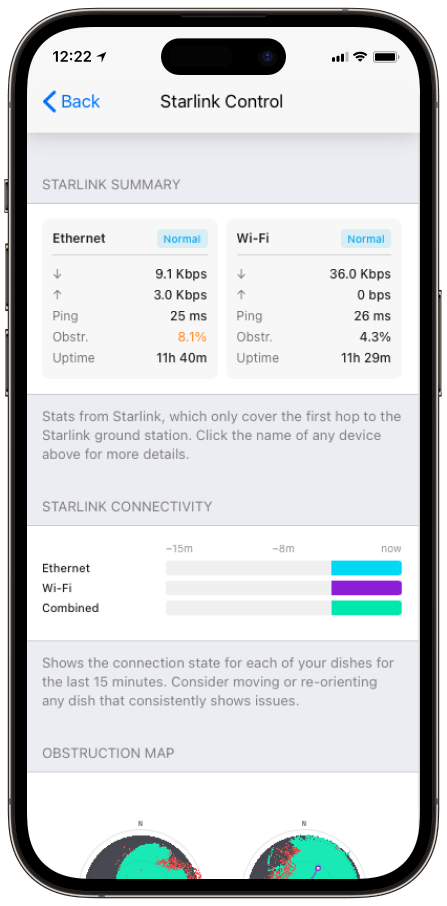
To find which Starlink dish has a problem when you run several, you’d normally check each Starlink dish’s stats one by one. Speedify’s Setup Analysis report, in the Starlink Control Center of the Speedify app, does it for you: one screen that says, in plain words, which Starlink dish needs attention and why.
Speedify is an app that uses all of your internet connections at the same time, including several Starlink dishes at once, and keeps you online on the others when one dish is blocked or fails. With a single Starlink dish and no second internet connection, Speedify works as an encrypted VPN and cannot stop that dish from dropping. Below: what the Setup Analysis report covers, and how it makes fixing a setup with several Starlink dishes faster.
Monitor your Starlink dish performance inside Speedify.
Starlink Internet Connection Dropouts Happen to Everyone
Speedify measures thousands of Starlink users in more than 150 countries. From 29 September to 12 October 2026, fixed Starlink dishes went offline for about 37 minutes a day on average, and Starlink dishes on RVs and boats for about 61 minutes a day.
Starlink also switches each dish to a new satellite every 15 seconds, and a switch can cause a short dropout. Even a perfectly installed Starlink dish goes offline, and about 7 in 10 Starlink users on Speedify use Starlink together with a second internet connection, like 4G/5G cellular.
What Speedify’s Starlink Setup Analysis Report Covers
- A live, plain-words summary of each Starlink dish. Speedify tells you how every connected Starlink dish is doing, instead of leaving you to make sense of raw numbers.
- One tap to the fix. Tap any line about a Starlink dish, and Speedify opens that Starlink dish’s Alignment Wizard, Speedify’s step-by-step tool for aiming a Starlink dish.
- One screen for your whole setup. The report covers all of your Starlink dishes, so you see the weakest one without hunting for it.
The report fills in once you connect a Starlink dish.
How to Fix a Starlink Dish the Setup Analysis Report Flags
The report is made to be acted on, not just read. When it flags a Starlink dish, tap it to go to the Alignment Wizard for that exact Starlink dish, with its obstruction map and its target direction already loaded. Turn the Starlink dish, watch the blocked area shrink, and move on to the next flagged Starlink dish.
For Starlink dish alerts you might see along the way, Speedify keeps a full list in its Starlink dish alert messages article, and Starlink explains what causes blocked views in its Obstructions Explained article.
Why Fixing the Weakest Starlink Dish Makes Your Whole Setup Faster with Speedify
Speedify already sends your traffic over every working internet connection at the same time, and switches it away from a Starlink dish that drops, automatically. The Setup Analysis report tells you which Starlink dish to fix by hand, so all of them carry their share, instead of Speedify leaning on one Starlink dish while another sits half blocked.
Who Gets the Most from the Setup Analysis Report
- IT and remote-site managers. One summary of every Starlink dish, with the fix one tap away.
- Crews on boats and trucks with several Starlink dishes. They find the problem Starlink dish fast, instead of checking each one.
- Anyone new to running more than one Starlink dish. Plain words are easier than reading compass directions and obstruction numbers.
Find and Fix the Weak Starlink Dish, and Stay Online with Speedify
The Setup Analysis report points you to the Starlink dish that needs work and takes you straight to the tool that fixes it. Meanwhile, Speedify keeps your other Starlink dishes carrying your traffic. With a single Starlink dish, Speedify needs a second internet connection, like 4G/5G cellular, to keep you online while you fix it. For the full dashboard, see how to use Speedify’s Starlink Control Center.
Speedify
Get started with Speedify today.
Speedify combines Wi-Fi, 4G/5G cellular, Ethernet, Starlink and satellite into one faster, more reliable internet connection. Free to try: 5 GB a month with a free account. No credit card required.
🚀 Speed
Faster uploads and downloads, because Speedify uses all your internet connections at once.
📶 Stability
If one internet connection drops, Speedify moves your traffic to the others in milliseconds.
🔒 Security
AES-256 encryption on every internet connection, on any network you join.



15M+ downloads worldwide. 75K+ five-star reviews on iOS and Android.