
Embedded & RTOS

Bonded connectivity built into your product, on the OS you already ship.

The Speedify SDK bonds every radio on the device into one connection. Cellular, Wi-Fi, Ethernet, and satellite, combined at the packet level by a single daemon inside your image, verified on hardware for QNX SDP 8.0.
One session draws on every uplink at once and stays alive when any of them fails. QNX, embedded Linux, and every other real-time operating system will route across multiple interfaces and bond none of them, so today that device leaves through one radio at a time.
Contact Enterprise Sales →

01 · The Problem

Every embedded product with two radios hits the same wall.

The radios are rarely the constraint. A modern gateway, telematics unit, or industrial controller ships with an embedded modem or two, a Wi-Fi client, sometimes a wired backhaul and a satellite terminal. The hardware is capable of far more than the software can use.

The operating system is where it stops. QNX SDP 8.0 ships the io-sock networking stack, which follows FreeBSD closely and gives you multiple interfaces, a routing table with metrics, PF for policy, and per-socket source binding. Embedded Linux gives you an equivalent set. Both let you build two designs: route failover, where you watch the primary and change the default route when it stops responding, and per-flow steering, where telemetry leaves on the metered link and video leaves on the fixed one.

What neither design does is combine them. A single TCP connection leaves through exactly one interface, at that interface's speed, and dies when that interface fails. Two 50 Mbps modems offer a choice between 50 Mbps and 50 Mbps, not a combined 100. Failover costs seconds of downtime while routes converge and every open socket resets.

There is no Multipath TCP waiting in the wings either. The Linux kernel has carried an MPTCP implementation since version 5.6. FreeBSD has not, so neither does io-sock, so a design that expected to enable multipath at the socket layer, the way it works on a Linux gateway, needs a different approach on QNX.

The capacity is already on the board. The Speedify SDK adds it up.

02 · The Solution

One bonded connection, running inside your image.
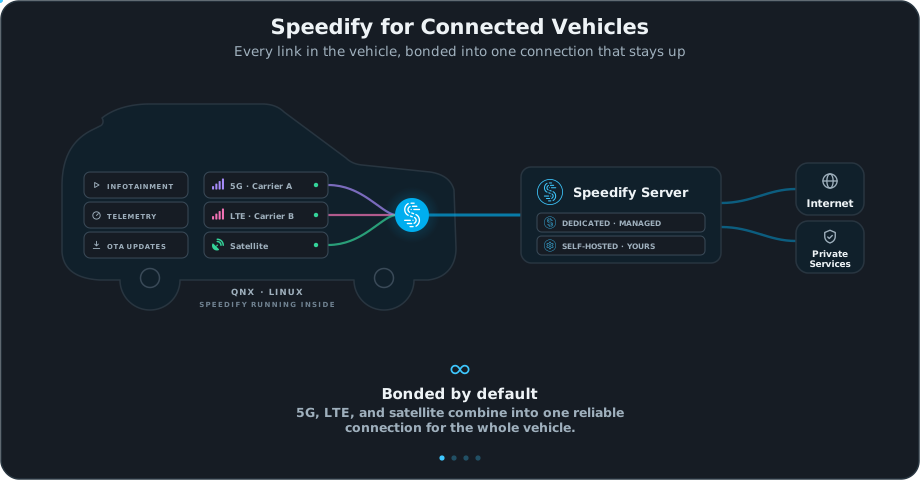
On QNX and embedded Linux targets, the Speedify SDK ships as a bonding data plane: a single daemon an integrator provisions once, which starts at boot and runs unattended from then on. It carries any IP traffic, TCP and UDP alike, across every available uplink and terminates at a server that reassembles the traffic in order.
Image

Every uplink carries the session at once

Traffic is distributed at the packet level rather than steered per flow, so one session draws on the combined capacity of every healthy link instead of picking the best one and living with it.

Unequal links do not pace each other

Every packet goes to the uplink with the most spare capacity at that moment. A satellite terminal and a cellular modem contribute in proportion to what each is actually delivering.

Latency stays bounded while the bond is full

Send buffers are capped from each link's measured bandwidth-delay product, holding latency under load near 30 to 50 ms on a full bond where an unmanaged bond reaches 200 ms and beyond.

One ordinary TCP connection per uplink

Plain TCP crosses networks that block anything more exotic, which matters when one uplink belongs to a carrier you do not control, and it keeps the transport predictable for anyone debugging it later.

Link health your provisioning system can act on

Modems fail ambiguously, and a link that holds an address while passing no traffic still reports as up. The doctor command exits non-zero on a bad uplink or an unreachable server, giving provisioning a definite signal.

No dependency on the customer's network

Bonding travels with the product rather than with the site. Nothing to configure at the far end, and nothing to renegotiate when the deployment environment changes.

// The Benefit

The capability ships as part of your product.

This is the difference between an embedded integration and every other way of buying connectivity software. There is no appliance to place alongside the machine, no per-device install for a field technician, and no dependency on a network your end customer configures and you never see.

The bonding logic compiles into what you already ship. Your customer receives a product that stays connected, not a product plus a connectivity vendor.

03 · Constraints

Four constraints an embedded build brings that a desktop client never has.

Connectivity software written for laptops assumes a filesystem, an installer, a user, and spare resources. An embedded target grants none of those. These are the constraints that decide whether a bonding stack can actually ship inside a product.
01 / image budget

Megabytes, not gigabytes

The Speedify SDK installs in 4.1 MB on the device, or 2.0 MB as a compressed package download. Nearly all of that is the daemon. The web UI is compiled into the binary at 48 kB, and the router panel, tuning service, and init scripts add roughly 7 kB. It links statically, so there is nothing else to install alongside it, and the management and terminal interfaces are compile-time options a production build can leave out.
02 / unattended operation

No user, no console, no second chance

Nobody opens an app on a telematics unit. The daemon configures the device itself, starts at boot, and runs without supervision for the life of the product. Fleet tooling drives it through the CLI and HTTP API, and health checks read an exit code rather than parsing a screen.
03 / composition

A data plane, not a suite

On embedded targets the SDK moves packets and leaves policy to the system around it, which is what keeps it small enough to ship. Encryption comes from the payload, with TLS or SRT over the bond, or from terminating the bond on a server you control. Classification and prioritisation happen on the device or upstream at the network edge. Local bypass uses host routing rules.
04 / real-time boundaries

Hard real-time stays local

Bonding operates on traffic that leaves the machine. Control loops with hard deadlines stay local, which is already where your design puts them. What bonding protects is everything that has to cross a wireless link to be useful: supervision, offload, updates, and telemetry.

04 · Platforms

Where the Speedify SDK runs.

QNX SDP 8.0, arm64

Channel bonding, per-uplink binding, and latency tuning verified on hardware. The transparent TCP proxy and the management web UI are Linux-only, so on QNX the daemon is driven from the CLI and the HTTP API.

Linux x86_64 and arm64

Full feature set, client and server.

OpenWrt arm64

Installable package with a LuCI panel, for products built on a router platform.
Building on something else? Platform support follows what customers are actually shipping, so tell us your target and we will give you a straight answer on where it stands. Get in touch.

05 · Integration

Three ways to put bonding in the product.

Embedded

Integrate bonding directly into your own software with the Speedify SDK. One daemon in your image, provisioned once, with no separate appliance and no dependency on the end customer's network.

Native on QNX SDP 8.0, plus Linux and OpenWrt targets, built to run inside real-time constraints on resource-limited hardware.

Most common for OEMs and platform teams shipping connectivity as a feature of their product.

Network level

Run Speedify on the product's onboard router or at the facility edge, so everything behind it inherits the bonded uplink with no per-device work.

Supported OpenWrt hardware with a Speedify for Routers license, or Powered by Speedify devices.

Best for retrofits, mixed fleets from several vendors, and putting one bonded uplink in front of several devices rather than integrating each.

Device level

Install the Speedify app on onboard compute, an engineering workstation, or an operator console.

Windows, macOS, Linux, iOS, and Android.

Best for pilots and bench validation before an embedded integration is scoped.

06 · FAQ

Frequently asked questions.

Outages are inevitable,
downtime doesn’t have to be

Get in touch with Speedify

Get in touch today to discuss your business’s needs and discover how Speedify can help deliver, faster, more reliable, and more secure online experiences.

Mission critical solutions for businesses of all sizes

Speedify has options for everyone and works with all apps - from live streaming software to video conferencing, social networks, and online games.

Speedify Teams

Increased speed, security, and stability for all of the people and devices in your organization.

Speedify SDK

Leverage the core channel bonding technology of Speedify in new and interesting ways.


Powered by Speedify

Put our channel bonding technology on your hardware products, Powered by Speedify.