
Physical AI
Connectivity for Physical AI, built to run inside the machine.
The onboard computer is already busy with perception, planning and logging, and the machine's network changes throughout the day. Speedify bonds every link the machine can reach, from facility Wi-Fi and private 5G to carrier cellular and Starlink, into one connection for telemetry, teleoperation video, diagnostics and data upload. It runs as the Speedify embedded daemon on Linux and QNX, under your own software's control.
Contact Enterprise Sales →
01 · The Problem
Autonomy moved onto the machine. Its data still has to get off.
A robot decides where to put its feet locally. Everything that makes the fleet improve, coordinate or stay supervised crosses a wireless link: sensor logs headed for training, video for a remote operator, a model update on its way down, a fault report that needs to arrive now.
Those links change constantly. A warehouse AMR crosses dozens of access points per shift. A humanoid in a retail store is on guest Wi-Fi nobody on your team controls. An inspection drone works at the edge of cellular coverage. Agricultural and mining machines operate past the last tower.
Each change is a chance for an upload to restart, a video feed to freeze, or the fleet dashboard to lose track of the machine.
02 · The Solution
Every link at once, through one connection.
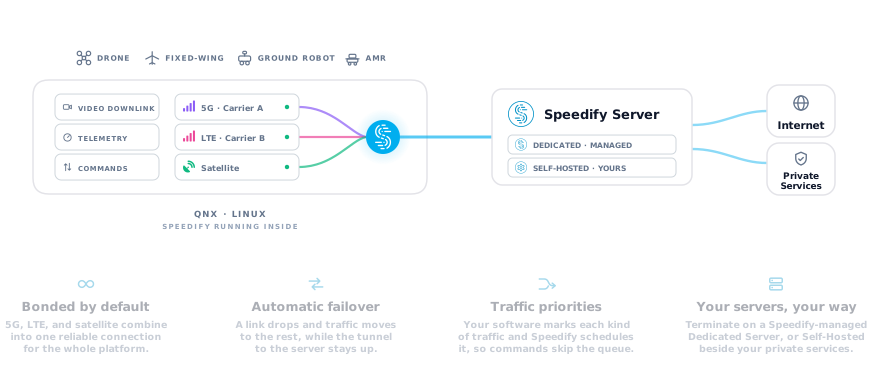
Speedify sits between the machine's applications and its network interfaces. Your routing sends selected traffic into Speedify, which spreads it packet by packet across every available link to a Speedify server. The server puts the traffic back in order and forwards it to your services. When one link degrades, traffic shifts to the links that are still working, and the connection to the server stays up.
- Independent radios don't fail together
A Wi-Fi roam, a carrier handover and a satellite handoff are unrelated events, so they rarely happen at the same moment. With carrier-diverse SIMs alongside private 5G and facility Wi-Fi, no single network decides whether the machine is reachable.
- One address while links change
Traffic reaches your services from the server's address, so MQTT brokers, WebRTC sessions and your fleet management plane keep seeing the same machine through a roam. During the switch itself, traffic can slow briefly while it moves to the remaining links.
- Local control stays local
Motion control, perception and safety behavior run on the machine and never depend on the network. Speedify carries the traffic that leaves it.
03 · Traffic
One connection, many jobs.
The traffic leaving a machine has very different needs. You decide which traffic enters the bond and how each kind is treated, and Speedify schedules it across the links. Speedify doesn't inspect payloads to decide what matters; the classification comes from your application or host.
| Traffic | What it needs | Typical treatment |
|---|---|---|
| Telemetry, fault reports and safety logs | Small and steady, and has to arrive during incidents, when the radio environment is often at its worst | Every available link, highest priority |
| Teleoperation and supervision video | Low delay and a steady bitrate | Scheduled for the fastest delivery, kept clear of bulk transfers |
| Diagnostics and remote access | Short, interactive sessions | Interactive priority over the bond |
| Sensor logs and training data | Very large, and can wait | Dock Wi-Fi and other unmetered links |
| Model and policy updates | Large, and has to finish | The full bond, continuing through roams instead of restarting |
04 · Compute budget
Built to share the onboard computer.
On a robot or vehicle, networking competes with perception, planning and recording for the same CPU and memory. The Speedify embedded daemon is designed for that budget. It runs unattended as a supervised service, builds with only the features you need, and uses batching and kernel offloads where the platform supports them.
What matters is resource use while your workload is running: per-core CPU, memory and your application's own latency, at steady state and during link changes. Those figures depend heavily on the board, the number of links and the traffic, so we measure them on your hardware during a pilot instead of quoting a general number.
Measured in a pilot
- Per-core CPU, with your workload running
- Resident memory, steady state and peaks
- Your application's own latency
- Behavior during link changes and restarts
05 · Integration
Your software stays in charge.
The Speedify daemon is built to be one component of your product, managed by your own device agent.
CLI · HTTP · socket
Local management
A command-line tool, a local HTTP API and a Unix socket share one management model, so scripts, local web interfaces and long-running agents all see the same state.
Events
Link events
An agent can hold one socket open and receive link-state changes as they happen, so it can pause a bulk upload or alert an operator when a link drops, without polling.
Routing
Routing your way
Speedify manages its own routes by default, or hands routing to your network manager when your image already owns it.
doctor
Preflight checks
A built-in doctor command checks interfaces, routes and server reachability before the service starts, and returns a non-zero exit code your supervisor can act on.
Access
Management stays on the device
The management interfaces listen locally by default. Remote management goes through your own authenticated layer.
06 · Servers
Put the server where your data needs to go.
Every bonded connection ends at a server that reassembles the traffic and forwards it. Embedded, router and app deployments can all use any of the three options: Speedify Cloud, a managed Dedicated Server, or a Self-Hosted Server in your own facility, cloud account or depot, close to your fleet management, data pipeline and teleoperation stations.
SELF-HOSTED
Your facility, cloud account or depot
Run the Speedify server software on bare metal in your own data center, on a VM at any cloud provider, or at a colo facility. Unlimited bandwidth, full data residency control.
Dedicated
Managed by Speedify
A cloud instance reserved exclusively for your organization in any of our 50+ data center locations. Speedify provisions, maintains, and monitors it.
Speedify Cloud
Shared global network
82 points of presence across 50+ cities on six continents, available to every Speedify subscriber at no additional cost. Automatic server selection routes you to the nearest healthy node.
The server needs an address the machine can reach from each of its networks. Compare server options.
07 · Deployment
Platforms and deployment options.
EMBEDDED
Speedify SDK
The Speedify embedded daemon, built into the machine's software image. No separate appliance, no per-device install, and no dependency on the customer's network setup.
Native on QNX, plus Linux and other embedded targets, built to run inside real-time constraints on resource-limited hardware.
Most common for robotics platform teams and OEMs.
Network level
Speedify for Routers
Run Speedify on the machine's onboard router or at the facility edge, so everything behind it inherits the bonded uplink with no per-device work.
Supported OpenWrt hardware with a Speedify for Routers license, or Powered by Speedify devices.
Best for retrofits and mixed fleets from multiple vendors.
Device Level
Speedify app
Install the Speedify app on the machine's onboard compute, a teleoperation console, or a field engineering workstation. Windows, macOS, Linux, iOS, and Android.
Best for pilots, and for the operator side of a teleop link, which teams routinely forget is also a failure mode.
08 · Machines
Built for the machine and the place it works.
| Machine | Typical links | How Speedify fits |
|---|---|---|
| AMRs and warehouse robots | Facility Wi-Fi + private 5G or cellular | An AMR crosses dozens of access points per shift and spends time behind racking where Wi-Fi is weak. Cellular keeps carrying traffic through each roam, and bulk uploads wait for the dock. |
| Humanoids and service robots | Guest Wi-Fi + carrier cellular | A machine deployed in someone else's building is on a network you can't audit or fix. Bonded cellular keeps it reachable when the building's Wi-Fi misbehaves, without a site visit. |
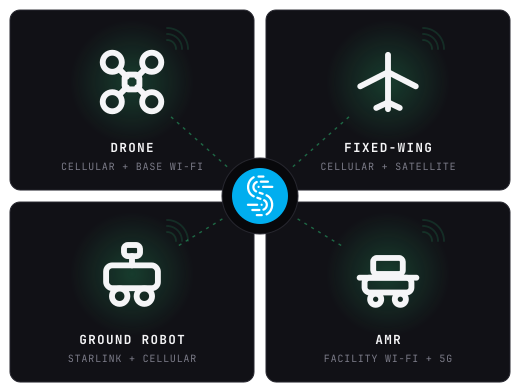
| Drones and inspection robots | Cellular + Wi-Fi at the base | Speedify runs on the companion computer alongside the mission software. Telemetry and selected previews go out live, full-resolution imagery queues for upload when coverage allows, and flight control stays on the autopilot. |
| Agriculture, mining and off-grid autonomy | Starlink + perimeter cellular | Work past the last tower runs on satellite, with cellular at the edges of the site. Bonding covers for the dust, weather and equipment that block a dish's view of the sky. |
| Autonomous vehicles and delivery | Carrier-diverse SIMs + depot Wi-Fi | No single carrier is strongest along a whole route. Bonding uses whichever networks are strong at each point, depot Wi-Fi takes the bulk upload when the vehicle returns, and the Speedify embedded daemon runs natively on QNX-based vehicle platforms. |
09 · Security and scope
Security and safety boundaries.
Encryption
The Speedify app and Speedify for Routers encrypt traffic with AES-256 between the machine and the Speedify server. The Speedify embedded daemon carries traffic over plain TCP on each uplink, so protect sensitive traffic with TLS or SRT in your application, or with a tunnel over the bond.
Network segmentation
Speedify works on the WAN side, so OT and IT separation and private 5G slices on the machine and in the facility stay as they are.
Management access
The daemon's management interfaces are local to the device by default and stay inside your device's trust boundary.
Safety scope
Speedify carries operational traffic: telemetry, video, diagnostics, data and updates. It isn't certified as a safety communication channel. Safety-critical control, and the machine's response to lost connectivity, belong in its own independently validated design.
10 · FAQ
Frequently asked questions.
Outages are inevitable,
downtime doesn’t have to be
Get in touch with Speedify
Get in touch today to discuss your business’s needs and discover how Speedify can help deliver, faster, more reliable, and more secure online experiences.