
Link Aggregation and Mobile Data Offloading Made Easy
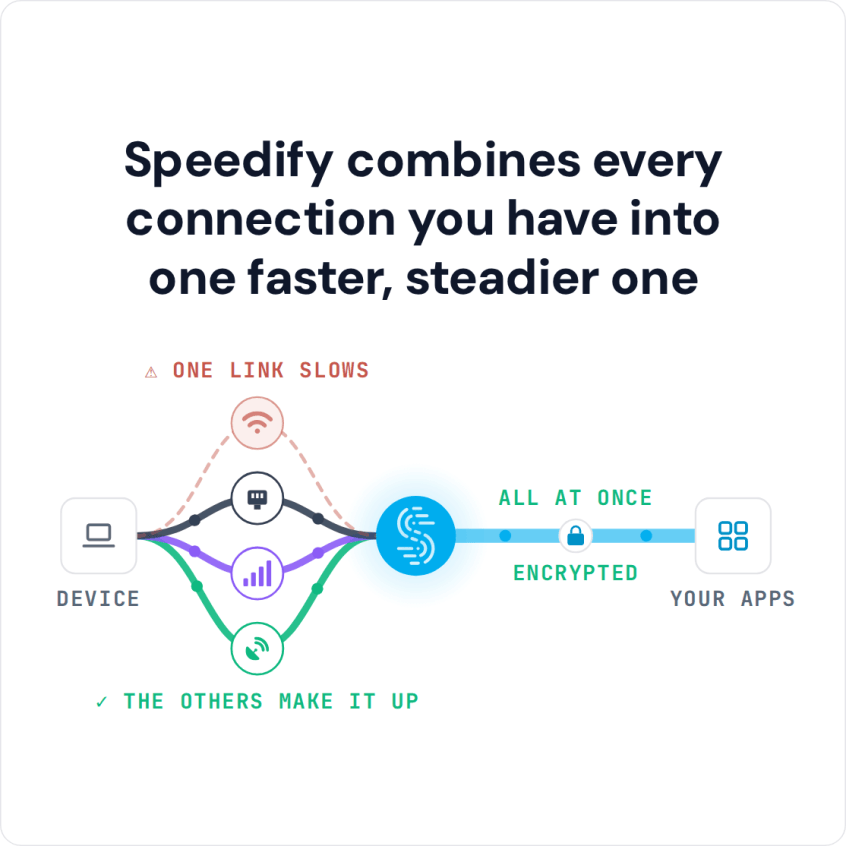
Channel bonding combines two or more internet connections into one, spreading your traffic across all of them at the packet level for faster downloads and uploads and staying online if one drops. Unlike basic round-robin methods, smart channel bonding measures each connection and sends traffic where it flows best. Bridging is a different technique; here is how combining connections differs from bridging.
Speedify is an app that uses channel bonding to combine Wi-Fi, 4G/5G cellular, Ethernet, Starlink and satellite internet connections, and it encrypts your traffic like a VPN. On a single connection there is nothing to combine, so Speedify then works as an encrypted VPN and cannot make that connection faster. Here is how channel bonding works in Speedify.
How do I use WiFi and 4G/5G cellular at the same time with Speedify?

Pick your two internet connections and your device below and we'll take you to the step-by-step setup guide.

Channel Bonding Keeps Calls and Uploads Running When One Connection Drops
Channel bonding is not only about speed; it also makes your internet more reliable. With Speedify, you stay online as long as one of your connections is working. If you walk out of range of your Wi-Fi router, your video call is not dropped, your file upload does not restart, and your streaming video keeps playing.
Channel Bonding Combines the Internet Connections You Already Have
Most people can reach more than one internet connection: free Wi-Fi in many places, plus the 4G/5G cellular connection on their phone or a tethered hotspot. A single public Wi-Fi or cellular connection often cannot deliver the bandwidth needed for daily tasks like streaming HD video on YouTube and Vimeo. Speedify’s easy channel bonding service combines those connections, so video buffers less and uploads finish faster.
Channel Bonding in Wi-Fi Router Settings Means Something Different
In Wi-Fi router settings, channel bonding means joining adjacent 20 MHz radio channels into one wider 40, 80 or 160 MHz channel, which raises the throughput of a single Wi-Fi connection. That setting does not combine separate internet connections. Speedify’s channel bonding works one level up: it combines whole internet connections, such as your Wi-Fi and your phone’s 4G/5G cellular, on Windows, macOS, Linux, iOS and Android.
Speedify
Get started with Speedify today.
Speedify combines Wi-Fi, 4G/5G cellular, Ethernet, Starlink and satellite into one faster, more reliable internet connection. Free to try: 5 GB a month with a free account. No credit card required.
🚀 Speed
Faster uploads and downloads, because Speedify uses all your internet connections at once.
📶 Stability
If one internet connection drops, Speedify moves your traffic to the others in milliseconds.
🔒 Security
AES-256 encryption on every internet connection, on any network you join.



15M+ downloads worldwide. 75K+ five-star reviews on iOS and Android.