
Breaking Free from the Slow Lane
Network bonding and network bridging solve different problems. Bonding combines two or more internet connections into one faster, more reliable connection. Bridging joins separate local networks so devices on each can talk to one another; bridging does not add internet speed.
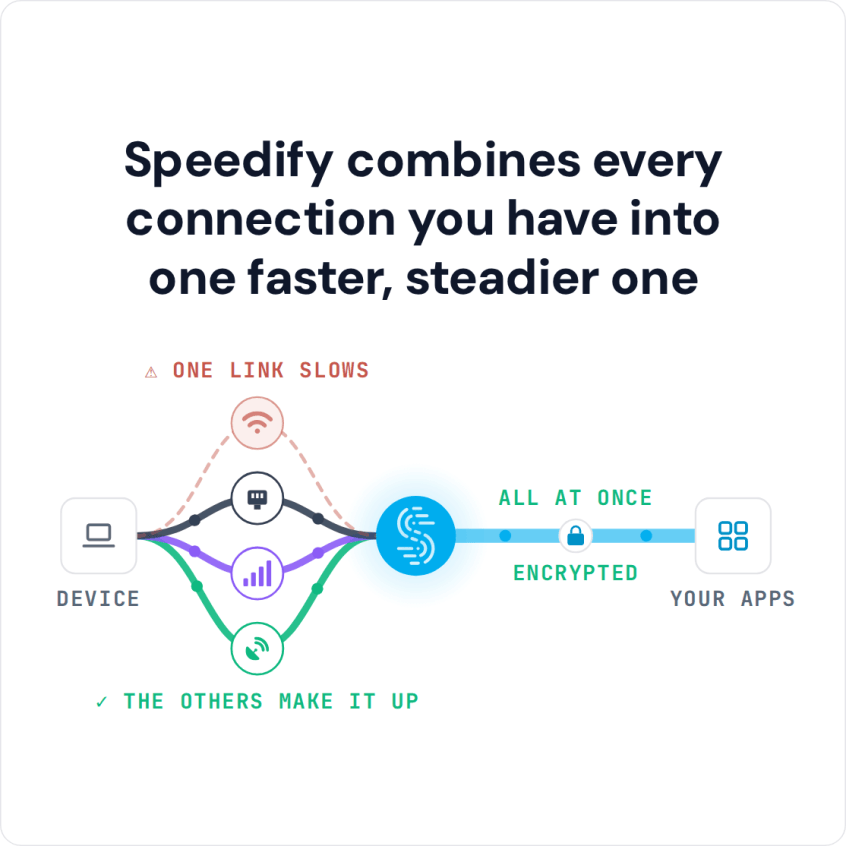
Speedify is an app that uses network bonding to combine Wi-Fi, 4G/5G cellular, Ethernet, Starlink and satellite internet connections at the same time, for faster downloads and uploads and automatic failover. Those gains need two or more internet connections; on a single connection, Speedify works as an encrypted VPN and cannot make that connection faster or stop it from dropping. Here is how bonding and bridging differ, and which one makes your internet faster.
How do I use WiFi and 4G/5G cellular at the same time with Speedify?

Pick your two internet connections and your device below and we'll take you to the step-by-step setup guide.


Network Bonding: Combining Internet Connections for Speed and Failover

What Is Bonding?
Bonding combines two or more internet connections into one connection with the bandwidth of all of them. For example, combining your home Wi-Fi with your phone’s 4G/5G cellular hotspot gives you their combined speed, and if one drops, the other keeps you online. Find out more about combining internet connections.
Real-World Example of Bonding
Picture a remote worker juggling video calls, cloud backups and large uploads. Combining the home Wi-Fi with 4G/5G cellular, or with a coffee shop hotspot, keeps those calls and uploads running when one connection slows or drops.
Benefits of Bonding
- Speed: Bonding adds the bandwidth of each connection together, so downloads and uploads finish faster.
- Reliability: If one connection falters, the others pick up the slack.
- Cost: Combining two inexpensive connections can cost less than upgrading to one expensive internet plan.
Network Bridging: Connecting Local Networks, Not Adding Internet Speed
Bridging works inside your local network, not on your internet connection.
What Is Bridging?
In networking, bridging connects separate LANs (Local Area Networks) into a larger network. It’s like building a virtual bridge between different segments of your network infrastructure. Here’s a more technical explanation.
Real-World Example of Bridging
Consider a large office building with multiple departments. Each department has its own LAN. Bridging ensures that employees in HR, IT, and Marketing can communicate effortlessly, as if they were all on the same network.
Benefits of Bridging
- Segmentation: Bridging allows you to segment your network logically. Different departments or teams can have their own LANs while still being part of the larger corporate network.
- Traffic Filtering: A bridge learns which devices sit on each segment and forwards a frame only to the segment where its destination is, so local traffic stays local. Broadcasts still reach every segment.
- Isolation: Each segment is its own collision domain, so a faulty cable or a busy segment does not slow down the others. A broadcast storm still crosses a bridge; containing one takes a router or separate VLANs.
Network Bonding Solutions Compared: Speedify, LiveU and Peplink

Channel bonding, link aggregation, network bonding and broadband bonding are all names for the technology that combines two or more internet connections at the same time. Speedify, LiveU and Peplink are three of the main options, compared below.
See a comparison of solutions that combine cellular connections for live streaming.
Speedify
Speedify is an app that combines Wi-Fi, 4G/5G cellular, Ethernet, Starlink and satellite internet connections on computers and phones (Windows, macOS, Linux, iOS and Android). If one connection drops, traffic moves to the others without dropping calls or streams. Speedify suits anyone who needs fast, reliable internet, from live streamers and online gamers to remote workers and storm chasers.
How Speedify Works: Speedify’s own combining protocol lets you use all available Wi-Fi, cellular and wired connections at the same time to speed up everything you do online. Speedify acts as a VPN client, creating a virtual network device. Traffic from other apps on your device goes into this device; Speedify then encrypts the packets and decides which internet connection sends each one.
Get Speedify and start using all your available Internet connections!
LiveU
LiveU specializes in live broadcast streaming over combined 4G/5G, satellite and Wi-Fi connections, so news and sports crews keep streaming even on slow and unreliable networks.
How LiveU Works: LiveU field units combine signals from multiple 4G/5G modems, satellite, and Wi-Fi. The compressed video file is divided into packets distributed across available transport mechanisms. Once delivered to the cloud, the packets are reassembled, allowing distribution to various destinations. LiveU decoders reassemble the packets for input into TV productions via HD-SDI outputs.
See how LiveU compares to Speedify.
Peplink
Peplink’s SpeedFusion technology powers enterprise VPNs that tap into the bandwidth of multiple low-cost connections (cable, DSL, 4G LTE and 5G), creating a single combined data pipe for any networking environment.
How Peplink Works: SpeedFusion combines traffic at the packet level, so you get the speed of multiple connections. Peplink routers are common at remote sites and in moving vehicles, where session persistence and uninterrupted failover matter to businesses.
See how Peplink compares to Speedify.
Speedify’s Cellular Sharing: Combine Phones’ 4G/5G Connections Over Wi-Fi
Speedify’s cellular sharing feature lets Speedify users on the same local network share their 4G/5G cellular connections with each other. A regular personal hotspot shares one device’s connection with another; with cellular sharing, both devices share and receive at the same time, for faster, more reliable internet for everyone.
In short: network bridging connects local networks so devices can talk to each other, but bridging connections does not make your internet faster. Network bonding combines internet connections for more speed and failover, and Speedify does that on your computer or phone.
Speedify
Get started with Speedify today.
Speedify combines Wi-Fi, 4G/5G cellular, Ethernet, Starlink and satellite into one faster, more reliable internet connection. Free to try: 5 GB a month with a free account. No credit card required.
🚀 Speed
Faster uploads and downloads, because Speedify uses all your internet connections at once.
📶 Stability
If one internet connection drops, Speedify moves your traffic to the others in milliseconds.
🔒 Security
AES-256 encryption on every internet connection, on any network you join.



15M+ downloads worldwide. 75K+ five-star reviews on iOS and Android.