

The Speedify Showdown Part 2 – Raspberry Pi vs Odroid as Wired Routers
The Speedify team first tested iPerf3 downloads through Speedify running directly on the Raspberry Pi 3B, Raspberry Pi 4B, and the ODroid N2. This round sets the devices up to share the Speedify connection over Ethernet and runs the iPerf client on a connected laptop.
The short answer: as a wired router sharing Speedify over Ethernet with encryption on, the Odroid N2 was fastest at about 780 Mbps, the Raspberry Pi 4 managed about 294 Mbps, and the Raspberry Pi 3 between 90 and 147 Mbps.
How do I use WiFi and 4G/5G cellular at the same time with Speedify?

Pick your two internet connections and your device below and we'll take you to the step-by-step setup guide.


Raspberry Pi vs. Odroid: Setting Up the Test
Premise: the goal is to find out which of the three devices is best for using as a wired router to share Internet over Ethernet.
Internet sharing setup
Once again, each device is hooked up via Ethernet to a Verizon Fios Gigabit Internet connection. Devices were set up to share the connection over Ethernet using the sharing options included with Speedify for Linux.
Tests were run on a Ubuntu 18.04 laptop connected to the Ethernet, using iPerf3 with a single TCP stream against the Northern Virginia #2 Speedify server (without Speedify running for the first test). Over this Internet connection, the available bandwidth for a single TCP stream to the Nova 2 server was typically around 820 to 850 Mbps. Some of the limitations below are with the available network bandwidth and not the devices themselves.
Here are the results of that first round, with the iPerf client running right on the Raspberry Pi / Odroid (averages of three runs, in Mbps):
|
Device |
Adapters |
No Speedify |
Speedify, Encryption Off |
Speedify, Encryption On |
|
Odroid N2 |
Built in ethernet, eth0 |
846 |
814 |
808 |
|
Raspberry Pi 3 |
Built in ethernet, eth0 |
95 |
91 |
93 |
|
USB ethernet eth2 |
272 |
265 |
267 |
|
|
Raspberry Pi 4 |
Built in ethernet, eth0 |
818 |
799 |
579 |
Testing Out Raspberry Pi vs Odroid as Wired Ethernet Routers
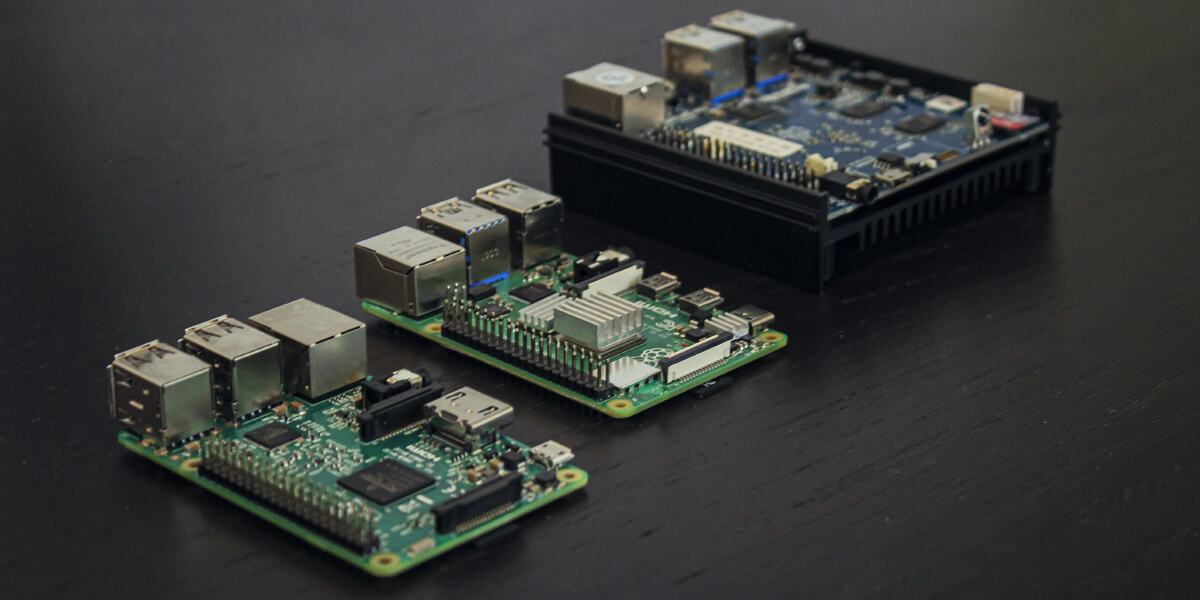
This time, the test runs from a laptop connected to the shared Ethernet, with Speedify on, and encryption on:
|
Device |
Adapters |
Run 1 (Mbps) |
Run 2 (Mbps) |
Run 3 (Mbps) |
Avg (Mbps) |
|
Odroid N2 |
Built in Giga Ethernet, shared over USB Ethernet |
774 |
785 |
780 |
780 |
|
Raspberry Pi 3 |
Built in 100 Mbps Ethernet, shared over USB Ethernet |
90 |
90 |
90 |
90 |
|
Internet Ethernet USB, shared over USB Ethernet |
145 |
146 |
149 |
147 |
|
|
Raspberry Pi 4 |
Built in Giga Ethernet, shared over USB Ethernet |
294 |
294 |
294 |
294 |
The Odroid N2 delivers to its Ethernet client about 96% of the speed it got running the iPerf client itself (780 Mbps vs. 808 Mbps). Smaller packets coming in over the Ethernet use a bit more bandwidth on headers, which costs it a few percentage points of performance.
The Raspberry Pi 3B using the built in 100 Mbps Ethernet card is simply stuck at 90 Mbps throughput that built in card can deliver. When using two USB Gigabit Ethernet cards, it gets just over 50% of the speed it got using just one of those cards to connect to the internet. The reason is the USB 2.0 bus which can only deliver about 300 Mbps of total throughput divided among all of the connected devices. Bringing each packet in from the internet and then back out to the client over that same bus cuts the total throughput in half.
It was a surprise to see how much worse the Raspberry Pi 4 performed than the Odroid N2 (although, it must be said, it is exactly twice as fast as the Raspberry Pi 3!). The Raspberry Pi 4 has a dedicated bus to the built-in Ethernet card, and another multi-gigabit bus to the shared USB ports.
How Do the Raspberry Pi’s and Odroid Perform without Encryption?
So, once again, the tests run with encryption turned off in Speedify:
|
Device |
Adapters |
Run 1 (Mbps) |
Run 2 (Mbps) |
Run 3 (Mbps) |
Avg (Mbps) |
|
Odroid N2 |
Built in Giga Ethernet, shared over USB Ethernet |
773 |
797 |
794 |
788 |
|
Raspberry Pi 3 |
Built in 100 Mbps Ethernet, shared over USB Ethernet |
88 |
89 |
88 |
88 |
|
Internet Ethernet USB, shared over USB Ethernet |
145 |
147 |
146 |
146 |
|
|
Raspberry Pi 4 |
Built in Giga Ethernet, shared over USB Ethernet |
363 |
370 |
379 |
371 |
The Raspberry Pi 3 and the Odroid are unchanged. The Odroid is limited by the Internet speed, and the Raspberry Pi 3 was limited by its own internal bus. In neither case did the encryption amount to a performance bottleneck.
But the Raspberry Pi 4 has jumped in speed by 26%, to 371 Mbps. The Raspberry Pi 4 is bottlenecked on CPU performance. Again, the Raspberry Pi 4 is really hamstrung by its lack of AES hardware.
The first round of tests found the reason. The Odroid N2 has AES encryption hardware, which Speedify detects and uses, so encryption costs its CPU almost nothing. The Raspberry Pi 3 and 4 lack the optional ARM extensions for AES, so Speedify falls back to ChaCha20 encryption in software, and the Pi’s CPU has to do that extra work for every packet. Running the test on the board itself, encryption cut the Raspberry Pi 4 from 799 Mbps to 579 Mbps.
Raspberry Pi vs Odroid as Wired Routers: Conclusions

The takeaways are similar to the last round of testing. If you need performance, the Odroid N2 is your device. It never delivered less than 773 Mbps on any test. Since the tests were limited by 850 Mbps of available bandwidth to the server, they may never have shown this device’s actual top speed.
The Raspberry Pi 3 is showing its age. Depending on your setup the maximum speed you can get could be as low as 88 Mbps.
The Raspberry Pi 4 is fine for speeds of over 200 Mbps with or without encryption. For anyone who wants to max out every internet connection, the Raspberry Pi 4 disappoints. But of course, it depends on what you’re doing with it.
For an IRL streaming backpack, you really just need to maintain a consistent speed of around 30 Mbps despite all the real world issues (range, movement, interference, etc.). For these users, a Raspberry Pi 4 is fantastic, cheap and plenty fast.
But for anyone with a Gigabit home internet connection who is looking for a way to secure the network on the way to their home router, skip the RPI, and look to the Odroid or something similar.
To run Speedify on a Raspberry Pi today, you need a paid Speedify plan (there is no free tier on Linux) and Raspberry Pi OS Bookworm or later. Speedify lists the Raspberry Pi 5, 4 B and 3B+ as tested; the Raspberry Pi 5 came out after these tests, so it is not in the tables above.
Speedify
Get started with Speedify today.
Speedify combines Wi-Fi, 4G/5G cellular, Ethernet, Starlink and satellite into one faster, more reliable internet connection. Free to try: 5 GB a month with a free account. No credit card required.
🚀 Speed
Faster uploads and downloads, because Speedify uses all your internet connections at once.
📶 Stability
If one internet connection drops, Speedify moves your traffic to the others in milliseconds.
🔒 Security
AES-256 encryption on every internet connection, on any network you join.



15M+ downloads worldwide. 75K+ five-star reviews on iOS and Android.