
How to Fix WiFi Login Page Not Showing While Enjoying the Fresh Air
A park Wi-Fi login page that is not loading is usually blocked by a custom DNS setting, a VPN, a pop-up blocker or an old DNS cache, and each has a quick fix below.
Speedify is an app that combines Wi-Fi, 4G/5G cellular, Ethernet, Starlink and satellite internet connections into one faster, more reliable connection, and encrypts your traffic like a VPN. In a park, Speedify keeps you online over 4G/5G cellular while the Wi-Fi login page refuses to load.
Find out how to force a park Wi-Fi login page open, and how to stay safe on a network anyone can join.
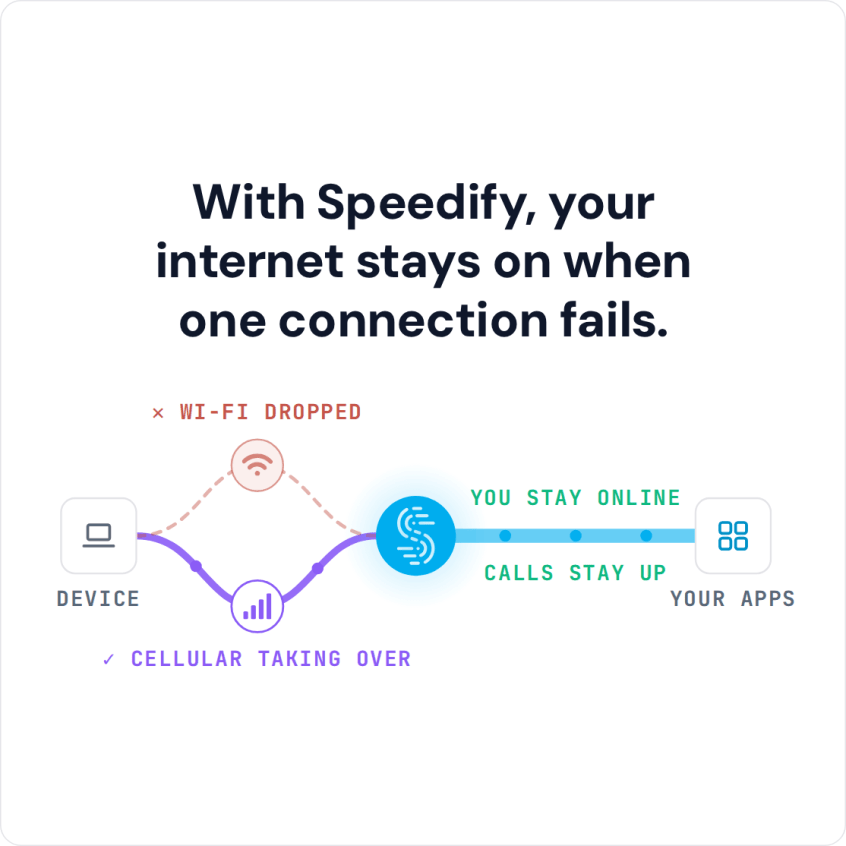
With Speedify, your internet stays on when one connection fails.
Park Wi-Fi Is Public Wi-Fi: Protect Your Data Before You Sign In
Before you sign in, keep one thing in mind. Park Wi-Fi networks are public Wi-Fi hotspots, so they can be unsafe. Anyone can join them, and someone on the same network can intercept an unprotected connection and steal personal information such as passwords and credit card details.
The easiest way to protect yourself is a VPN. Unfortunately, Wi-Fi login pages and VPNs do not work well together: with most VPNs, you either disconnect from the VPN or skip the Wi-Fi hotspot. Speedify solves this, as the last section shows.
How to Force Open a Park Wi-Fi Login Page That Is Not Loading
To understand why the park Wi-Fi login page will not load, it helps to know how the login page, also called a captive portal, works.
Captive portals usually redirect you to a web page where you log in or accept the terms and conditions. The network only accepts the IP address range that the hotspot or router assigns when you connect. The problem often appears when you use a third-party DNS or a VPN. For example, if you use a third-party DNS to block ads, the Wi-Fi login page may not show; switching the custom DNS off fixes that. Sometimes the fault is in the Wi-Fi login page itself, and only the provider can fix it. One quick test: open a plain http page such as http://neverssl.com, which the network can redirect to its login page.
Here are a few more tips and tricks:
- Restart your device. A restart clears stuck network settings and often brings the login page back.
- Disable pop-up blocking: if pop-ups are blocked on your device, the Wi-Fi login page will not show up. Here is a How-To Geek article showing how to do this in Chrome.
- Flush DNS cache: your device stores the addresses of websites in its DNS cache. If the IP address of the Wi-Fi login page changed recently, the old cached address sends you nowhere. You can find instructions on how to flush the DNS cache on any operating system in this Hostinger article.
If you care about your online privacy, you should be using a VPN. With most VPNs, though, none of these tips help, and you are stuck either exposed without a VPN or without internet.
Stay Protected on Park Wi-Fi Login Pages with Speedify
When you join a park Wi-Fi hotspot with a login page, Speedify will:
- Show you a notification asking if you want to log in.
- Keep you connected over 4G/5G cellular, so your other online activities (calls on Skype or Slack, streaming, gaming) keep working over the cellular connection, protected by Speedify, without dropped calls or streams.
- If you click the notification prompting you to connect to the Wi-Fi hotspot, Speedify will pop up the login screen in a window.
- Once you log in, Speedify starts using the Wi-Fi connection right away and moves your traffic from cellular to Wi-Fi without stopping anything you are doing online.
In the example above, Speedify’s technology for combining internet connections uses multiple Internet connections at once: the Wi-Fi and the cellular connection on your smartphone or laptop.
The same works with Ethernet, Starlink and satellite internet connections. Speedify also handles captive portals in a way most VPNs do not:
- when it detects a captive portal, it automatically moves the traffic to and from the captive portal login page outside of the encrypted VPN tunnel
- once you successfully log onto the network, Speedify moves that direct traffic back to the VPN tunnel
- you can also use the split tunneling feature (Bypass) for specific services, which sends their traffic outside the encrypted Speedify tunnel.
With Speedify, you can sign in to a park hotspot and keep your data protected while you use it.
Speedify
Get started with Speedify today.
Combine Wi-Fi, 4G/5G cellular, Ethernet, Starlink, and more into one faster, steadier connection. Free to try — no credit card required.
🚀 Speed
Faster uploads and downloads by bonding all your connections at once.
📶 Stability
Automatic failover in under a second when any connection drops.
🔒 Security
AES-256 encryption on every connection, on every network you join.



15M+ downloads worldwide. 75K+ five-star reviews on iOS and Android.