
Working Out at Home
Halfway through a live workout is the worst moment for the picture to stall, and the cause is usually the internet connection in the room rather than the phone or laptop running the class.
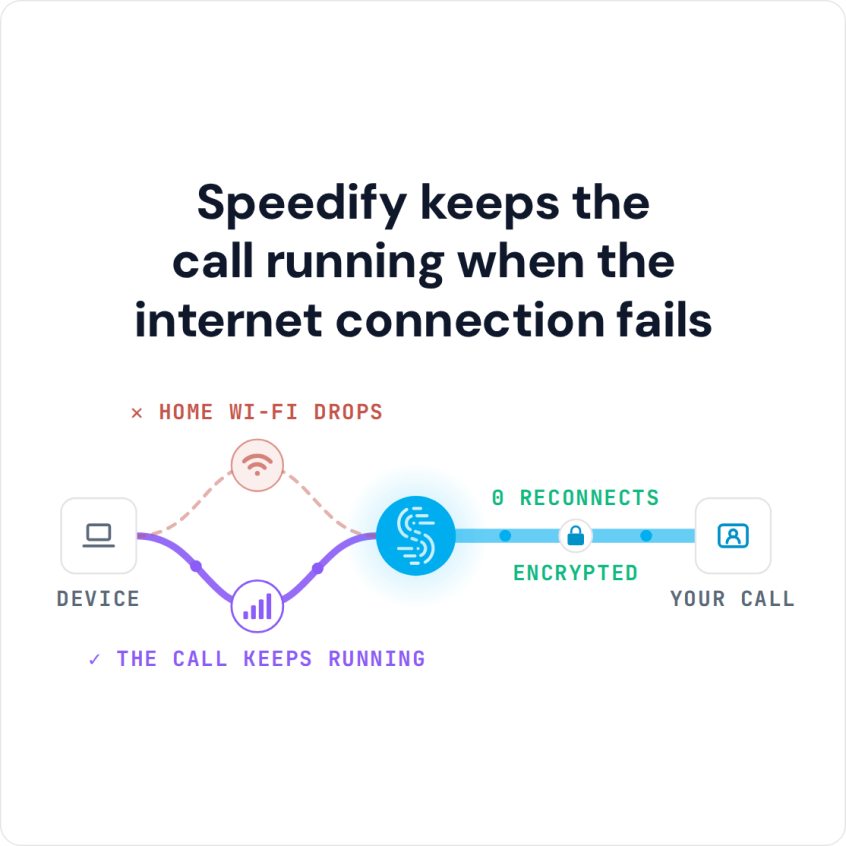
Speedify is an app that sends your traffic over Wi-Fi and 4G/5G cellular at the same time, so a dip on the home connection does not stop the session or push everyone out of the call. That needs two or more internet connections; on a single connection Speedify works as an encrypted VPN and cannot stop that connection from dropping.
Speedify keeps the call running when the internet connection fails
This article looks at the gear a trainer needs, how to get the home internet connection ready before class, and the steadier, higher-quality stream you get with Speedify running for the full hour.
Equipment for Live Streaming Workout Classes
Instructors, you might have the best of the best with audio / video equipment for streaming and the software to go with it: multiple cameras, effects and more. That is enough to create great videos for DVDs, Blu-ray discs or other offline media. Live streaming workout classes is a whole other story.
The thing you need most is a reliable and fast internet connection. Whether you’re using a GoPro on a tripod or a smartphone mounted by the row of treadmills, the quality of the live stream comes down to the quality of your internet connection.
So, assuming you’ve got the equipment, how do you get the internet to go with it?
Ensure Your Internet is at its Best
Having an internet connection does not mean trouble-free internet access. Disruptive things can happen:
- Your ISP may have issues with their infrastructure
- There might be an issue with your local equipment: modem or router
- The overall Internet speed might be lower because of increased traffic from all the people staying at home
One solution that comes to mind is a second internet connection kept in reserve, which is better than nothing. But what if the issues happen during a live streaming session? How long does it take for your camera, phone, or computer to switch from one connection to the other? How will that affect your transmission? Will the streaming servers drop you for inactivity?
The answer is to use all the connections (at least two) at the same time. That is called combining internet connections, and the Speedify app for Android, iOS, Windows, macOS and Linux does it.
Provide Higher Quality Streams with Speedify
One of the best Zoom streaming tricks is to use Speedify with two internet connections: Speedify’s Streaming Mode keeps a Zoom workout steadier when one connection weakens.
To put it in context, here’s what happens under the hood of Streaming Mode. Speedify monitors statistics in real time about how each of your internet connections is performing. As connections change, and other apps start or stop sending data, Speedify adjusts its strategies on the fly. So you are not chained to a spot near your Wi-Fi router, hoping to get a good signal, while on Zoom. With 4G/5G cellular on as well, you can walk around, and even leave the house, without dropping the call. Just run your Zoom workout session: Speedify picks the strategy.
To learn more about Streaming Mode, which is on by default, check out the Speedify Knowledge Base article.
Zoom Workout Tricks: update to the latest Speedify version and keep both Wi-Fi and cellular on if you’re tired of connectivity issues in Zoom workout sessions.
Speedify
Get started with Speedify today.
Speedify combines Wi-Fi, 4G/5G cellular, Ethernet, Starlink and satellite into one faster, more reliable internet connection. Free to try: 5 GB a month with a free account. No credit card required.
🚀 Speed
Faster uploads and downloads, because Speedify uses all your internet connections at once.
📶 Stability
If one internet connection drops, Speedify moves your traffic to the others in milliseconds.
🔒 Security
AES-256 encryption on every internet connection, on any network you join.



15M+ downloads worldwide. 75K+ five-star reviews on iOS and Android.