
How to Get Fast and Stable Internet for Streaming
Video streaming is slow when one internet connection cannot deliver enough steady bandwidth, and for live streamers the same shortage shows up as a choppy picture for viewers: not enough upload speed leaving the place you broadcast from. Upload is the traffic going out of your internet connection, and one connection rarely has enough to spare on a busy home network, in a crowded venue or on hotel Wi-Fi.
Speedify is a software app that carries your stream over Wi-Fi, 4G/5G cellular, Ethernet and other internet connections at the same time, so a dip in one does not reach your audience. That needs two or more internet connections; on a single connection Speedify works as an encrypted VPN and cannot stop that connection from dropping. What follows covers why slow streaming happens, and how Speedify holds your upload steady while you go live.
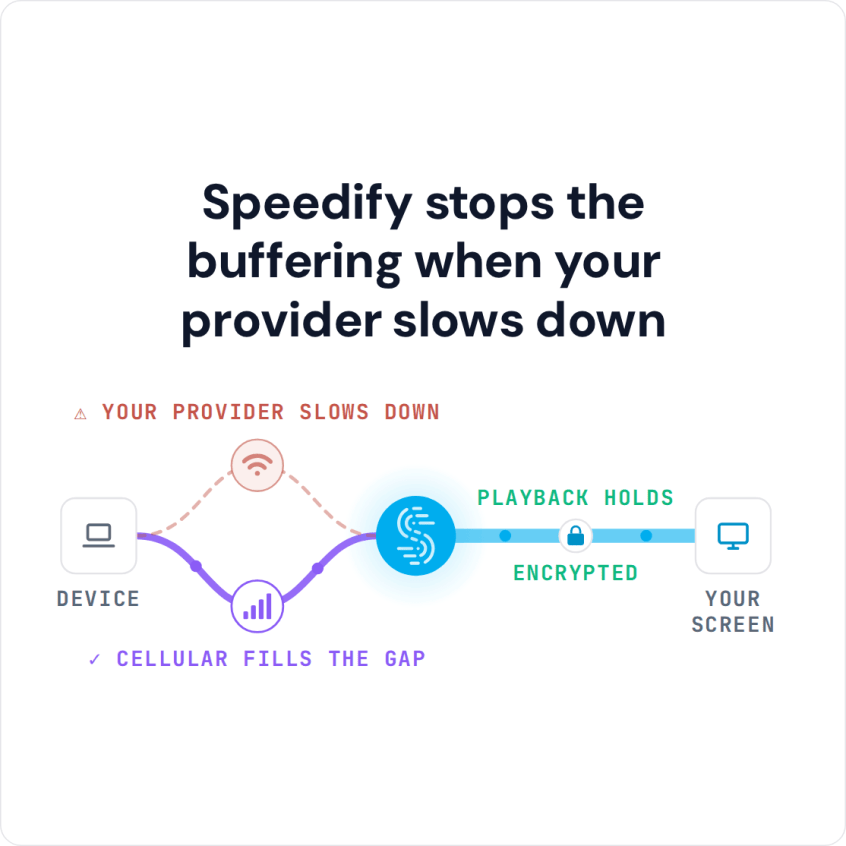
Speedify stops the buffering when your provider slows down
What Causes Slow Streaming
Everyone runs into slow Internet, buffering streams and even connection drops at some point. If you’re live streaming, your setup should include a solution to address such connectivity issues. If you stream to YouTube, here is a YouTube Live setup guide.
The most common situations where you might encounter these connectivity issues:
- On the move or traveling: on the street, bus or train. You may be connected to a bad / spotty Wi-Fi hotspot with no working internet.
- In crowded areas: the available bandwidth may not be enough to serve everyone at a stadium, a concert or a house party.
- At home: your ISP may be doing maintenance work right when you’re broadcasting live streams, or throttling data.
If the Internet connection is slow, you may not be live streaming at a high resolution due to limited available bandwidth, so your videos may appear jittery / choppy. If you broadcast on X, see how to stop choppy live video on X.
Speedify: an Essential Tool in Your Live Streaming Setup
If the Internet connection speed and latency causes issues with your live video streams, then you should get more bandwidth, preferably from more sources.
Speedify is a VPN app that combines connections, giving you faster, more reliable and secure internet by allowing you to use multiple Internet connections at the same time. That solves the bandwidth side of live streaming and adds an automatic failover mechanism that is activated if anything happens to one of your connections. Speedify cannot make a single connection faster, but in Redundant Mode, Speedify sends each packet over every connection and uses the copy that arrives first, so latency follows whichever connection is faster at that moment.
To combine 2 or more Internet connections simultaneously, Speedify uses its own technology for combining internet connections, and it runs as software on desktop and laptop computers, smartphones and tablets.
If one of your connections fails, Speedify automatically reroutes all the traffic through your other available connection(s). This happens in the background without you having to do anything. When the dropped connection is back online, Speedify will pick it up and start using it again.
So with two or more connections, Speedify gets you faster, more reliable internet, which solves the slow streaming problem.
Speedify Also Keeps Live Streamers Secure
Speedify doesn’t just get you a fast and stable internet connection when streaming. Speedify is a true mobile VPN: it protects you from compromised Wi-Fi networks and snooping hackers, and uses high performance encryption to keep your private data under your control.
Before Speedify, users often had to choose between security and speed. With two or more connections combined, Speedify does not make you sacrifice speed for security. You can have both.
Article takeaway: with Speedify in your live streaming setup, your viewers get steadier, higher quality video. Get started with Speedify today.
Speedify
Get started with Speedify today.
Speedify combines Wi-Fi, 4G/5G cellular, Ethernet, Starlink and satellite into one faster, more reliable internet connection. Free to try: 5 GB a month with a free account. No credit card required.
🚀 Speed
Faster uploads and downloads, because Speedify uses all your internet connections at once.
📶 Stability
If one internet connection drops, Speedify moves your traffic to the others in milliseconds.
🔒 Security
AES-256 encryption on every internet connection, on any network you join.



15M+ downloads worldwide. 75K+ five-star reviews on iOS and Android.